
Zavedení
This manual provides essential information for the safe and efficient installation, operation, and maintenance of your HP ATX 300W Power Supply, Model 366505-001. This power supply is designed to provide reliable power to compatible personal computer systems.
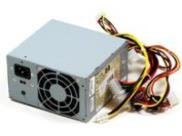
Obrázek 1: Přední strana view of the HP ATX 300W Power Supply. This image displays the compact form factor and primary connectors of the power supply unit.
Před zahájením jakékoli instalace nebo provozu si prosím pečlivě přečtěte tento návod. Uschovejte si tento návod pro budoucí použití.
Bezpečnostní informace
- Elektrické nebezpečí: Napájecí zdroje obsahují vysoké napětítagkomponenty. Neotevírejte napájecí zdroj casing. Risk of electric shock.
- Větrání: Ensure adequate ventilation around the power supply. Do not block air vents. Overheating can cause damage or fire.
- Základy: Always connect the power supply to a properly grounded electrical outlet.
- vlhkost: Do not expose the power supply to water or excessive moisture.
- Profesionální instalace: Pokud si nejste jisti postupem instalace, vyhledejte pomoc kvalifikovaného technika.
- Kompatibilita: Use only with compatible personal computer systems as specified.
Nastavení a instalace
Follow these steps for proper installation of the HP ATX 300W Power Supply into your personal computer system:
- Příprava:
- Turn off and unplug your computer from the wall outlet.
- Open the computer case according to your computer's manufacturer instructions.
- Před manipulací se součástmi vybijte statickou elektřinu dotykem uzemněného kovového předmětu.
- Demontáž starého napájecího zdroje (pokud je k dispozici):
- Disconnect all cables from the existing power supply to the motherboard, graphics card, hard drives, and other components.
- Unscrew the old power supply from the computer case and carefully remove it.
- Instalace nového napájecího zdroje:
- Carefully place the HP ATX 300W Power Supply into the designated power supply bay in your computer case.
- Připevněte napájecí zdroj k pouzdru pomocí příslušných šroubů.
- Připojit kabely:
- Connect the main 20+4 pin ATX connector to the motherboard.
- Připojte 4pinový nebo 8pinový konektor napájení CPU k základní desce.
- Connect SATA power connectors to hard drives, SSDs, and optical drives.
- Connect any necessary PCIe power connectors to graphics cards (if applicable).
- Ujistěte se, že všechna připojení jsou pevná a správně usazená.
- Závěrečné kroky:
- Organize cables to improve airflow and prevent interference.
- Zavřete skříň počítače.
- Zapojte napájecí kabel počítače do zdroje napájení a poté do uzemněné zásuvky.
Operace
Once installed, the HP ATX 300W Power Supply operates automatically with your computer system. When you power on your computer, the power supply will deliver stable and consistent power to all connected components.
- Zapnutí/vypnutí: The power supply is controlled by your computer's power button. Ensure the main power switch on the back of the power supply (if present) is in the 'ON' position before powering on the computer.
- Chlazení: The integrated air cooling system will activate automatically to maintain optimal operating temperatures. Ensure the fan intake and exhaust are not obstructed.
- Výkon: This unit provides a maximum output of 300 Watts. Ensure your system's total power requirements do not exceed this limit for stable operation.
Údržba
Pravidelná údržba pomáhá zajistit dlouhou životnost a optimální výkon vašeho zdroje napájení:
- Čištění: Periodically clean the exterior of the power supply and its fan vents to prevent dust buildup. Use compressed air to gently clear dust from the fan and internal components (with the computer powered off and unplugged).
- Inspekce: Occasionally inspect power cables for any signs of wear, fraying, or damage. Replace damaged cables immediately.
- Prostředí: Operate the computer in a clean, dry, and well-ventilated environment to prevent dust accumulation and overheating.
Odstraňování problémů
Pokud narazíte na problémy se zdrojem napájení, zvažte následující běžné kroky pro řešení problémů:
- Bez napájení:
- Check if the power cord is securely plugged into both the power supply and the wall outlet.
- Ensure the main power switch on the power supply is in the 'ON' position.
- Ověřte funkčnost zásuvky zapojením jiného zařízení.
- Check all internal power connections (motherboard, CPU, peripherals) are firmly seated.
- Intermittent Power/System Instability:
- Ujistěte se, že je napájecí zdrojtage (300W) is sufficient for all your computer components. Upgrading components may require a higher wattage napájecí zdroj.
- Check for overheating. Ensure proper airflow and clean any dust from the power supply fan.
- Inspect for loose cable connections.
- Neobvyklé zvuky:
- A grinding or loud fan noise may indicate a failing fan. Consider professional inspection or replacement.
If problems persist after attempting these steps, contact HP customer support or a qualified computer technician.
Specifikace
| Značka | HP |
| Název / číslo modelu | 366505-001 |
| Form Factor | ATX |
| Výstupní Wattage | 300 wattů |
| Typ konektoru | ATX |
| Kompatibilní zařízení | Osobní počítač |
| Způsob chlazení | Vzduch |
| Rozměry produktu (D x Š x V) | 9.5 x 12 x 4 palce |
| Hmotnost položky | 5.59 liber (2.54 kilogramů) |
| ASIN | B001U0ICS6 |
| Datum první dostupnosti | 16. srpna 2010 |
Záruka a podpora
For information regarding the warranty coverage for your HP ATX 300W Power Supply, please refer to the warranty documentation provided with your original computer system or contact HP customer support directly. Warranty terms and conditions may vary based on region and purchase date.
For technical support, service, or further inquiries, please visit the official HP support website or contact their customer service department. Have your product model number (366505-001) and serial number (if applicable) ready when contacting support.
Podpora HP Webmísto: www.hp.com/support