
1. Úvod
This manual provides comprehensive instructions for the installation, operation, and maintenance of your Chieftec BT-02B-U3 Mesh Mini-ITX PC Case. Please read this manual thoroughly before beginning any installation or operation to ensure proper usage and to prevent damage to the product or other components. Keep this manual for future reference.
2. Bezpečnostní informace
- Před instalací nebo demontáží jakýchkoli součástí vždy odpojte napájecí kabel ze zásuvky.
- Handle all components with care to avoid electrostatic discharge (ESD) damage. Consider using an anti-static wrist strap.
- Zajistěte dostatečné větrání kolem skříně počítače, abyste zabránili přehřátí.
- Nevystavujte výrobek vlhkosti nebo extrémním teplotám.
- Uchovávejte malé díly a obalové materiály mimo dosah dětí.
3. Konec produktuview
The Chieftec BT-02B-U3 is a compact Mini-ITX PC case designed for standard, cost-effective components. It includes a powerful 250W SFX power supply, making it suitable for ITX motherboards with desktop CPUs. Its mesh design aids in ventilation.

Obrázek 3.1: Přední a boční view of the Chieftec BT-02B-U3 Mesh Mini-ITX PC Case. This image displays the compact form factor, the optical drive bay, and the front panel controls including power and USB ports.

Obrázek 3.2: Horní přední část view of the Chieftec BT-02B-U3 PC Case. This perspective highlights the horizontal orientation, the optical drive slot, and the front panel buttons and indicators.
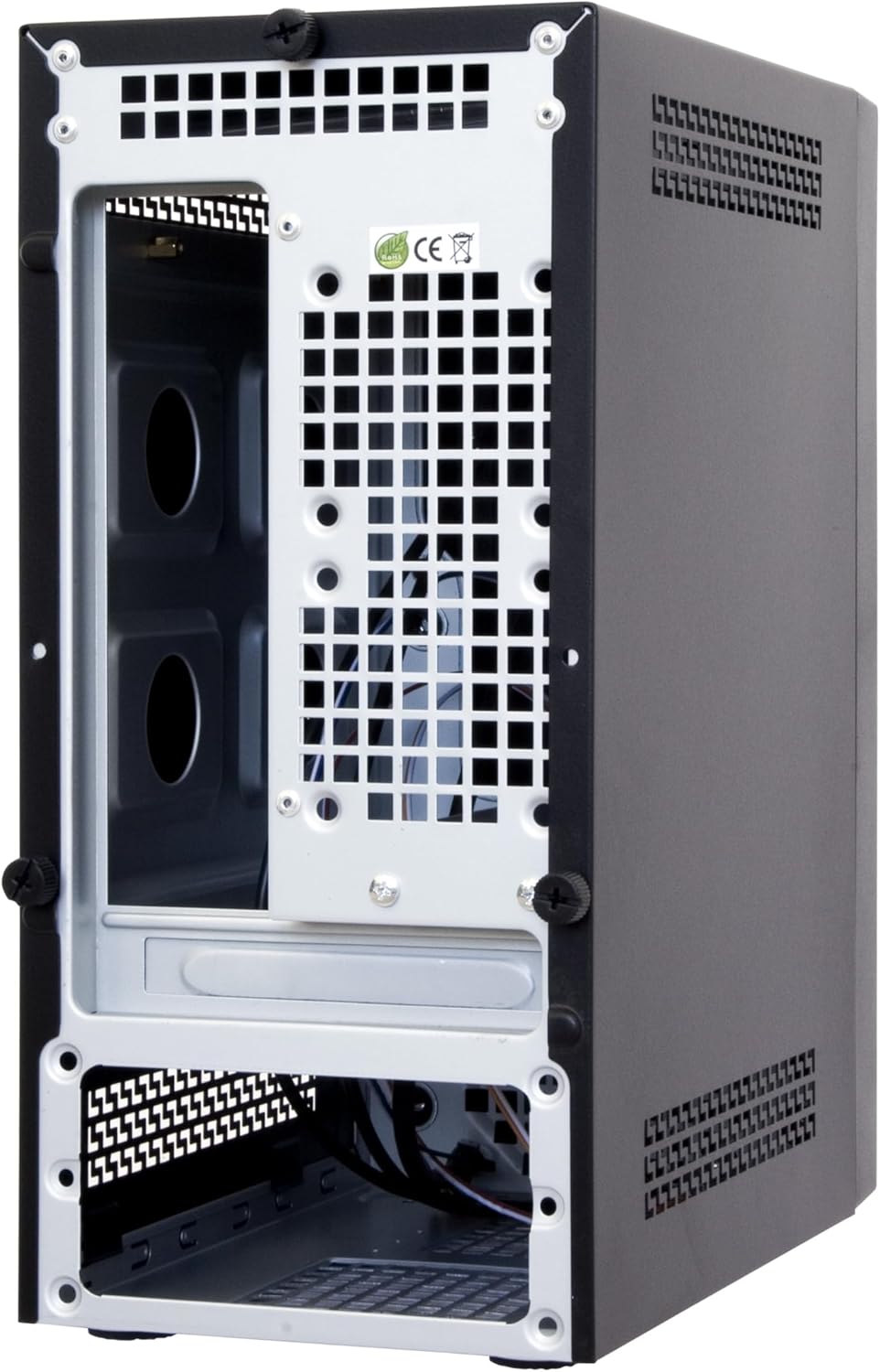
Obrázek 3.3: Rear and internal view of the Chieftec BT-02B-U3 PC Case. This image shows the internal structure, including the motherboard tray area, expansion slots, and the bottom-mounted power supply bay.
4. Nastavení a instalace
Follow these general steps for installing components into your Chieftec BT-02B-U3 PC case. Specific component installation instructions should be referenced from their respective manuals.
- Připravte si případ: Remove the side panel(s) by unscrewing the thumbscrews at the rear of the case.
- Instalace základní desky: Secure your Mini-ITX motherboard onto the standoffs provided in the case. Ensure the I/O shield is properly seated.
- Instalace úložných jednotek: Mount your 2.5-inch or 3.5-inch storage drives into the designated bays.
- Install Optical Drive (Optional): If using, install a slim optical drive into the front bay.
- Připojení kabelů předního panelu: Connect the power switch, reset switch, USB ports (2x USB 2.0, 2x USB 3.0), and audio jacks to the corresponding headers on your motherboard.
- Připojte napájecí zdroj: Connect the 24-pin ATX power connector, 4/8-pin CPU power connector, and SATA power connectors to your components. The case includes a pre-installed 250W SFX power supply.
- Správa kabelů: Kabely veďte úhledně pro zlepšení proudění vzduchu a estetiky.
- Zavřít případ: Reattach the side panel(s) and secure them with the thumbscrews.
5. Návod k obsluze
- Zapnutí: Connect the power cable to the power supply and a wall outlet. Press the power button located on the front panel of the case.
- Vypnout: Shut down your operating system normally. The system will power off automatically. Alternatively, press and hold the power button for 4 seconds to force a shutdown (not recommended for regular use).
- Připojení periferií: Use the available USB ports (2x USB 2.0, 2x USB 3.0) on the front panel and the rear I/O panel of your motherboard to connect keyboards, mice, and other devices.
6. Údržba
- Čištění: Regularly clean the exterior of the case with a soft, dry cloth. For dust accumulation inside, use compressed air to gently clear vents and components. Ensure the system is powered off and unplugged before cleaning.
- Větrání: Ensure that the case's ventilation openings are not obstructed to maintain optimal airflow and cooling performance.
7. Řešení problémů
Pokud narazíte na problémy s sestavením počítače, zvažte následující obecné kroky pro řešení potíží:
- Bez napájení:
- Check if the power cable is securely connected to both the power supply and the wall outlet.
- Ensure the power supply switch (if present) is in the 'ON' position.
- Ověřte, zda je kabel vypínače na předním panelu správně připojen k základní desce.
- Bez displeje:
- Ensure your monitor is connected to the correct video output port (either on the motherboard or a dedicated graphics card).
- Check that all internal power cables (24-pin ATX, CPU power) are firmly seated.
- Reseat RAM modules and any graphics cards.
- Nadměrný hluk:
- Identify the source of the noise (e.g., CPU fan, case fan, PSU fan).
- Ujistěte se, že žádné kabely nebrání lopatkám ventilátoru.
- Vyčistěte prach z ventilátorů a chladičů.
8. Specifikace
| Funkce | Detail |
|---|---|
| Značka | Chieftec |
| Číslo modelu | BT-02B-U3 |
| Typ pouzdra | Mini-Tower (Mini-ITX) |
| Kompatibilita základní desky | Mini ITX |
| Napájení | Integrated 250W SFX Power Supply |
| Materiál | Legovaná ocel |
| Barva | Černý |
| Rozměry produktu (DxŠxV) | 9.45 x 5.31 x 11.61 palce (24 x 13.5 x 29.5 cm) |
| Hmotnost položky | 7.22 libry (3.28 kg) |
| Porty USB 2.0 | 2 |
| Porty USB 3.0 | 2 |
| Způsob chlazení | Vzduch |
| Typ montáže napájecího zdroje | Spodní montáž |
9. Záruka a podpora
For warranty information or technical support, please refer to the official Chieftec webnebo se obraťte na místního prodejce. Uschovejte si doklad o koupi pro případ reklamace.
For further assistance, you may visit the Chieftec official webmísto: www.chieftec.eu