
Zavedení
The Altec Lansing M302 Moondance Home is a versatile alarm clock radio and speaker system designed for use with iPod and MP3 players. It offers clear audio, multiple alarm options, and a compact design suitable for various spaces. This manual provides detailed instructions for setting up, operating, and maintaining your device.
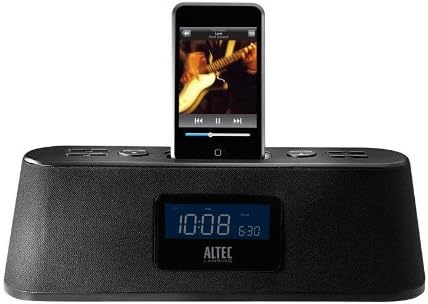
Figure 1: Altec Lansing M302 Moondance Home Alarm Clock Radio with an iPod docked. The front display shows the current time and alarm setting, while the top panel features control buttons.
Obsah balení
Před zahájením se ujistěte, že jsou přítomny všechny komponenty:
- Altec Lansing Moondance Home speaker system
- Adapters for iPod (various sizes)
- AC adaptér
- Anténa FM rádia
- Wireless remote control (includes 2 batteries)
- Uživatelská příručka
- Quick connect instructions
Nastavení
1. Připojení napájení
- Connect the AC adapter to the DC IN port on the back of the Moondance Home unit.
- Zapojte AC adaptér do standardní zásuvky.
- Jednotka se zapne a displej se rozsvítí.
2. Připojení FM antény
- Locate the FM antenna port on the back of the unit.
- Connect the provided FM wire antenna to this port.
- Extend the antenna for optimal radio reception.
3. iPod/iPhone Docking
- Select the appropriate iPod adapter for your specific iPod or iPhone model.
- Insert the adapter into the docking well on top of the Moondance Home.
- Carefully place your iPod or iPhone onto the dock connector within the adapter. Ensure it is seated firmly.
- Zařízení se začne automaticky nabíjet.
Note: While adapters provide better support, some iPod/iPhone models may function without a specific adapter by directly connecting to the dock connector. However, using the correct adapter is recommended for stability and protection of the dock connector. This unit is not compatible with the newest iPhone/iPod units without an extension purchased separately.
4. Připojení pomocného vstupu
To connect other audio devices (CD player, DVD player, other MP3 players):
- Use a standard 3.5mm audio cable (not included).
- Connect one end of the cable to the headphone jack or line-out port of your external audio device.
- Connect the other end to the AUX IN port on the back of the Moondance Home unit.
Návod k obsluze
Basic Controls (Onboard and Remote)
The Moondance Home can be operated using the buttons on the unit's top panel or the included wireless remote control. The remote offers full functionality for convenience.
- Vypínač: Zapíná nebo vypíná jednotku.
- Zvýšení/Snížení hlasitosti: Nastavuje výstupní úroveň zvuku.
- Tlačítko režimu: Switches between iPod, FM Radio, and Auxiliary input modes.
- Tlačítko odložení/ztlumení: Activates snooze during an alarm; also adjusts display brightness.
- Nastavení budíku: Vstupuje do režimu nastavení budíku.
- Nastavení času: Vstupuje do režimu nastavení času.
- Tuning/Track Skip: Navigates radio frequencies or skips tracks on iPod.
Nastavení času
- Stiskněte tlačítko Nastavení času tlačítko. Zobrazení hodin bude blikat.
- Použijte Tuning/Track Skip buttons (or Up/Down on remote) to adjust the hour.
- Stiskněte Nastavení času znovu pro potvrzení hodiny a přechod na minuty.
- Adjust minutes using the Tuning/Track Skip tlačítka.
- Stiskněte Nastavení času ještě jednou, abych ušetřil čas.
Nastavení budíků (duální budíky)
The unit supports two independent alarms (Alarm 1 and Alarm 2).
- Stiskněte tlačítko Alarm set button. "AL1" will appear, and the hour will flash.
- Použijte Tuning/Track Skip tlačítky nastavte požadovanou hodinu buzení.
- Stiskněte Alarm set pro potvrzení hodiny a přechod na minuty.
- Adjust minutes using the Tuning/Track Skip tlačítka.
- Stiskněte Alarm set to select the alarm source (iPod, Radio, or Buzzer). Use Tuning/Track Skip pro procházení možností.
- Stiskněte Alarm set znovu pro uložení nastavení budíku 1.
- To set Alarm 2, repeat steps 1-6, pressing Alarm set dokud se neobjeví „AL2“.
- To activate/deactivate an alarm, press the corresponding Alarm button (e.g., AL1 or AL2 on remote) until the alarm icon appears/disappears on the display.
Note: Alarms feature progressive alert volume, starting softly and gradually increasing.
Použití FM rádia
- Stiskněte tlačítko Režim tlačítko, dokud se na displeji nezobrazí „FM“.
- Použijte Tuning/Track Skip tlačítky pro ruční ladění požadované frekvence.
- Pro automatické vyhledávání stanic stiskněte a podržte Tuning/Track Skip tlačítka.
- To save a preset station, tune to the station, then press and hold a Číslo předvolby button (on remote) until the display flashes. Use Tuning/Track Skip to select a preset number, then press the Číslo předvolby znovu tlačítko pro uložení.
- To recall a preset, simply press the corresponding Číslo předvolby tlačítko.
Používání zařízení iPod/iPhone
- Ensure your iPod/iPhone is properly docked.
- Stiskněte tlačítko Režim button until "iPod" appears on the display.
- Použijte Přehrát/Pozastavit, Další stopaa Předchozí stopa buttons (on unit or remote) to control playback.
- Volume is controlled by the unit's volume buttons.
Použití pomocného vstupu
- Ensure your external audio device is connected to the AUX IN port.
- Stiskněte tlačítko Režim tlačítko, dokud se na displeji nezobrazí „AUX“.
- Control playback directly from your external audio device.
- Volume is controlled by the Moondance Home unit's volume buttons.
Časovač spánku
The sleep timer allows you to fall asleep to music, with the unit automatically turning off after a set period.
- Během přehrávání stiskněte tlačítko Spát button (on remote).
- Each press will cycle through available sleep times (e.g., 15, 30, 60, 90 minutes, OFF).
- Select your desired sleep duration. The unit will turn off automatically after this time.
Zobrazit stmívač
Upravte jas LCD displeje podle svých preferencí.
- Stiskněte tlačítko Odložit/ztlumit button repeatedly to cycle through different brightness levels, including off.
- Note: Some users may find the lowest setting still too bright or the contrast difficult to read at very low brightness. Adjust to a comfortable level.
Údržba
Čištění
- Před čištěním odpojte napájecí adaptér.
- K otření vnějších povrchů jednotky použijte měkký, suchý hadřík.
- Do not use liquid cleaners, aerosols, or abrasive cleaning agents.
- Keep the docking connector free of dust and debris.
Výměna baterie dálkového ovládání
The remote control uses two AAA batteries (included). Replace them when the remote's range or responsiveness decreases.
- Otevřete přihrádku na baterie na zadní straně dálkového ovladače.
- Vyjměte staré baterie.
- Vložte dvě nové baterie AAA a dbejte na správnou polaritu (+/-).
- Bezpečně uzavřete přihrádku na baterie.
Odstraňování problémů
| Problém | Možná příčina | Řešení |
|---|---|---|
| Jednotka se nezapne. | Napájecí adaptér není připojen nebo je vadný. | Ujistěte se, že je síťový adaptér bezpečně zapojený do zařízení a do funkční zásuvky. Zkuste jinou zásuvku. |
| Z iPodu/iPhonu není slyšet žádný zvuk. | iPod/iPhone not properly docked; unit in wrong mode; volume too low. | Re-seat iPod/iPhone firmly. Press Režim button to select iPod mode. Increase unit volume. Ensure iPod/iPhone volume is not muted or too low. |
| Špatný příjem FM rádia. | Antenna not extended or positioned incorrectly; weak signal. | Fully extend the FM wire antenna and reposition it for better reception. Try auto-scanning for stations. |
| Dálkové ovládání nefunguje. | Vybité nebo nesprávně vložené baterie; překážka mezi dálkovým ovladačem a jednotkou. | Replace remote batteries, ensuring correct polarity. Remove any obstructions. Point remote directly at the unit. |
| Alarm se nespustí. | Budík není nastavený nebo aktivovaný; hlasitost je příliš nízká. | Verify alarm time and source are correctly set. Ensure alarm icon is visible on display. Increase unit volume. |
| Displej je příliš jasný nebo příliš tmavý. | Je třeba upravit nastavení stmívače. | Stiskněte tlačítko Odložit/ztlumit button repeatedly to cycle through brightness levels until desired setting is reached. |
| Buttons are confusing/non-intuitive. | Unfamiliarity with control logic. | Refer to the "Operating Instructions" section of this manual for detailed steps on specific functions. Practice using the controls. |
Specifikace
- Model: M302 Moondance Home
- Značka: Altec Lansing
- Rozměry produktu: 2.3 x 11 x 3.5 palce (V x Š x H)
- Hmotnost položky: 2 libry
- Barva: Černý
- Kompatibilní zařízení: iPhone, iPod (models with Universal Dock Connector; newer models may require adapter)
- Hardwarové rozhraní: Blesk
- Počet portů: 1 (Docking) + Auxiliary Input
- Wattage: 100.00 W
- UPC: 021986800088
- Výrobce: Altec Lansing
- První dostupné datum: 23. září 2008
Záruka a podpora
Omezená záruka
The Altec Lansing M302 Moondance Home comes with a 1letá omezená zárukaTato záruka se vztahuje na vady materiálu a zpracování při běžném používání. Uschovejte si prosím doklad o koupi pro případ uplatnění záruky.
Právní vyloučení odpovědnosti
This item is not compatible with the newest iPhone/iPod units. An extension must be purchased separately for compatibility with newer models.
Zákaznická podpora
For technical assistance, warranty inquiries, or additional support, please visit the official Altec Lansing website or contact their customer service department. Refer to the packaging or the Altec Lansing webstránky s nejaktuálnějšími kontaktními informacemi.
Note: While Altec Lansing aims to provide adapters for common models, not all iPod/iPhone models may have a perfectly fitting adapter included. Direct connection to the dock connector is often possible, but an adapter provides better physical support.