
1. Úvod
Thank you for choosing the NEC LCD4215 42-inch MultiSync LCD Monitor. This manual provides essential information for the safe and efficient use of your new display. Please read these instructions thoroughly before installation and operation, and retain them for future reference.
2. Bezpečnostní informace
Dodržujte následující bezpečnostní opatření, abyste zabránili poškození monitoru a zajistili bezpečnost uživatele:
- Zdroj napájení: Connect the monitor only to a grounded power outlet with the correct voltage, jak je uvedeno na štítku produktu.
- Větrání: Zajistěte dostatečné větrání kolem monitoru. Neblokujte větrací otvory.
- Expozice tekutin: Avoid exposing the monitor to rain, moisture, or excessive humidity. Do not place liquid-filled objects on or near the monitor.
- Čištění: Před čištěním odpojte napájecí kabel. Použijte měkký, suchý hadřík. Nepoužívejte tekuté ani aerosolové čisticí prostředky.
- Servis: Nepokoušejte se tento výrobek opravit sami. Veškerý servis svěřte kvalifikovanému servisnímu personálu.
- Umístění: Umístěte monitor na stabilní a rovný povrch, aby nedošlo k jeho pádu.
3. Obsah balení
Verify that all items are present in the package. If any items are missing or damaged, contact your dealer immediately.
- NEC LCD4215 42-inch MultiSync LCD Monitor
- Napájecí kabel
- VGA kabel
- Dálkové ovládání s bateriemi
- Uživatelská příručka (tento dokument)
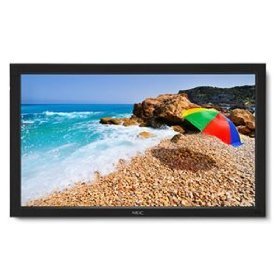
Image: The NEC LCD4215 42-inch MultiSync LCD Monitor, shown from the front with its stand. This image represents the primary display unit.
4. Nastavení
4.1 Vybalení
- Carefully open the packaging and remove the monitor and accessories.
- Place the monitor face down on a soft, clean surface to avoid scratching the screen.
4.2 Stand/Mounting Installation
The monitor can be used with its included desktop stand or mounted using a VESA-compatible wall mount (sold separately).
4.2.1 Desktop Stand Installation
- Připevněte základnu stojanu k krku stojanu pomocí dodaných šroubů.
- Secure the assembled stand to the back of the monitor using the designated mounting points and screws.
- Carefully lift the monitor and place it on a stable, level surface.
4.2.2 Montáž na stěnu (volitelné)
If using a VESA-compatible wall mount, follow the instructions provided with your wall mount kit. Ensure the mount supports the weight and VESA pattern of the NEC LCD4215 monitor.
4.3 Propojovací kabely
Before connecting any cables, ensure the monitor and all connected devices are powered off.
- Video kabel: Connect one end of the appropriate video cable (VGA, DVI, HDMI, etc.) to the video output port of your computer or media device and the other end to the corresponding input port on the monitor.
- Audio kabel (volitelný): If using the monitor's internal speakers or audio output, connect an audio cable from your source device to the monitor's audio input.
- Napájecí kabel: Connect the power cord to the monitor's AC input and then plug the other end into a grounded electrical outlet.
5. Návod k obsluze
5.1 Zapnutí/vypnutí
- Press the power button on the front panel of the monitor or on the remote control to turn the monitor on. The power indicator light will illuminate.
- Chcete-li monitor vypnout, stiskněte znovu tlačítko napájení.
5.2 Výběr vstupu
The monitor can display content from multiple sources. To switch between inputs:
- Press the 'Input' or 'Source' button on the remote control or the monitor's control panel.
- Use the navigation buttons to select the desired input source (e.g., VGA, DVI, HDMI).
- Press 'Enter' or 'OK' to confirm your selection.
5.3 Základní nastavení displeje
Pro úpravu různých nastavení otevřete nabídku OSD (On-Screen Display):
- Press the 'Menu' button on the remote control or the monitor's control panel.
- Use the navigation buttons (Up/Down/Left/Right) to browse through menu options such as 'Brightness', 'Contrast', 'Color Temperature', and 'Aspect Ratio'.
- Press 'Enter' or 'OK' to select an option and adjust its value.
- Press 'Menu' again to exit the OSD menu.
6. Údržba
6.1 Čištění displeje
To maintain optimal display quality, clean the screen and casing regularly:
- Před čištěním vždy monitor vypněte a odpojte ze zásuvky.
- Použijte měkký hadřík, který nepouští vlákna dampened with water or a non-abrasive, ammonia-free, and alcohol-free screen cleaner.
- Jemně otřete obrazovku a casing. Do not apply excessive pressure.
- Avoid spraying liquid directly onto the screen or into any openings.
6.2 Skladování
If storing the monitor for an extended period, ensure it is powered off, unplugged, and stored in a cool, dry place away from direct sunlight and extreme temperatures. Use the original packaging if available for protection.
7. Řešení problémů
Než kontaktujete zákaznickou podporu, podívejte se do následující tabulky s běžnými problémy a jejich řešeními:
| Problém | Možná příčina | Řešení |
|---|---|---|
| Na obrazovce není žádný obraz | Monitor not powered on; Video cable loose or disconnected; Incorrect input source selected. | Press the power button; Check video cable connections; Select the correct input source. |
| Příliš tmavý/světlý obraz | Nesprávné nastavení jasu/kontrastu. | Adjust 'Brightness' and 'Contrast' in the OSD menu. |
| Žádný zvuk | Odpojený audio kabel; Hlasitost příliš nízká; Ztlumený zvuk. | Check audio cable connection; Increase volume; Unmute audio. |
| Blikající obrázek | Video cable faulty; Resolution/Refresh rate mismatch. | Replace video cable; Adjust display settings on your computer. |
8. Specifikace
Detailed technical specifications for the NEC LCD4215 MultiSync LCD Monitor:
| Funkce | Specifikace |
|---|---|
| Číslo modelu | LCD4215 |
| Velikost obrazovky | 42 palce |
| Maximální rozlišení obrazovky | 1366 x 768 |
| Poměr stran | 1.78:1 |
| Hmotnost položky | 47 libry |
| Rozměry produktu (DxŠxV) | 44 x 27.5 x 9.25 palce |
| Barva | Černý |
| Výrobce | Nec Computers |
| Datum první dostupnosti | 31. července 2008 |
9. Záruka a podpora
9.1 Informace o záruce
This NEC LCD4215 monitor comes with a standard manufacturer's warranty. Please refer to the separate warranty card included in your product packaging for specific terms, conditions, and duration of coverage. Keep your proof of purchase for warranty claims.
9.2 Zákaznická podpora
For technical assistance, troubleshooting beyond this manual, or warranty service, please contact NEC customer support. Visit the official NEC webweb s nejaktuálnějšími kontaktními informacemi, včetně telefonních čísel a online zdrojů podpory.
Webmísto: www.nec.com