
Zavedení
This manual provides detailed instructions for the proper setup, operation, and maintenance of your Kodak EasyShare M893IS Digital Camera. Please read this manual thoroughly before using your camera to ensure optimal performance and longevity.
1. Nastavení
1.1. Instalace a nabíjení baterie
The Kodak EasyShare M893IS uses a rechargeable Lithium-Ion battery. Ensure the battery is fully charged before first use.
- Locate the battery compartment door on the bottom or side of the camera.
- Posuňte západku pro otevření přihrádky.
- Insert the Li-Ion battery with the contacts facing inward, ensuring it clicks into place.
- Bezpečně zavřete dvířka přihrádky na baterie.
- Connect the camera to a power source using the provided USB cable for in-camera charging. The charging indicator light will show the charging status.

Obrázek 1.1: Strana view of the camera, indicating the general location of the battery compartment.
1.2. Instalace paměťové karty
Fotoaparát podporuje paměťové karty SD/SDHC (nejsou součástí balení). Pro ukládání fotografií a videí je paměťová karta vyžadována.
- Open the battery compartment door. The memory card slot is usually located next to the battery.
- Insert the SD/SDHC card into the slot with the metal contacts facing the correct direction (refer to the diagram inside the compartment). Push until it clicks into place.
- Zavřete dvířka prostoru pro baterie.
2. Ovládání fotoaparátu
2.1. Ovládání kameryview
Familiarize yourself with the main controls of your Kodak EasyShare M893IS camera.

Obrázek 2.1: Přední strana view of the camera. Key components include the lens, flash, and microphone.
- Vypínač: Located on the top panel, turns the camera on/off.
- Tlačítko spouště: Press halfway to focus, fully to capture a photo.
- Páčka zoomu: Controls the 3x optical zoom and 5x digital zoom.
- Volič/tlačítko režimů: Selects shooting modes (e.g., Auto, Program, Scene modes).
- LCD obrazovka: 2.7-inch display for framing shots, reviewprohlížení obrázků a navigace v nabídkách.
- Směrový ovladač/tlačítko OK: Používá se pro navigaci v menu a výběr.
- Tlačítko nabídky: Přístup k nastavení a možnostem fotoaparátu.
- Review/Playback Button: Displays captured photos and videos.
- Smazat tlačítko: Removes unwanted images or videos.
- Tlačítko Sdílet: For easy sharing options (if configured).
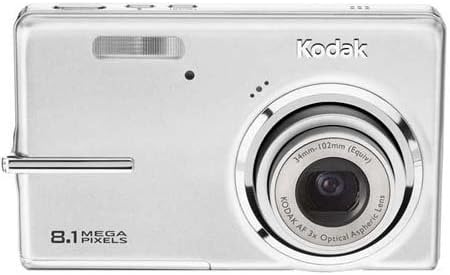
Obrázek 2.2: Zadní view of the camera, showing the 2.7-inch LCD and control buttons.
2.2. Fotografování
- Turn on the camera by pressing the Power button.
- Select your desired shooting mode using the Mode dial/button. Common modes include:
- Auto: Camera automatically adjusts settings for most situations.
- Scénické režimy: Specific settings for various scenarios like 'Night mode' or 'Sports'.
- Frame your shot using the LCD screen. Use the zoom lever to adjust the 3x optical zoom or 5x digital zoom.
- Press the Shutter button halfway down to allow the camera to focus (Contrast Detection Auto Focus, Multi-zone, Center Spot options available). A green frame indicates focus lock.
- Press the Shutter button fully to capture the image. The camera features optical image stabilization to reduce blur.
- For low-light conditions, adjust the flash mode (Auto, On, Off, Slow Synch) or utilize the High ISO (up to 1600) setting.
2.3. Nahrávání videí
- Switch the camera to video recording mode (refer to your camera's mode dial/menu for the video icon).
- Zaměřte objekt na LCD displeji.
- Press the Shutter button to start recording. Press it again to stop.
- Videos are recorded in VGA resolution (640 x 480 at 15 fps or 320 x 240 at 30 fps) in MJPEG format.
2.4. Reviewspráva a správa médií
- Stiskněte tlačítko Review/Playback button to view vaše fotografie a videa.
- Use the directional pad to scroll through your media.
- To delete an unwanted item, select it and press the Delete button. Confirm deletion when prompted.
- Connect the camera to a computer via USB to transfer files.
3. Údržba
3.1. Čištění fotoaparátu
- Čočka: Use a soft, lint-free cloth specifically designed for camera lenses. Gently wipe in a circular motion. Avoid using harsh chemicals.
- LCD obrazovka: Wipe with a soft, dry microfiber cloth. For stubborn smudges, slightly damphadřík vodou nebo čističem obrazovek.
- Tělo fotoaparátu: Prach a otisky prstů setřete měkkým suchým hadříkem.
3.2. Péče o baterie
- Pokud baterii nepoužíváte, uchovávejte ji na chladném a suchém místě.
- Abyste prodloužili životnost baterie, vyhněte se častému úplnému vybíjení.
- Pokud fotoaparát skladujete delší dobu, vyjměte baterii.
3.3. Skladování
Store the camera in a protective case or bag to prevent scratches and damage from dust or moisture. Avoid extreme temperatures.
4. Řešení problémů
| Problém | Možná příčina | Řešení |
|---|---|---|
| Fotoaparát se nezapne. | Baterie je vybitá nebo nesprávně vložená. | Charge the battery. Ensure the battery is inserted correctly with contacts aligned. |
| Fotografie jsou rozmazané. | Chvění fotoaparátu, pohyb objektu nebo nesprávné zaostření. | Hold the camera steady. Ensure the subject is within the camera's focus range. Use optical image stabilization. Increase ISO in low light. |
| Zpráva „Chyba paměťové karty“. | Memory card is full, corrupted, or incorrectly inserted. | Insert a new or empty SD/SDHC card. Reinsert the card. Format the card (this will erase all data). |
| Blesk se nespouští. | Flash is set to "Off" or battery is low. | Change flash mode to "Auto" or "On". Charge the battery. |
| Nelze přenést fotografie do počítače. | Incorrect USB connection or driver issues. | Ensure USB cable is securely connected to both camera and computer. Try a different USB port. Check computer's device manager for driver issues. |
5. Specifikace
| Funkce | Detail |
|---|---|
| Název modelu | Easyshare M893IS |
| Rozlišení foto snímače | 8.1 MP |
| Optický zoom | 3x |
| Digitální zoom | 5x |
| Stabilizace obrazu | Optický |
| Velikost obrazovky | 2.7palcový LCD displej |
| Podporováno File Formát | JPEG (Stills), MJPEG (Video) |
| Rozlišení videa | 640 x 480 (15 sn./s), 320 x 240 (30 sn./s) |
| Citlivost ISO | Minimální rozšířené ISO 80, maximální rozšířené ISO 1600 |
| Minimální rychlost závěrky | 4 sekund |
| Maximální rychlost závěrky | 1/2000 sekundy |
| Režimy blesku | Auto, On, Off, Slow Synch |
| Typ baterie | Lithium Ion |
| Konektivita | USB |
| Compatible Flash Memory | SD, SDHC (až 32 GB) |
| Hmotnost položky | 0.35 libry |
| Barva | Stříbro |
6. Informace o záruce
Your Kodak EasyShare M893IS Digital Camera is covered by a 1letá omezená záruka from the date of purchase. This warranty covers manufacturing defects and workmanship under normal use. It does not cover damage caused by misuse, accidents, unauthorized modifications, or external causes.
Please retain your proof of purchase for warranty claims. For detailed terms and conditions, refer to the warranty card included with your product or visit the official Kodak support webmísto.
7. Zákaznická podpora
If you encounter any issues not covered in the troubleshooting section or require further assistance, please contact Kodak Customer Support.
- Online podpora: Visit the official Kodak support webStránka s častými dotazy, ovladači a softwarem ke stažení.
- Telefonická podpora: Refer to your product packaging or the Kodak webmísto pro regionální kontaktní čísla.
- When contacting support, please have your camera model (M893IS) and serial number ready.