
Konec produktuview
The LogiLink USB 2.0 Hub 4-Port (Model UA0003) is a compact and efficient solution for expanding the number of USB ports available on your computer. This hub provides four Hi-Speed USB 2.0 ports, allowing you to connect multiple USB devices simultaneously, such as keyboards, mice, external hard drives, and more. Its desktop design and included power adapter ensure stable performance for all connected peripherals.
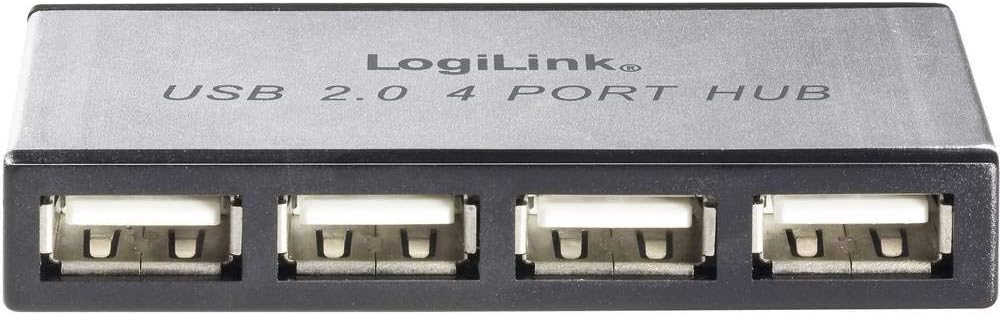
Obrázek: Přední strana view of the LogiLink USB 2.0 4-Port Hub, showing the four USB ports and the LogiLink branding.
Obsah balení
Prosím, ověřte, zda jsou v balení přítomny všechny položky:
- LogiLink USB 2.0 4-Port Hub (Model UA0003)
- Napájecí adaptér
- USB kabel

Image: The LogiLink USB 2.0 4-Port Hub displayed alongside its included power adapter and USB connection cable.
Pokyny pro nastavení
- Připojte napájecí adaptér: Insert the small barrel connector of the power adapter into the DC input port on the LogiLink USB Hub. Plug the power adapter into a standard electrical outlet.
- Připojte se k počítači: Connect one end of the provided USB cable to the upstream USB port on the LogiLink Hub. Connect the other end of the USB cable to an available USB port on your computer (desktop or laptop).
- Instalace ovladače (Plug & Play): The LogiLink USB 2.0 Hub is a plug-and-play device. Your operating system (Windows, macOS, Linux) should automatically detect and install the necessary drivers. No manual driver installation is typically required.
- Ověřit připojení: Once connected, the hub should be recognized by your computer. You can now begin connecting your USB devices to the four available downstream ports on the hub.
Provozování centra
Using the LogiLink USB 2.0 Hub is straightforward:
- Připojovací zařízení: Simply plug your USB devices (e.g., flash drives, external hard drives, printers, keyboards, mice) into any of the four available USB 2.0 ports on the hub.
- Výměna za provozu: The hub supports hot-swapping, meaning you can connect or disconnect USB devices while the computer is running without needing to restart.
- Indikátor napájení: The hub may feature an LED indicator to show that it is powered on and functioning correctly.
- Rychlost přenosu dat: The hub supports USB 2.0 speeds, offering data transfer rates of up to 480 Mbps (Megabits per second). This is suitable for most common USB peripherals.
Údržba
To ensure the longevity and optimal performance of your LogiLink USB 2.0 Hub, follow these simple maintenance guidelines:
- Čištění: Use a soft, dry, lint-free cloth to gently wipe the exterior of the hub. Avoid using liquid cleaners, aerosols, or abrasive solvents, as these can damage the device.
- Skladování: When not in use for extended periods, store the hub in a cool, dry place away from direct sunlight and extreme temperatures.
- Zacházení: Handle the hub with care. Avoid dropping it or subjecting it to strong impacts, which could damage internal components.
- Větrání: Ensure the hub is placed in an area with adequate ventilation to prevent overheating, especially when multiple power-hungry devices are connected.
Odstraňování problémů
If you encounter issues with your LogiLink USB 2.0 Hub, please refer to the following common problems and solutions:
| Problém | Možné řešení |
|---|---|
| Hub is not recognized by the computer. |
|
| Connected devices are not working or are intermittently disconnecting. |
|
| Pomalé rychlosti přenosu dat. |
|
Specifikace
| Funkce | Detail |
|---|---|
| Číslo modelu | UA0003 |
| Značka | Logilink |
| Počet portů USB 2.0 | 4 |
| Hardwarové rozhraní | USB |
| Kompatibilní zařízení | Desktops (and generally any device with a USB port) |
| Barva | Stříbro |
| Hmotnost položky | 7 unce (cca 198 gramů) |
| Rozměry produktu (DxŠxV) | Approx. 23.62 x 23.62 x 33.46 inches (Note: These dimensions seem unusually large for a hub, likely a packaging or shipping dimension. The hub itself is compact.) |
| Zdroj napájení | Externí napájecí adaptér (součástí balení) |
| Datum první dostupnosti | 7. srpna 2012 |
Záruka a podpora
LogiLink products are designed for reliability and performance. For specific warranty terms and conditions, please refer to the documentation included with your purchase or visit the official LogiLink webUschovejte si doklad o koupi pro případ reklamace.
For technical support or further assistance, please contact LogiLink customer service through their official website or the contact information provided in your product packaging. When contacting support, please have your product model number (UA0003) and a description of your issue ready.
Poznámka: Specifikace a vzhled produktu se mohou změnit bez předchozího upozornění.