
Konec produktuview
The Western Digital My Book Essential external hard drive provides 1 terabyte (1TB) of storage capacity. Designed for data backup and archiving, this device features a high-speed USB 2.0 interface for broad compatibility and efficient data transfer. Its design allows it to power on and off in conjunction with your computer, contributing to energy efficiency.
Klíčové vlastnosti:
- Jednoduchá instalace: Plug-and-play functionality for immediate use.
- Kompaktní design: Occupies minimal desk space, similar to a paperback book.
- Energeticky účinný: Automatically enters standby mode after 10 minutes of inactivity to conserve power.
- Rozhraní USB 2.0: Offers convenient and compatible connectivity with various computers.
- PC and Mac Compatible: Supports Windows 2000/XP/Vista and Mac OS X 10.4.8 or later.
Co je v krabici
Ověřte, zda balení produktu obsahuje všechny následující položky:
- Western Digital My Book Essential WDBAAF0010HBK Hard Drive
- USB kabel
- AC adaptér
- Průvodce rychlou instalací
Pokyny pro nastavení
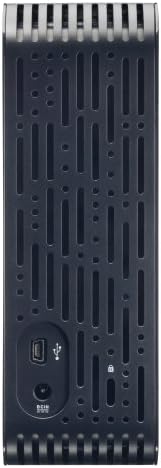
- Připojte AC adaptér: Plug the AC adapter into the power port on the back of the My Book Essential drive. Connect the other end of the AC adapter to a power outlet.
- Připojte kabel USB: Connect one end of the supplied USB cable to the USB 2.0 port on the back of the My Book Essential drive. Connect the other end of the USB cable to an available USB port on your computer.
- Zapnutí: The drive is designed to power on automatically with your computer. Ensure your computer is powered on. The drive's indicator light will illuminate.
- Počáteční uznání: Your operating system (Windows or Mac OS) should automatically detect and install the necessary drivers for the drive. This process may take a few moments.
- Přístup k disku: Once installed, the drive will appear as a new storage device in 'My Computer' (Windows) or 'Finder' (Mac OS). You can now begin transferring files.
Note: For detailed operating system-specific instructions or if the drive is not recognized, refer to the included Quick Install Guide or the Western Digital support webmísto.
Návod k obsluze
The Western Digital My Book Essential drive functions as an external storage device for your computer. It is ideal for backing up important files, storing large media libraries, and freeing up space on your computer's internal hard drive.
Přenos dat:
- K převodu files, simply drag and drop them to and from the My Book Essential drive icon in your computer's file badatel.
- For optimal performance, ensure the USB cable is securely connected to a USB 2.0 port on your computer.
Řízení spotřeby:
- The drive is designed to turn on and off with your computer. When your computer is shut down or put to sleep, the drive will also enter a low-power state.
- After 10 minutes of inactivity, the drive will automatically enter standby mode to save energy. It will resume normal operation when accessed.
Bezpečné odstranění:
Always use the "Safely Remove Hardware" option (Windows) or drag the drive icon to the Trash/Eject (Mac OS) before disconnecting the USB cable to prevent data corruption.
Údržba
Proper maintenance ensures the longevity and reliable performance of your external hard drive.
- Fyzikální péče: Keep the drive in a stable, well-ventilated area. Avoid exposing it to extreme temperatures, direct sunlight, or moisture. Do not block the ventilation slots.
- Čištění: Use a soft, dry cloth to clean the exterior of the drive. Do not use liquid cleaners or aerosols.
- Záloha dat: Regularly back up critical data stored on the external drive to another location (e.g., cloud storage, another hard drive) to prevent data loss in case of unforeseen issues.
- Aktualizace firmwaru: Periodically check the Western Digital support webna webu, kde najdete veškeré dostupné aktualizace firmwaru pro váš model.
Odstraňování problémů
If you encounter issues with your My Book Essential drive, try the following steps:
- Disk nebyl detekován:
- Ensure the AC adapter is securely connected to both the drive and a working power outlet.
- Verify the USB cable is firmly connected to both the drive and your computer's USB port. Try a different USB port or cable if available.
- Restartujte počítač.
- Check your computer's Disk Management (Windows) or Disk Utility (Mac OS) to see if the drive is recognized but unformatted or unallocated.
- Pomalý přenos dat:
- Ensure you are using a USB 2.0 port. While compatible with USB 1.1, performance will be significantly slower.
- Vyhněte se spouštění více náročných aplikací během velkých file převody.
- Check for background processes that might be using system resources or disk I/O.
- Drive Light Not On:
- Confirm the AC adapter is connected and the power outlet is active.
- If connected to a computer, ensure the computer is powered on and not in sleep mode.
For further assistance, consult the Quick Install Guide or visit the Western Digital support webmísto.
Specifikace
| Funkce | Detail |
|---|---|
| Název modelu | My Book Essential Edition 2.0 |
| Číslo modelu | WDH1U10000N |
| Digitální kapacita úložiště | 1024 GB (1 TB) |
| Rozhraní pevného disku | USB 2.0 |
| Technologie připojení | USB |
| Pevný disk Form Factor | 3.5 palce |
| Popis pevného disku | Desktop |
| Kompatibilní zařízení | Desktop |
| Typ instalace | Připojit |
| Barva | Černý |
| Rychlost otáčení pevného disku | 7200 ot./min |
| Rychlost čtení | 60 megabajtů za sekundu |
| Rychlost médií | 30 XNUMX MB/s |
| Materiál pouzdra | Hard Plastic or Metal |
| Hmotnost položky | 3.3 libry |
| Systémové požadavky | Available USB port, Windows 2000/XP/Vista, Mac OS X 10.4.8 or later |
Záruka a podpora
The Western Digital My Book Essential drive comes with a 1letá omezená záruka. For warranty claims, technical support, or to access additional resources such as drivers and software, please visit the official Western Digital support webmísto.
Online podpora: support.wdc.com
Obrázky produktů




Produktová videa
WD Hard Drives: Essential vs. Home Edition Comparison
This video provides a comparison between the Western Digital My Book Essential and Home Edition hard drives, highlighting their physical differences and connectivity options. It helps users understand the specific features of the Essential model in context.