
Zavedení
This manual provides detailed instructions for the proper use and maintenance of your Casio WV-59E-1AVEF digital watch. This timepiece features radio-controlled timekeeping, ensuring accurate time display by receiving time calibration signals. Please read this manual thoroughly to ensure optimal performance and longevity of your watch.
Key features include display illumination, world time function, 5-bar water resistance, and an automatic calendar.
Konec produktuview
The Casio WV-59E-1AVEF is a robust digital watch designed for daily wear. It features a square case, digital display, and a comfortable resin strap. The watch is equipped with multiple buttons for navigating its various functions.
Obrázek 1: Přední view of the Casio WV-59E-1AVEF digital watch, displaying the time, date, and various mode indicators.
Ovládací prvky a displej
- Zobrazit: Shows time, date, and function indicators.
- tlačítka: Typically located on the sides of the watch for mode selection, adjustment, and illumination.

Obrázek 2: Strana view of the Casio WV-59E-1AVEF watch, highlighting the control buttons on the left and right sides of the case.

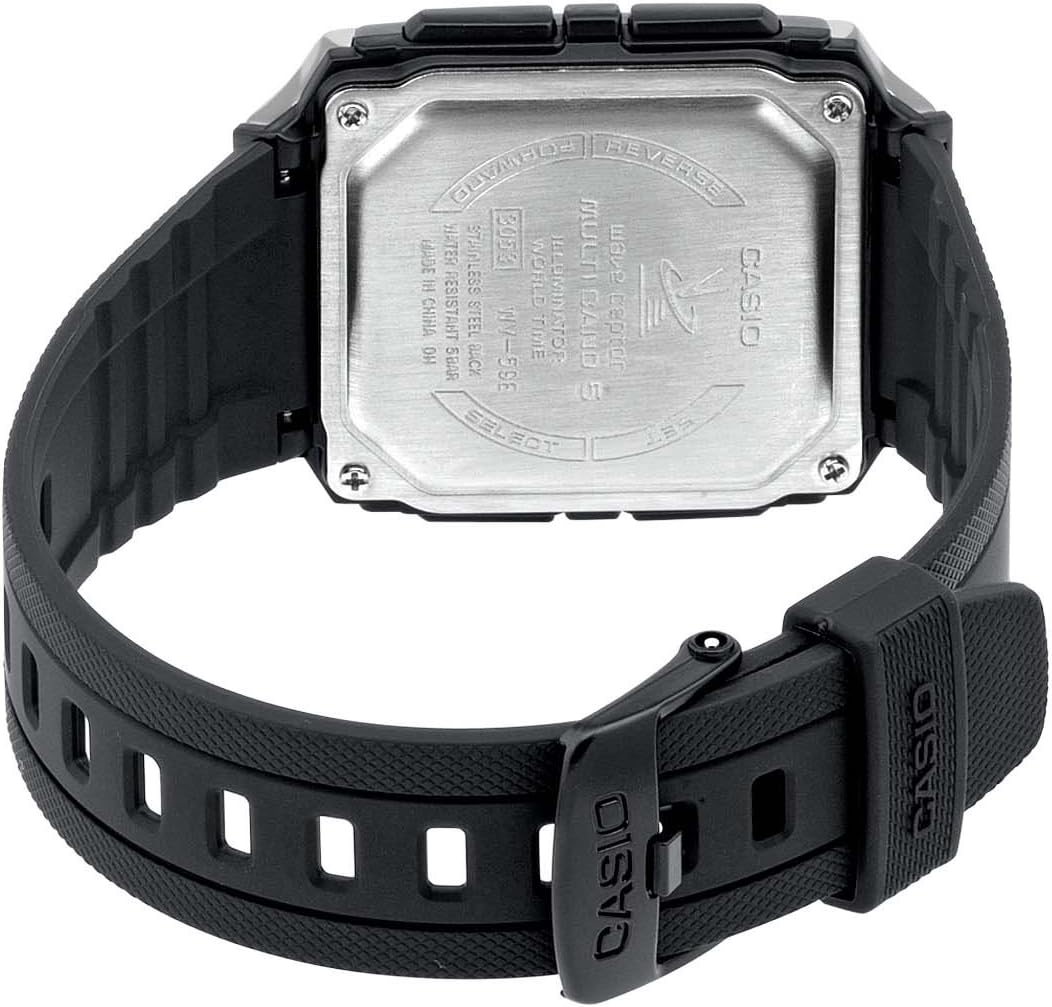
Obrázek 3: Zadní view of the Casio WV-59E-1AVEF watch, showing the stainless steel case back with model number WV-59E, water resistance rating, and 'Wave Ceptor' branding.
Nastavení
Initial Time Setting and Time Zone
Upon first use or after a battery change, you may need to set your home city (time zone) manually. This is crucial for the watch to receive the correct time calibration signal.
- V režimu měření času stiskněte a podržte tlačítko UPRAVIT button (usually top-left) until the city code starts to flash.
- Použijte VPŘED a ZVRÁTIT buttons (usually on the right side) to select your desired home city code. Refer to the world time map for city codes corresponding to your region.
- Stiskněte tlačítko MODE button (usually bottom-left) to cycle through other settings like DST (Daylight Saving Time) and 12/24-hour format. Adjust these as needed using the VPŘED a ZVRÁTIT tlačítka.
- Stiskněte tlačítko UPRAVIT znovu stiskněte tlačítko pro opuštění obrazovky nastavení.
Radio Signal Reception (Wave Ceptor)
Your watch automatically receives time calibration signals to maintain accurate time. Automatic reception typically occurs in the early hours of the morning. For best reception, place the watch near a window overnight.
To manually initiate signal reception:
- V režimu měření času stiskněte a podržte tlačítko DOSTÁVAT button (refer to watch diagram for exact button, often bottom-right) for about two seconds.
- The watch will display "RCV" or "GET" to indicate it is attempting to receive the signal.
- Keep the watch stationary and away from sources of interference (e.g., computers, televisions) during reception.
- Successful reception will be indicated by "OK" or "RCVD". If reception fails, "ERR" or "FAIL" will be displayed.

Obrázek 4: The 'Wave Ceptor' logo, indicating the watch's radio-controlled timekeeping capability.
Provozní režimy
Stiskněte tlačítko MODE button (usually bottom-left) to cycle through the different modes:
- Režim měření času: Zobrazuje aktuální čas a datum.
- Režim světového času: Umožňuje vám to view aktuální čas v různých městech po celém světě.
- Režim stopek: Měří uplynulý čas.
- Režim alarmu: Nastavte si denní budíky.
Režim světového času
V režimu světového času použijte VPŘED a ZVRÁTIT buttons to scroll through different city codes and view their current times.
Režim stopek
- Enter Stopwatch Mode.
- Stiskněte tlačítko START/STOP button (often top-right) to start and stop the stopwatch.
- Stiskněte tlačítko RESETOVAT button (often bottom-right) to reset the stopwatch to zero.
Režim alarmu
- Vstupte do režimu alarmu.
- Použijte VPŘED a ZVRÁTIT buttons to select an alarm number (if multiple are available).
- Stiskněte a podržte UPRAVIT tlačítko , dokud nezačne blikat čas budíku.
- Použijte VPŘED a ZVRÁTIT buttons to set the alarm hour and minute.
- Stiskněte tlačítko UPRAVIT tlačítko pro uložení nastavení budíku.
- Stiskněte tlačítko ON/OFF button (often top-right) to toggle the alarm on or off.
Osvětlení
Stiskněte tlačítko SVĚTLO button (usually top-right or a dedicated button) to illuminate the display for easy viewza zhoršených světelných podmínek.
Údržba
Výměna baterie
The watch is powered by a Lithium metal battery. When the display becomes dim or functions become unreliable, it is time to replace the battery. It is recommended to have battery replacement performed by a qualified watch technician to ensure proper sealing and water resistance.
Water Resistance (50 Meters / 5 Bar)
Your watch is water resistant to 50 meters (5 bar). This means it is suitable for everyday use and can withstand splashes, rain, showering, and shallow swimming. It is ne suitable for diving, snorkeling, or high-impact water sports. Do not operate buttons while the watch is wet or submerged.
Čištění
Wipe the watch case and strap with a soft, dry cloth. For resin straps, you can use a mild soap solution and rinse thoroughly, then dry completely. Avoid using harsh chemicals or abrasive cleaners.
Odstraňování problémů
- Time is incorrect or not synchronizing:
- Ensure your home city code is set correctly for your time zone.
- Place the watch near a window overnight for automatic reception.
- Manually initiate signal reception (refer to "Radio Signal Reception" section).
- Check for strong interference sources nearby (e.g., electronic devices).
- The battery may be low and require replacement.
- Displej je tmavý nebo prázdný:
- Baterie může být vybitá. Vyměňte baterii.
- Ensure the watch is not in a power-saving mode (if applicable to your model).
- Tlačítka nereagují:
- Ujistěte se, že hodinky nejsou v uzamčeném režimu (pokud je to možné).
- If the watch is wet, dry it thoroughly before operating buttons.
- A low battery can affect button responsiveness.
Specifikace

Obrázek 5: Diagram illustrating the dimensions of the Casio WV-59E-1AVEF watch face, with measurements in millimeters and inches for reference.
| Značka | Casio |
| Název modelu | WV-59E |
| Číslo modelu | WV-59E-1AVEF |
| Tvar položky | Náměstí |
| Typ zobrazení | Digitální |
| Typ materiálu pouzdra | Akryl |
| Typ materiálu okénka číselníku | Akryl |
| Typ materiálu pásku | Pryskyřice |
| Barva pásu | Černý |
| Barva číselníku | Černý |
| Typ spony | Přezka |
| Průměr pouzdra | 39 milimetrů |
| Tloušťka pouzdra | 12.5 milimetrů |
| Šířka pásma | 18 milimetrů |
| Hmotnost položky | 40 gramů |
| Typ pohybu | Křemen |
| Hloubka vodotěsnosti | 50 metrů (5 bary) |
| Zdroj napájení | Battery Powered (1 Lithium metal battery included) |
| Speciální funkce | Radio-controlled time, Stopwatch, Alarm, Illumination, World Time, Automatic Calendar |
| Zahrnuté komponenty | Resin strap |
| Mezinárodní kód zboží | 04971850882220 |
Záruka a podpora
For warranty information and customer support, please refer to the warranty card included with your product or visit the official Casio webwebu. Uschovejte si účtenku jako doklad o koupi.
For service or repairs, contact an authorized Casio service center.