
Zavedení
Thank you for choosing the Casio F-94WA-8DG Digital Watch. This manual provides detailed instructions on how to set up, operate, and maintain your watch. Please read this manual carefully to ensure proper use and to fully utilize all features of your new timepiece.
The Casio F-94WA-8DG is a reliable and practical digital watch designed for everyday use, featuring timekeeping, alarm, and stopwatch functions, along with water resistance suitable for daily activities.
Hlídatview
Familiarize yourself with the buttons and display of your Casio F-94WA-8DG watch.
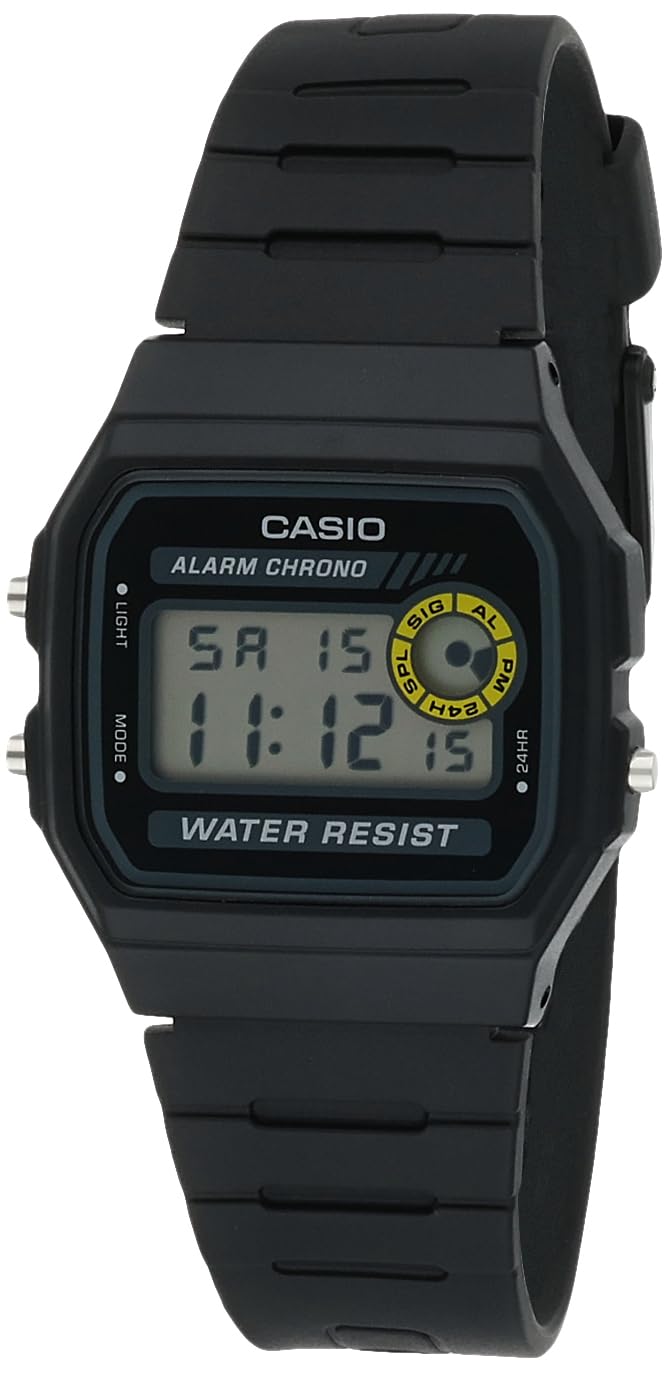
Obraz: Přední view of the Casio F-94WA-8DG digital watch. The display shows the time, day, and date. Buttons are visible on the left and right sides of the watch case.
- Tlačítko světla (vlevo nahoře): Aktivuje podsvícení.
- Tlačítko režimu (vlevo dole): Cycles through different modes (Timekeeping, Alarm, Stopwatch).
- Adjust/24HR Button (Top Right): Used for setting adjustments and switching between 12/24-hour format.
- Start/Stop Button (Bottom Right): Used for starting/stopping stopwatch and confirming settings.
Nastavení
Nastavení času a data
- V režimu měření času stiskněte tlačítko Režim button until the seconds digits begin to flash. This indicates you are in setting mode.
- Stiskněte tlačítko Adjust/24HR button to cycle through the settings: Seconds → Hour → Minutes → Month → Day → Day of the Week.
- While a setting is flashing, use the Start/Stop button to increase the value. Hold the button down to change the value rapidly.
- Jakmile jsou všechna nastavení správná, stiskněte tlačítko Režim tlačítko pro opuštění režimu nastavení.
12/24hodinový formát
V režimu měření času stiskněte tlačítko Adjust/24HR tlačítko pro přepínání mezi 12hodinovým (označené „PM“ pro odpolední hodiny) a 24hodinovým formátem času.
Návod k obsluze
Režim měření času
Toto je výchozí režim, který zobrazuje aktuální čas, den v týdnu a datum. Stiskněte tlačítko Světlo tlačítko pro podsvícení displeje za zhoršených světelných podmínek.
Režim alarmu
V režimu měření času stiskněte tlačítko Režim Jedním stisknutím tlačítka přejděte do režimu budíku. Zobrazí se čas budíku.
- Chcete-li nastavit budík, stiskněte a podržte tlačítko Adjust/24HR tlačítko, dokud nezačnou blikat číslice hodin.
- Použijte Start/Stop nastavte hodinu.
- Stiskněte tlačítko Adjust/24HR button to select the minute digits, then use the Start/Stop tlačítko pro nastavení minut.
- Stiskněte tlačítko Režim tlačítko pro ukončení nastavení budíku.
- Chcete-li zapnout/vypnout budík, stiskněte tlačítko Start/Stop button in Alarm Mode. An alarm indicator will appear/disappear on the display.
- To activate/deactivate the Hourly Time Signal (chime), press the Adjust/24HR button in Alarm Mode. A chime indicator will appear/disappear.
Režim stopek
V režimu měření času stiskněte tlačítko Režim dvakrát stiskněte tlačítko pro vstup do režimu stopek.
- Stiskněte tlačítko Start/Stop tlačítko pro spuštění stopek.
- Stiskněte tlačítko Start/Stop znovu stiskněte tlačítko pro zastavení stopek.
- Chcete-li stopky vynulovat, stiskněte tlačítko Adjust/24HR tlačítko, když jsou stopky zastaveny.
Údržba
Voděodolnost
Your Casio F-94WA-8DG watch is water resistant up to 100 meters. This means it is suitable for everyday use and can withstand splashes, rain, and brief immersion in water. However, it is ne recommended for diving or prolonged underwater use. Do not operate buttons while the watch is wet or submerged.

Obraz: Zadní view of the Casio F-94WA-8DG watch, highlighting the stainless steel back case with water resistance information.
Čištění
Wipe the watch with a soft, dry cloth to remove dirt and moisture. For resin bands, you can use a mild soap solution and rinse thoroughly, then dry completely. Avoid using harsh chemicals or abrasive cleaners.
Výměna baterie
The watch is powered by a single C battery (included). When the display becomes dim or functions become erratic, it may be time to replace the battery. Battery replacement should be performed by a qualified watch technician to ensure proper sealing and water resistance.
Odstraňování problémů
- Displej je prázdný nebo tmavý: Baterie může být slabá nebo vybitá. Vyměňte baterii.
- Čas je nesprávný: Re-set the time and date following the instructions in the "Setup" section. Ensure the 12/24-hour format is set as desired.
- Budík se nespustí: Check if the alarm is activated (alarm indicator on display). Ensure the alarm time is set correctly.
- Tlačítka nereagují: Ujistěte se, že hodinky nejsou mokré. Pokud problém přetrvává, hodinky mohou vyžadovat servis.
If you encounter issues not covered here, please contact Casio customer support.
Specifikace
| Značka | Casio |
| Číslo modelu | F-94WA-8DG |
| Typ zobrazení | Digitální |
| Hnutí | Japonský křemen |
| Materiál pouzdra | Nerez |
| Materiál pásku | Pryskyřice |
| Voděodolnost | 100 metrů (330 stop) |
| Průměr pouzdra | 32 mm |
| Tloušťka pouzdra | 8.5 mm |
| Hmotnost položky | 21 gramů |
| Zdroj napájení | Napájení z baterie (1 baterie typu C je součástí balení) |
| Typ spony | Přezka |
| Tvar položky | Obdélníkový |
| Watch Glass Material | Pryskyřičné sklo |
Záruka a podpora
Informace o záruce
Your Casio F-94WA-8DG watch comes with a manufacturer's limited warranty for two years from the date of purchase. This warranty covers manufacturing defects under normal use. It does not cover damage resulting from misuse, accidents, unauthorized repairs, or normal wear and tear.
Zákaznická podpora
For warranty claims, technical assistance, or any other inquiries regarding your watch, please contact Casio customer support. Refer to the official Casio website or your purchase documentation for specific contact details in your region.