
1. Úvod
Děkuji za nákupasing the COWON iAUDIO 7 Portable MP3 Player. This device is designed to provide high-quality audio playback, along with additional features such as an FM radio, voice recorder, line-in recorder, and picture viewer. This manual provides essential information for the safe and efficient use of your device. Please read it thoroughly before operation.
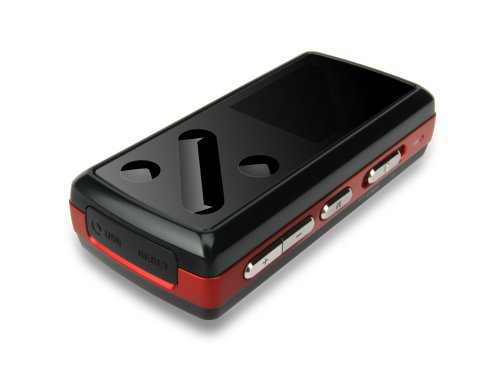
Obrázek: Přední strana view of the COWON iAUDIO 7 Portable MP3 Player, showcasing its compact design and color LCD screen.
2. Konec produktuview
2.1 Klíčové vlastnosti
- Color LCD display for clear navigation.
- Supports multiple audio formats including MP3.
- Integrovaný FM tuner.
- Voice and Line-In recording capabilities.
- Obrázek viewer funkčnost.
- 8 GB internal memory for extensive storage.
- USB connectivity for data transfer.
2.2 Komponenty
The iAUDIO 7 features a compact design with a 1.3-inch screen. It includes physical buttons for navigation and control, a USB port for connectivity, and a headphone jack. Specific button functions are detailed in the 'Operating Instructions' section.
3. Nastavení
3.1 Počáteční nabíjení
Before first use, fully charge the iAUDIO 7. Connect the device to a computer's USB port or a compatible USB wall adapter using the provided USB cable. The charging indicator on the device will show its status. A full charge typically takes several hours.
3.2 Zapnutí/vypnutí
- Zapnutí: Press and hold the Power button until the COWON logo appears on the screen.
- Vypnutí: Stiskněte a podržte tlačítko napájení, dokud se zařízení nevypne.
- Zámek obrazovky: Use the Hold switch to prevent accidental button presses during transport.
4. Návod k obsluze
4.1 Základní navigace
The iAUDIO 7 features a combination of physical buttons for menu navigation and selection. Use the directional buttons to scroll through menus and the 'Play/Pause' button to select items or confirm actions. The 'Menu' button typically returns to the previous screen or main menu.
4.2 Přehrávání hudby
- From the main menu, navigate to 'Music'.
- Browse your music by artist, album, genre, or all tracks.
- Select a track and press the 'Play/Pause' button to begin playback.
- Use the volume buttons to adjust audio levels.
- Supported audio formats include MP3, OGG, and FLAC.
4.3 FM rádio
- Connect headphones, as they act as the FM antenna.
- V hlavní nabídce přejděte na „FM rádio“.
- Pomocí navigačních tlačítek můžete vyhledávat stanice nebo ručně ladit frekvenci.
- The device supports recording from the FM radio. Refer to the on-screen prompts for recording options.
4.4 Voice and Line-In Recording
- V hlavní nabídce vyberte možnost „Záznamník“.
- Choose 'Voice Recording' to use the built-in microphone or 'Line-In Recording' to record from an external audio source connected via the line-in port.
- Press the 'Play/Pause' button to start and stop recording.
- Zaznamenáno files are saved in a designated folder on the device.
4.5 Obrázek a video ViewIng
- Navigate to 'Pictures' or 'Videos' from the main menu.
- Procházet a vybírat files pro viewIng.
- Note: Videos may require conversion to a compatible format using COWON's software before transfer to the device.
5. Připojení k počítači
The iAUDIO 7 connects to a computer via a standard USB cable for data transfer. When connected, the device will appear as a removable disk drive.
- Uživatelé systému Windows: The device is compatible with Windows operating systems. You can drag and drop files directly to and from the device. COWON may provide optional software (e.g., JetAudio) for enhanced management and video conversion.
- Uživatelé systému Mac: The iAUDIO 7 supports data transfer with Mac OS. You can transfer files by dragging and dropping. However, the supplied software for device management and video conversion is primarily designed for Windows.
- Always safely eject the device from your computer before disconnecting the USB cable to prevent data corruption.
6. Údržba
- Čištění: K čištění zařízení používejte měkký, suchý hadřík. Nepoužívejte tekuté čisticí prostředky ani abrazivní materiály.
- Skladování: Přístroj skladujte na chladném a suchém místě mimo dosah přímého slunečního záření a extrémních teplot.
- Péče o baterie: Chcete-li prodloužit životnost baterie, vyvarujte se častého úplného vybíjení. Zařízení pravidelně nabíjejte, i když jej delší dobu nepoužíváte.
- Aktualizace firmwaru: Periodically check the official COWON webweb s dostupnými aktualizacemi firmwaru pro zlepšení výkonu a přidání funkcí.
7. Řešení problémů
- Zařízení se nezapne: Ensure the battery is charged. Connect to a power source and try again. If unresponsive, perform a soft reset (refer to the device's specific reset procedure, often a small reset button or holding the power button for an extended period).
- Žádný zvuk: Zkontrolujte připojení sluchátek a úroveň hlasitosti. Ujistěte se, že zvuk file není poškozený a je v podporovaném formátu.
- Počítač nerozpozná zařízení: Ensure the USB cable is securely connected. Try a different USB port or cable. Restart both the device and the computer.
- Controls are unresponsive or erratic: Ensure the Hold switch is not engaged. If the device is exposed to extreme heat, allow it to cool down. A soft reset may resolve temporary software glitches.
- Cannot play certain files: Ověřte, že file format is supported by the iAUDIO 7 (e.g., MP3, OGG, FLAC for audio). Video files often require specific conversion.
8. Specifikace
| Název modelu | COWON iAUDIO 7 |
| Číslo modelu položky | I7-08RD |
| Kapacita paměti | 8 GB |
| Velikost obrazovky | 1.3 palce |
| Technologie připojení | USB |
| Podporované standardy | MP3 (and other formats like OGG, FLAC) |
| Speciální funkce | FM Radio, Voice Recorder, Line-In Recorder, Picture Viewer |
| Rozměry produktu | 3 x 1 x 1 palce |
| Hmotnost položky | 4.2 unce (0.26 libry) |
| Výrobce | Cowon |
9. Bezpečnostní informace
- Nevystavujte zařízení vodě ani nadměrné vlhkosti.
- Zabraňte pádu zařízení nebo jeho vystavení silným nárazům.
- Nepokoušejte se zařízení rozebírat ani upravovat. Ztratíte tak záruku.
- Používejte pouze schválené příslušenství a nabíječky.
- Prolonged listening at high volumes can cause hearing damage.
- Zařízení a jeho baterii zlikvidujte zodpovědně v souladu s místními předpisy.
10. Záruka a podpora
COWON products are manufactured under strict quality control. For information regarding warranty coverage, terms, and conditions, please refer to the warranty card included with your purchase or visit the official COWON website. For technical support or service inquiries, please contact COWON customer service through their official channels.
Pro další pomoc prosím navštivte COWON Store on Amazon.