
1. Úvod
The Iwata-Medea Studio Series Smart Jet Pro is a single-piston, oil-less air compressor designed for airbrush applications. This unit features an auto shut-off function, an adjustable air-pressure gauge, and a moisture filter. It is engineered for quiet operation and reliability, making it suitable for both occasional and professional artists.
This manual provides essential information for the safe and efficient operation, setup, and maintenance of your Smart Jet Pro compressor.
2. Bezpečnostní informace
Please read and understand all safety instructions before operating the compressor. Failure to follow these instructions may result in electric shock, fire, or serious injury.
- Kompresor provozujte vždy v dobře větraném prostoru.
- Nepoužívejte v blízkosti hořlavých kapalin nebo plynů.
- Ujistěte se, že napájecí kabel není poškozený a řádně uzemněný.
- Před prováděním jakékoli údržby nebo čištění odpojte napájení.
- Během provozu držte děti a domácí zvířata mimo dosah kompresoru.
- Tento produkt obsahuje chemikálie, o kterých je ve státě Kalifornie známo, že způsobují rakovinu a vrozené vady nebo jiná poškození reprodukce.
3. Obsah balení
Ověřte, zda jsou v balení přítomny všechny položky:
- Iwata-Medea Studio Series Smart Jet Pro Air Compressor (Model IS 875)
- High-strength polyurethane air hose
- Moisture filter (pre-installed)
- Návod k použití (tento dokument)
4. Konec produktuview
The Smart Jet Pro compressor features a compact design with an all-metal protective case and a convenient carrying handle. Key components include the air pressure gauge, pressure regulator knob, and moisture filter.

Obrázek 1: Přední strana view of the Iwata-Medea Smart Jet Pro Air Compressor, showing the pressure gauge, regulator, and included air hose.
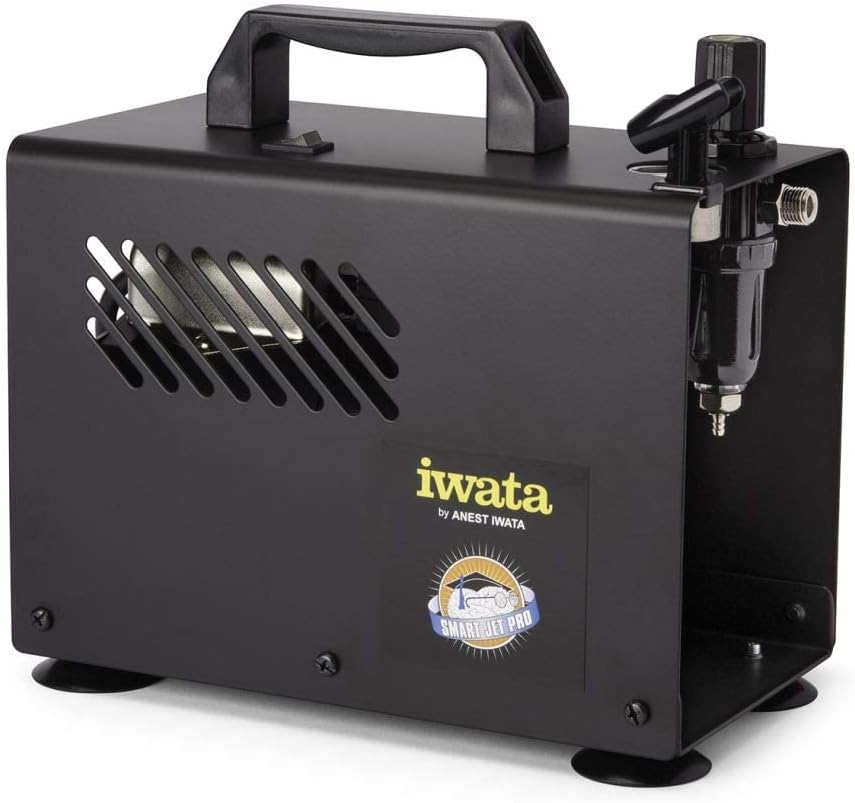
Obrázek 2: Strana view of the compressor, highlighting the integrated moisture filter and pressure adjustment knob.
5. Nastavení
- Umístění: Umístěte kompresor na stabilní, rovný povrch v čistém a dobře větraném prostoru. Zajistěte kolem jednotky dostatečný prostor pro cirkulaci vzduchu.
- Připojení vzduchové hadice: Connect one end of the provided air hose to the air outlet on the compressor. Connect the other end to your airbrush. Ensure connections are secure to prevent air leaks.
- Připojení napájení: Plug the compressor's power cord into a standard 120V AC electrical outlet.
6. Návod k obsluze
- Zapnutí: Flip the power switch located on the top of the compressor to the "ON" position. The compressor will start running.
- Nastavení tlaku vzduchu: Use the pressure regulator knob (typically located near the air outlet and gauge) to adjust the desired air pressure. Turn clockwise to increase pressure and counter-clockwise to decrease. Monitor the air pressure gauge for accurate readings. The maximum operating pressure is 35 PSI.
- Funkce automatického vypnutí: The Smart Jet Pro features an automatic shut-off function. When the airbrush trigger is released and air flow stops, the compressor will automatically turn off to conserve energy and reduce wear. It will restart automatically when the airbrush trigger is pressed again.
- Begin Airbrushing: Once the desired pressure is set, you can begin your airbrushing work.
- Vypnout: After use, flip the power switch to the "OFF" position and unplug the compressor from the power outlet.
7. Údržba
Regular maintenance ensures optimal performance and longevity of your compressor.
- Moisture Filter Drainage: The integrated moisture filter collects condensation. Periodically check the filter bowl for accumulated water. To drain, ensure the compressor is off and depress the small valve at the bottom of the filter bowl to release the water.
- Čištění: Wipe the exterior of the compressor with a clean, damp cloth. Do not use harsh chemicals or abrasive cleaners. Ensure no liquids enter the internal components.
- Vzduchový filtr: The compressor is designed with an internal air filter. No user-serviceable air filter replacement is typically required for this model.
8. Řešení problémů
V této části naleznete běžné problémy a jejich řešení.
| Problém | Možná příčina | Řešení |
|---|---|---|
| Kompresor se nezapne. | Žádné napájení, uvolněné připojení, vypnutý vypínač. | Check power cord connection, ensure outlet is functional, verify power switch is ON. |
| Nízký nebo žádný tlak vzduchu. | Regulator set too low, air leaks, clogged airbrush. | Adjust pressure regulator, check hose connections for leaks, clean airbrush. |
| Kompresor běží nepřetržitě. | Air leak in system, airbrush trigger stuck open. | Check all connections for leaks, ensure airbrush trigger is fully released. |
| Excessive moisture in air line. | Moisture filter needs draining. | Drain the moisture filter as described in the Maintenance section. |
9. Specifikace
Technical specifications for the Iwata-Medea Studio Series Smart Jet Pro Air Compressor (Model IS 875).

Figure 3: Product dimensions of the Iwata-Medea Smart Jet Pro Air Compressor.
| Funkce | Specifikace |
|---|---|
| Název modelu | JE 875 |
| Značka | Iwata |
| svtage | 120 voltů |
| Zdroj napájení | Elektrický kabel |
| Úroveň hluku | 50 decibelů |
| Maximální provozní tlak | 35 PSI (libra na čtvereční palec) |
| Výkon motoru | 0.13 HP (1/8 hp) |
| Hmotnost položky | 12.67 liber (5.76 kilogramů) |
| Rozměry produktu (D x Š x V) | 6.18 cm x 8.65 cm x 2.25 cm |
| Speciální funkce | Moisture Filter, Auto Shut-Off |
| Zahrnuté komponenty | Filter, Air Hose |
10. Záruka a podpora
For warranty information or technical support, please refer to the documentation included with your purchase or contact Iwata customer service. Keep your purchase receipt as proof of purchase for warranty claims.
For further assistance, visit the official Iwata webnebo se obraťte na jejich autorizovaná servisní střediska.