
Altec Lansing BX1020
Altec Lansing BX1020 2-Piece Music and Gaming Speaker System
Návod k použití
Zavedení
Děkuji za nákupasing the Altec Lansing BX1020 2-Piece Music and Gaming Speaker System. This system is designed to provide clear and powerful audio for your CD player, MP3 player, video gaming system, or personal computer. This manual provides essential information for setting up, operating, and maintaining your new speaker system.
Obsah balení
Zkontrolujte prosím, zda jsou ve vašem balení přítomny všechny níže uvedené položky:
- Two (2) Altec Lansing BX1020 Satellite Speakers
- Jeden (1) napájecí adaptér
- Audio Input Cable (attached to one speaker)
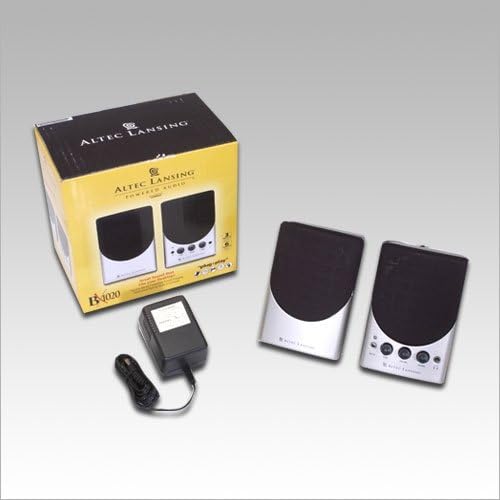
Image: Contents of the Altec Lansing BX1020 package, showing the two speakers, power adapter, and the product box.
Pokyny pro nastavení
- Umístění reproduktorů: Position the two satellite speakers on either side of your computer monitor or audio source for optimal stereo separation. Ensure they are on a stable, flat surface.
- Připojení reproduktorů: The left speaker connects to the right speaker via an integrated cable. Ensure this connection is secure.
- Připojení zdroje zvuku: Locate the audio input cable (3.5mm stereo jack) attached to one of the speakers. Plug this cable into the headphone jack or audio output port of your computer, MP3 player, CD player, or gaming console.
- Připojte napájení: Insert the power adapter cable into the DC input jack on the back of the main speaker (the one with controls). Plug the power adapter into a standard electrical outlet.

Image: The Altec Lansing BX1020 speaker system, showing the primary speaker with its control panel and the secondary speaker.
Návod k obsluze
- Zapnutí/vypnutí: The power button is located on the front panel of the main speaker. Press it to turn the speakers on or off. A blue LED indicator will illuminate when the speakers are powered on.
- Ovládání hlasitosti: Rotate the "Volume" knob clockwise to increase the audio output and counter-clockwise to decrease it.
- Tónová kontrola: Adjust the "Tone" knob to modify the bass and treble response of the audio. Turning it clockwise generally increases treble, while counter-clockwise increases bass.
- Sluchátkový jack: A 3.5mm headphone jack is provided on the front panel. Plugging headphones into this jack will mute the speakers and route audio to your headphones.
- Pomocný vstup: An "Aux In" port (3.5mm) is available on the front panel for connecting an additional audio device without disconnecting the primary audio source.
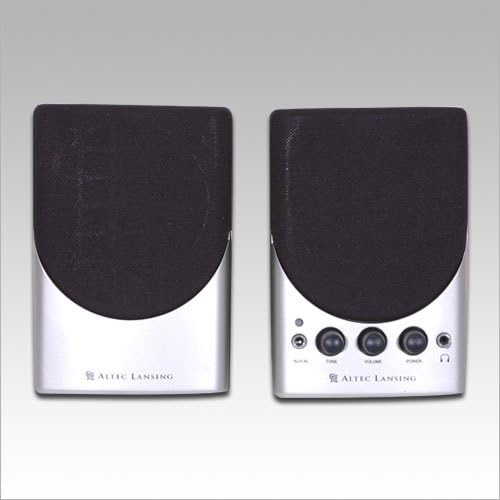
Obrázek: Přímá fronta view of both Altec Lansing BX1020 speakers, highlighting the control knobs and ports on the right speaker.
Údržba
To ensure the longevity and optimal performance of your Altec Lansing BX1020 speaker system, follow these maintenance guidelines:
- Čištění: Use a soft, dry cloth to wipe down the speaker surfaces. Do not use liquid cleaners, aerosols, or abrasive chemicals, as these may damage the finish or internal components.
- Odstranění prachu: Periodically use a soft brush or compressed air to gently remove dust from the speaker grilles and control knobs.
- Skladování: Pokud budete reproduktory skladovat delší dobu, odpojte je od napájení a zdrojů zvuku a uložte je na chladném a suchém místě mimo dosah přímého slunečního záření a extrémních teplot.
- Vyhněte se tekutinám: Keep the speakers away from water and other liquids. Do not place beverages or liquid containers on or near the speakers.
Odstraňování problémů
If you encounter issues with your speaker system, please refer to the following common problems and solutions:
| Problém | Možná příčina | Řešení |
|---|---|---|
| Žádný zvuk z reproduktorů. |
|
|
| Zkreslený nebo nejasný zvuk. |
|
|
| Kontrolka napájení nesvítí. |
|
|
Specifikace
Key technical specifications for the Altec Lansing BX1020 speaker system:
| Typ produktu | Systém reproduktorů |
| Číslo modelu | BX1020 |
| Systémové komponenty | 2 Speakers (2.0 Stereo System) |
| Celkový výkon | 6 wattů |
| Driver Size (per Satellite) | One 2.5-inch full range driver |
| Konektivita | Kabelové (3.5mm audio vstup) |
| Barva | Černá/Stříbrná |
| Rozměry (DxŠxV) | 7.6 x 12.7 x 10.2 centimetrů (přibližně 3 x 5 x 4 palce) |
| Hmotnost položky | 885 gramů (přibližně 1.95 libry) |
| Zdroj napájení | Elektrický kabel |
Záruka a podpora
For information regarding warranty coverage, technical support, or service for your Altec Lansing BX1020 speaker system, please refer to the official Altec Lansing webnebo se obraťte přímo na jejich zákaznický servis. Uschovejte si účtenku jako doklad o koupi pro případ reklamace.
Oficiální Altec Lansing Webmísto: www.alteclansing.com
Ask a question about this manual
Ask about setup, troubleshooting, compatibility, parts, safety, or missing instructions. Manuals+ will review the question and use this page’s manual context to help answer it.