
1. Úvod
The Sigma SD14 is a 14-megapixel Digital Single-Lens Reflex (DSLR) camera designed for advanced photographers. It features the Foveon X3 direct-image sensor, which captures full RGB color information at each pixel layer, aiming for high-definition images with rich gradation. This manual provides essential information for setting up, operating, and maintaining your SD14 camera.
Key features include a 2.5-inch LCD monitor, a durable shutter mechanism rated for over 100,000 cycles, a 5-point autofocus system, and continuous shooting capabilities. The camera supports both RAW and JPEG image recording formats and includes Sigma Photo Pro 3.0 software for RAW image processing.

Obrázek 1.1: Přední strana view of the Sigma SD14 Digital SLR Camera, showing the lens mount and body design.
2. Co je v krabici
Verify that all the following items are included in your Sigma SD14 package:
- Sigma SD14 Digital SLR Camera Body
- Lithium-ion Power Battery BP-21
- Battery Charger BC-21
- USB kabel
- Video kabel
- Popruh na krk
- Eye Cap
- Čepice těla
- Krytka okuláru
- SIGMA Photo Pro 3.0 CD-ROM
- SD14 Instruction Manual (this document)
3. Nastavení
3.1. Nabíjení a instalace baterie
- Insert the Lithium-ion Battery BP-21 into the Battery Charger BC-21.
- Zapojte nabíječku do elektrické zásuvky. Rozsvítí se kontrolka nabíjení.
- Charging typically takes approximately 120 minutes for a full charge.
- Po úplném nabití vyjměte baterii z nabíječky.
- Open the battery compartment cover on the camera body.
- Vložte nabitou baterii do přihrádky a dbejte na správnou orientaci.
- Bezpečně zavřete kryt bateriového prostoru.
A fully charged BP-21 battery can capture approximately 500 images.
3.2. Vložení paměťové karty
The SD14 uses CompactFlash (CF) Type I/II cards. Ensure the card is formatted in the camera before first use.
- Open the CF card slot cover on the side of the camera.
- Insert the CF card with the correct orientation until it clicks into place.
- Close the CF card slot cover securely.
3.3. Nasazení objektivu
The Sigma SD14 uses the Sigma SA Bayonet mount. Only Sigma SA mount lenses are directly compatible.
- Sejměte krytku těla z fotoaparátu a zadní krytku objektivu z objektivu.
- Align the red index mark on the lens with the red index mark on the camera body's lens mount.
- Attach the lens by rotating it clockwise until it locks into place with a click.
- Chcete-li objektiv sejmout, stiskněte tlačítko pro uvolnění objektivu na těle fotoaparátu a otočte objektivem proti směru hodinových ručiček.
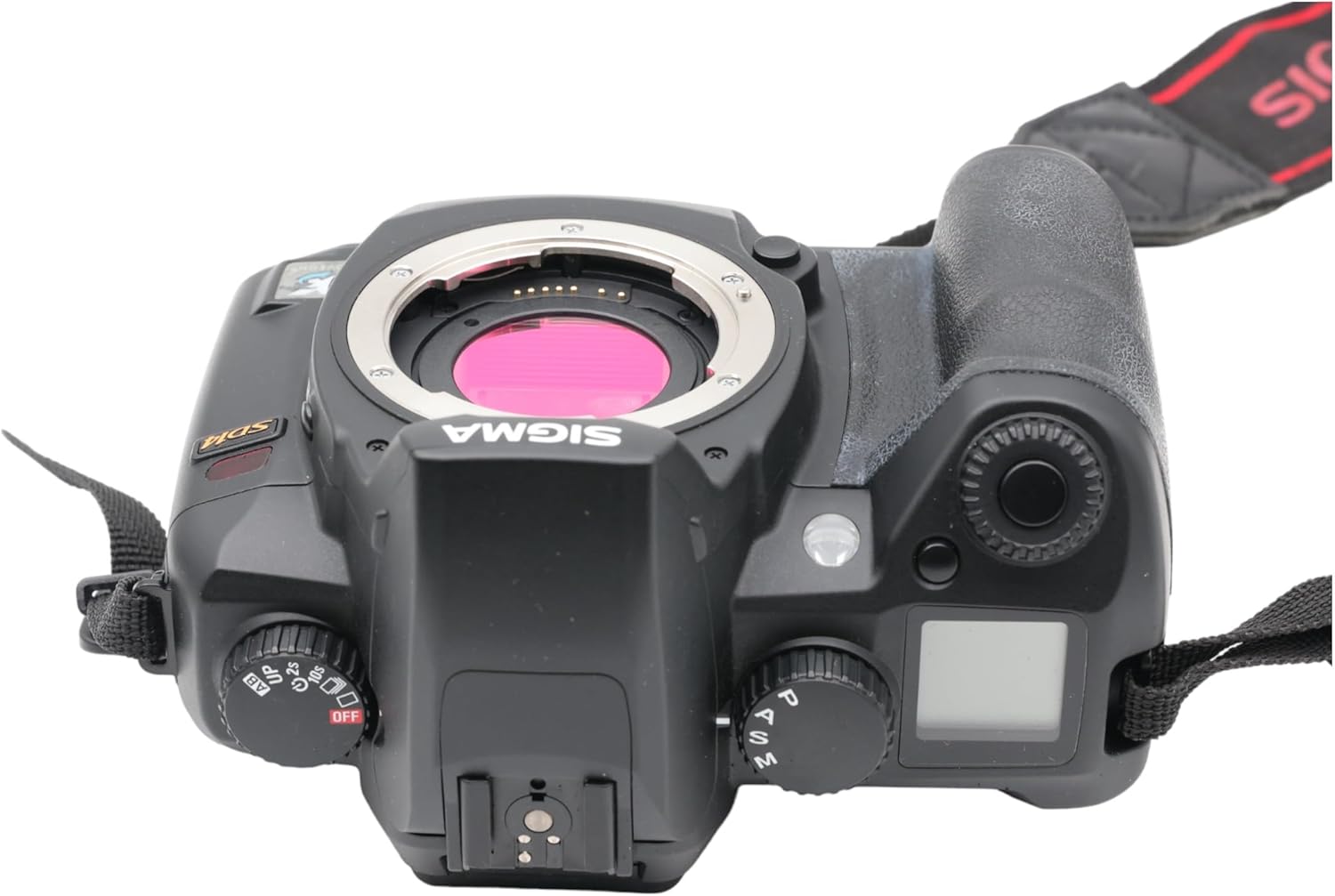
Obrázek 3.1: Nahoře view of the Sigma SD14, illustrating the lens mount and mode dials.
4. Provoz
4.1. Zapnutí/vypnutí
Rotate the power switch to the ON position to turn on the camera. Rotate it to OFF to power down.
4.2. Základní ovládací prvky a displej
The SD14 features a 2.5-inch LCD monitor for reviewing images and navigating menus, and a pentaprism viewfinder for composing shots. The top LCD panel displays key settings such as resolution, metering mode, battery status, and remaining shots.

Obrázek 4.1: Zadní view of the Sigma SD14, showing the LCD monitor, viewvyhledávač a ovládací tlačítka.
Key buttons include MENU, ISO, WB (White Balance), and a 4-way controller with an OK button for navigation. The INFO button displays shutter speed, aperture, and other settings on the LCD.
4.3. Zaostřování
The camera utilizes a 5-point autofocus (AF) system (center, left, right, up, and down). The center AF point features a cross-type sensor for enhanced precision. AF point selection can be automatic or manual.
4.4. Metering Modes
The SD14 offers three metering modes:
- 8-segment Evaluative Metering: Analyzes the entire scene for balanced exposure.
- Center Area Metering: Prioritizes the central area of the frame.
- Center Weighted Average Metering: Measures the entire frame but gives more weight to the central area.
Exposure compensation and auto bracketing functions are available for fine-tuning exposure.
4.5. Záznam obrazu
The camera supports both RAW (X3F) and JPEG formats. JPEG recording offers four sizes (Super High, High, Medium, Low) and three quality settings (Fine, Normal, Basic).
- Super High (4608 x 3072 pixels): Suitable for A3 or larger prints.
- High (2640 x 1760 pixels): Suitable for A4 prints.
- Medium (1776 x 1184 pixels): Suitable for regular size prints.
- Low (1296 x 864 pixels): Vhodné pro web pages and email.
4.6. Nepřetržité fotografování
The SD14 can shoot continuously at 3 frames per second. The number of frames captured in a burst depends on the resolution setting:
- Vysoký: 6 rámečky
- Střední: 12 rámečky
- Nízký: 24 rámečky
These figures apply to both RAW and JPEG modes.
4.7. Vestavěný blesk
The built-in flash has a guide number of 11 (ISO 100) and covers a 17mm lens angle (28mm equivalent on 35mm format). It supports S-TTL automatic flash metering and can synchronize with shutter speeds up to 1/180 second.
4.8. Mirror Lock-up
Activate the mirror lock-up mechanism to prevent camera shake caused by mirror movement during exposure. This is particularly useful for macro photography, long telephoto shots, or scientific applications. For best results, use with a remote controller or cable release (sold separately).
4.9. Sigma Photo Pro 3.0 Software
The included Sigma Photo Pro 3.0 software is a RAW image developer. It allows for quick conversion of RAW data and offers three adjustment modes: X3F Mode (original settings), Auto Adjustment Mode, and Custom Mode for manual adjustments (exposure, contrast, shadow, highlight, saturation, sharpness, fill-light). The software supports 8-bit TIFF, 16-bit TIFF, and JPEG file formats, and sRGB, Apple RGB, Adobe RGB, and ColorMatch RGB color spaces.
5. Údržba
5.1. Image Sensor Dust Protector
The SD14 features a dust protector positioned in front of the image sensor. This design prevents dust from adhering directly to the sensor, minimizing its impact on image quality. If dust accumulates on the protector, it will be out of focus and generally not visible in images.
5.2. Čištění těla fotoaparátu a objektivu
- K otření těla fotoaparátu použijte měkký hadřík, který nepouští vlákna. V případě odolných nečistot lehceampnavlhčete hadřík vodou nebo jemným čisticím roztokem.
- For lenses, use a lens brush to remove loose dust, then a lens cleaning solution and a microfiber cloth. Avoid touching the lens surface with your fingers.
- Never use organic solvents like paint thinner or benzene to clean the camera or lens.
5.3. Péče o baterie
- Pokud baterie nepoužíváte, skladujte je na chladném a suchém místě.
- Abyste prodloužili životnost baterie, vyhněte se častému úplnému vybíjení.
- Pokud fotoaparát nebudete delší dobu používat, vyjměte baterii.
6. Řešení problémů
| Problém | Možná příčina | Řešení |
|---|---|---|
| Fotoaparát se nezapne. | Baterie je vybitá nebo nesprávně vložená. | Plně nabijte baterii a ujistěte se, že je správně vložena. |
| Obrázky jsou rozmazané. | Nesprávné zaostření, chvění fotoaparátu nebo znečištěný objektiv. | Zajistěte správné zaostření. Použijte kratší čas závěrky nebo stativ. Vyčistěte objektiv. |
| Snímky jsou příliš tmavé nebo příliš světlé. | Incorrect exposure settings or metering mode. | Adjust exposure compensation. Select an appropriate metering mode for the scene. |
| Color blotching in underexposed areas. | Characteristic of the Foveon sensor when severely underexposed. | Aim to slightly overexpose images (e.g., +.7 EV) to retain shadow detail and avoid this effect. |
| Nelze nahrávat snímky. | Paměťová karta je plná, uzamčená nebo není správně vložena. | Insert an empty card, unlock the card, or reinsert it correctly. Format the card if necessary (this will erase all data). |
| Fotoaparát se zasekne nebo přestane reagovat. | Dočasná softwarová závada. | Vyjměte a znovu vložte baterii pro resetování fotoaparátu. |
For more detailed troubleshooting or error codes, please refer to the comprehensive instruction manual included with your camera or visit the Sigma support webmísto.
7. Specifikace
| Funkce | Detail |
|---|---|
| Název modelu | SD14 |
| Rozlišení foto snímače | 14 MP (Foveon X3 direct-image sensor) |
| Velikost foto senzoru | APS-C |
| Kompatibilní montáže | Sigma SA Bayonet |
| Podporováno File Formáty | JPEG, RAW (X3F), TIFF |
| Velikost obrazovky | 2.5 Inches (150,000 pixels) |
| Viewnálezce | Optical Pentaprism (98% coverage, 0.9x magnification) |
| Body automatického ostření | 5-point (Phase Detection) |
| Rychlost nepřetržitého fotografování | 3 snímků za sekundu |
| Maximální rychlost závěrky | 1/4000 sekundy |
| Minimální rychlost závěrky | 30 sekund |
| Rozšířený rozsah ISO | 100–1600 |
| Režimy měření | 8-segment Evaluative, Center Area, Center Weighted Average |
| Built-in Flash Guide Number | 11 (ISO 100) |
| Paměťová média | Compact Flash (CF) Type I/II |
| Zdroj napájení | Lithium-ion Battery BP-21 |
| Konektivita | USB, video výstup |
| Hmotnost položky | 1.65 libry (cca 748 g) |
| Číslo modelu | C23900 |
| UPC | 085126924416 |
7.1. Volitelné příslušenství (prodává se samostatně)
- Sigma Lenses (over 40 compatible models)
- Flashguns: EF-500 DG SUPER, EF-500 DG ST, EM-140 DG
- Power Grip PG-21
- Cable Release CR-21
- Remote Controller RS-31
- AC Adapter SAC-21
8. Záruka a podpora
8.1. Informace o záruce
For detailed warranty terms and conditions, please refer to the warranty card included with your product or visit the official Sigma webZáruka se obvykle vztahuje na vady materiálu a zpracování po stanovenou dobu od data nákupu.
8.2. Zákaznická podpora
If you encounter any issues or have questions not covered in this manual, please contact Sigma customer support. Contact information can usually be found on the official Sigma webna webu nebo v záruční dokumentaci.
Online zdroje: Visit the official Sigma website for product registration, firmware updates, FAQs, and additional support resources.