
1. Úvod
Thank you for choosing the Black+Decker KW712 650W Electric Planer. This manual provides essential information for the safe and efficient operation, maintenance, and troubleshooting of your new tool. Please read these instructions carefully before use and keep them for future reference. This planer is designed for planing wood and wood-like materials.
Obecná bezpečnostní upozornění
- Vždy používejte vhodné osobní ochranné prostředky, včetně ochranných brýlí, ochrany sluchu a protiprachové masky.
- Ujistěte se, že pracovní prostor je čistý, dobře osvětlený a bez překážek.
- Při práci s nářadím držte děti a přihlížející mimo dosah.
- Disconnect the planer from the power source before making any adjustments, changing accessories, or performing maintenance.
- Secure the workpiece firmly to prevent movement during planing.
- Nepoužívejte hoblík vamp nebo vlhké podmínky.
2. Konec produktuview
Familiarize yourself with the components of your Black+Decker KW712 Electric Planer before operation.

Obrázek 1: Celkově view of the Black+Decker KW712 Electric Planer. The image shows the orange and black body of the planer with its cord, front handle, and rear handle, along with the planing base and dust port.
Klíčové komponenty:
- Knoflík pro nastavení hloubky: Používá se k nastavení požadované hloubky hoblování.
- Přední rukojeť: Provides control and stability during operation.
- Rear Handle (with Trigger): Main grip for operating the tool, includes the power trigger and lock-off button.
- Hoblovací základna: Rovný povrch, který klouže po obrobku.
- Port pro odsávání prachu: Connects to a dust bag or vacuum cleaner for chip removal.
- V-drážka: Located on the front shoe for chamfering edges.
- Čepele: Reversible TCT (Tungsten Carbide Tipped) blades for efficient material removal.
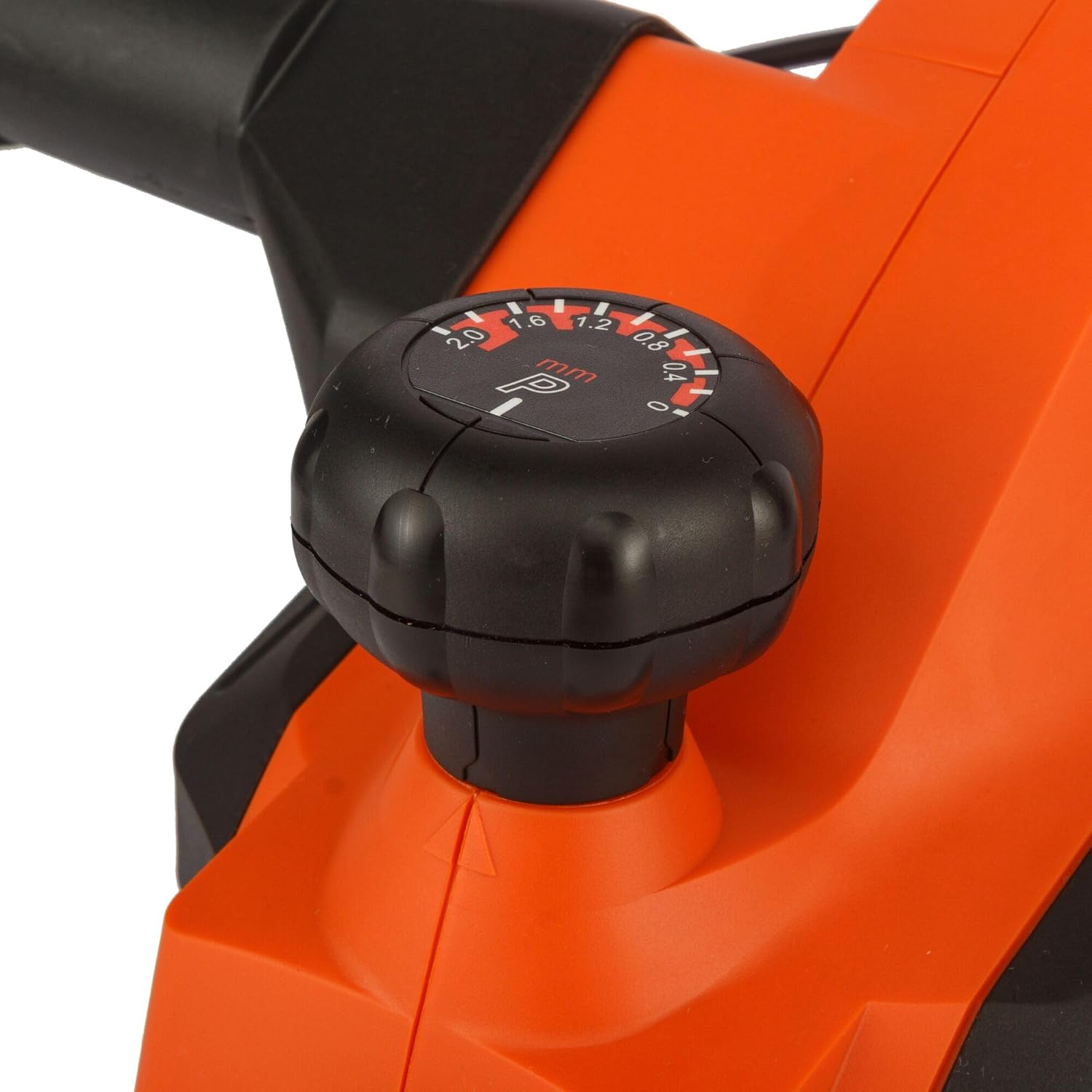
Obrázek 2: Detail view of the depth adjustment knob. The knob is black with white markings indicating planing depths from 0 to 2.0 mm.

Obrázek 3: Detail view of the dust extraction port. This shows the circular opening on the side of the planer where a dust bag or vacuum hose can be attached.

Obrázek 4: Detail view of the power trigger and the safety lock-off button located on the handle of the planer.
3. Nastavení
Připojení napájení
- Ensure the power switch is in the 'OFF' position before plugging the tool into a power outlet.
- Connect the planer to a grounded power outlet with the correct voltage (230 V).
Odsávání prachu
The KW712 planer is equipped with a dust extraction port to maintain a clean work environment.
- Attach a suitable dust bag or connect a vacuum cleaner hose to the dust extraction port.
- Ujistěte se, že je připojení bezpečné, aby nedošlo k úniku prachu.
Kontrola čepele
The planer uses TCT double-sided blades designed for long life. Before each use, inspect the blades.
- Check blades for sharpness, chips, or damage. Damaged blades can affect planing quality and safety.
- If blades are dull or damaged, refer to the Maintenance section for replacement instructions.
4. Návod k obsluze
Holding the Planer
- Hold the planer firmly with both hands, one on the front handle and one on the rear handle.
- Maintain a balanced stance to ensure control over the tool.
Nastavení hloubky hoblování
- Rotate the depth adjustment knob at the front of the planer to select the desired cutting depth. The planer allows for precise adjustments, including a 0.2mm depth setting for fine work.
- The maximum cutting depth is 2mm for quick material removal.
- Start with a shallow depth and gradually increase if needed.
Spouštění a zastavování
- To start the planer, press the safety lock-off button and then squeeze the trigger switch.
- To stop the planer, release the trigger switch.
Technika hoblování
- Umístěte přední patku hoblíku naplocho na obrobek a ujistěte se, že se nože nedotýkají povrchu.
- Start the planer and allow it to reach full speed before moving it forward.
- Rovnoměrně tlačte a pohybujte hoblíkem plynule a konzistentně po obrobku.
- Maintain control and avoid tilting the planer.
- For chamfering edges, align the V-groove on the front shoe with the edge of the workpiece and guide the planer along.

Figure 5: A user demonstrating the operation of the Black+Decker KW712 planer on a wooden plank, with a dust extraction hose connected to the tool.
5. Údržba
Pravidelná údržba zajistí dlouhou životnost a optimální výkon vašeho hoblíku.
Čištění
- Always disconnect the planer from the power supply before cleaning.
- K odstranění prachu a dřevěných třísek z nástroje, zejména v okolí větracích otvorů motoru a oblasti nožů, použijte měkký kartáč nebo stlačený vzduch.
- Otřete exteriér reklamouamp tkanina. Nepoužívejte agresivní chemikálie nebo abrazivní čisticí prostředky.
Blade Replacement (TCT Double-Sided Blades)
The KW712 uses durable TCT double-sided blades. When one side becomes dull, the blade can be reversed. When both sides are dull, the blades must be replaced.
- Bezpečnost především: Disconnect the planer from the power supply.
- Vyhledejte čepel clamping screws on the cutter head.
- Using the appropriate wrench (usually supplied with the tool), loosen the clampšrouby.
- Carefully remove the dull blade. Blades are extremely sharp; handle with caution.
- Clean the blade seating area.
- Insert a new or reversed blade, ensuring it is correctly seated and aligned.
- Utáhněte třampbezpečně zašroubujte.
- Repeat for the other blade if necessary.
- Ensure both blades are at the same height before operating the planer.
Skladování
- Store the planer in a dry, secure location, out of reach of children.
- Chraňte čepele před poškozením během skladování.
6. Řešení problémů
Tato část se zabývá běžnými problémy, se kterými se můžete setkat při používání hoblíku.
| Problém | Možná příčina | Řešení |
|---|---|---|
| Hoblík se nespustí | No power supply; Faulty switch; Safety lock-off not engaged correctly. | Check power connection and outlet; Ensure safety lock-off button is pressed before trigger; If problem persists, contact service. |
| Špatný hoblovací výsledek (drsný povrch, stopy po chvění) | Dull or damaged blades; Incorrect planing depth; Uneven pressure; Blades not set at equal height. | Replace or reverse blades; Reduce planing depth; Apply even pressure; Check and adjust blade height. |
| Nadměrné vibrace nebo hluk | Loose components; Damaged blades; Unbalanced cutter head. | Check all screws and tighten if necessary; Inspect and replace damaged blades; If vibration continues, seek professional service. |
| Neúčinné odsávání prachu | Dust port clogged; Dust bag full or improperly attached; Vacuum cleaner not powerful enough. | Clear dust port; Empty or reattach dust bag; Use a more powerful vacuum cleaner. |
7. Specifikace
| Funkce | Specifikace |
|---|---|
| Číslo modelu | KW712 |
| Vstup napájení | 650W |
| svtage | 230V |
| Plánovací šířka | 82 mm |
| Max. Planing Depth | 2 mm |
| Nastavení hloubky | Přírůstky 0.2 mm |
| Hmotnost | 2 kg (2000 gramů) |
| Rozměry (D x Š x V) | 10 x 10 x 10 cm |
| Materiál | Hliník |
| Zdroj napájení | Elektrický kabel |
8. Záruka a podpora
For warranty information, please refer to the warranty card included with your product or contact your local Black+Decker dealer or authorized service center. Keep your purchase receipt as proof of purchase.
For technical support or service inquiries, please visit the official Black+Decker webnebo kontaktujte jejich oddělení zákaznických služeb.