
Zavedení
This manual provides essential information for the installation, operation, and maintenance of the HP Procurve 3500yl-48G-PWR Managed Ethernet Switch. This device is designed to offer advanced intelligent edge switching capabilities, supporting demanding networking features such as Quality of Service (QoS) and security. It features a variety of Gigabit interfaces, integrated Power over Ethernet (PoE) on all 10/100/1000Base-T ports, and 10-Gigabit Ethernet (10-GbE) capability.
Konec produktuview
The HP Procurve 3500yl-48G-PWR is a robust managed Ethernet switch. It is equipped with 44 x 10/100/1000Base-T ports and 4 x 10/100/1000Base-T ports, providing extensive connectivity options for various network environments. The integrated PoE functionality simplifies deployment of IP phones, wireless access points, and other PoE-powered devices.
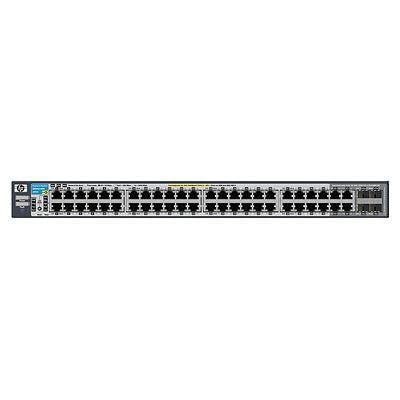
Obrázek 1: Přední strana view of the HP Procurve 3500yl-48G-PWR Managed Ethernet Switch, showing the 48 Ethernet ports and status indicators.
Nastavení
1. Vybalení a kontrola
Opatrně vyjměte přepínač z obalu. Zkontrolujte zařízení, zda nevykazuje známky fyzického poškození. Veškeré poškození ihned nahlaste svému dodavateli.
2. Montáž do racku (volitelné)
The switch is designed for standard 19-inch rack mounting. Use the provided rack-mount kit and screws to secure the switch in the rack. Ensure adequate ventilation around the unit.
3. Připojení napájení
- Connect the power cord to the AC power inlet on the rear of the switch.
- Zapojte druhý konec napájecího kabelu do uzemněné elektrické zásuvky.
- Ověřte, zda se na předním panelu rozsvítí kontrolka napájení, což znamená, že přepínač je napájen.
4. Síťová připojení
Connect Ethernet cables from your network devices (computers, servers, other switches, access points) to the RJ45 ports on the front panel of the switch. The switch supports 10/100/1000Base-T connections. For PoE devices, simply connect them to any of the 48 ports; the switch will automatically detect and provide power if the device is PoE-compatible.
5. Přístup k počáteční konfiguraci
For initial configuration, connect a console cable (typically RJ45 to DB9) from your management workstation to the console port on the switch. Use a terminal emulation program (e.g., PuTTY, Tera Term) with the following settings: 9600 baud, 8 data bits, no parity, 1 stop bit, no flow control. Alternatively, if the switch has a default IP address, you can connect via a web browser or SSH/Telnet after assigning your workstation an IP address in the same subnet.
Návod k obsluze
1. Zapnout
Once connected to power, the switch will automatically power on. Observe the front panel LEDs for status indications.
2. LED indikátory
- LED napájení: Indikuje stav napájení. Svítí zeleně pro normální provoz.
- Stavové LED diody portu: Each port has an LED indicating link status and activity. Typically, solid green indicates a link, and blinking green indicates activity. Amber may indicate a 10/100 Mbps link, while green indicates a 1000 Mbps link, depending on the specific model's LED scheme. Refer to the detailed LED guide in the full product documentation for precise interpretations.
- Stavové LED diody PoE: Indicate Power over Ethernet status for each port.
3 Základní síťové operace
The switch operates as a Layer 2 device, forwarding Ethernet frames between connected devices. With its managed capabilities, you can configure VLANs, Spanning Tree Protocol (STP), Link Aggregation (LAG), and other advanced features via the command-line interface (CLI) or webrozhraní pro správu.
4. Pokročilé funkce
The Procurve 3500yl-48G-PWR supports advanced features such as Quality of Service (QoS) for prioritizing network traffic, robust security features to protect your network, and 10-GbE uplink capabilities (if equipped with optional modules) for high-bandwidth connections.
Údržba
1. Čištění
Periodically clean the exterior of the switch with a soft, dry cloth. Do not use liquid or aerosol cleaners. Ensure ventilation openings are free from dust and obstructions to maintain proper airflow.
2. Aktualizace firmwaru
Pravidelně kontrolujte informace od výrobce webweb s aktualizacemi firmwaru. Udržování firmwaru aktuálního zajišťuje optimální výkon, zabezpečení a přístup k novým funkcím. Pečlivě dodržujte pokyny dodané s balíčkem aktualizace firmwaru.
3. Ohledy na životní prostředí
Operate the switch within its specified temperature range (up to 40 degrees Celsius). Avoid exposing the device to excessive heat, humidity, or direct sunlight. Ensure proper airflow around the unit to prevent overheating.
Odstraňování problémů
1. Bez napájení
- Zkontrolujte, zda je napájecí kabel bezpečně připojen k vypínači i k elektrické zásuvce.
- Zkontrolujte funkčnost zásuvky pomocí jiného zařízení.
- Ujistěte se, že je napájecí zdroj (pokud je externí) správně připojen a funkční.
2. No Link on a Port
- Check the Ethernet cable for damage and ensure it is securely plugged into both the switch port and the connected device.
- Ověřte, zda je připojené zařízení zapnuté a zda funguje správně.
- Try a different port on the switch or a different Ethernet cable.
- Check the port configuration in the switch's management interface to ensure it is enabled and correctly configured.
3. Problémy s připojením k síti
- Confirm IP address settings on connected devices and the switch.
- Check for conflicting IP addresses on the network.
- Review switch configuration for VLANs, routing, or security policies that might be blocking traffic.
- Restartujte přepínač a připojená zařízení.
If issues persist, consult the comprehensive troubleshooting guide available on the manufacturer's support webwebu nebo kontaktujte technickou podporu.
Specifikace
| Funkce | Specifikace |
|---|---|
| Značka | HEWLETT PACKARD |
| Číslo modelu | J8693A |
| Počet portů | 48 (44 x 10/100/1000Base-T, 4 x 10/100/1000Base-T) |
| Rychlost přenosu dat | 1000 megabitů za sekundu |
| Rozhraní | PoE, RJ45 |
| Typ přepínače | Spravováno |
| svtage | 48 V (DC) |
| Hmotnost položky | 16.1 libry |
| Hodnocení vyšší teploty | 40 stupňů Celsia |
| Typ materiálu pouzdra | Kov |
| Kompatibilní zařízení | Desktop |
Záruka a podpora
This product is subject to the manufacturer's warranty policy. For specific details regarding warranty length and coverage, please contact the manufacturer directly. Please note that returns for non-defective items may be subject to a restocking fee. Any merchandise returned for repair and found not to be defective by technicians will incur a 25% restocking fee. By purchasing this product, you acknowledge and accept these procedures.
For technical support, documentation, and additional resources, please visit the official HP Procurve support webnebo kontaktujte jejich oddělení zákaznických služeb.