
1. Úvod
This manual provides comprehensive instructions for the safe and efficient use of your Logisys PS480D 480W ATX Power Supply. Please read this manual thoroughly before installation and operation to ensure proper functionality and to prevent damage to the unit or other components.

Figure 1: Logisys PS480D 480W ATX Power Supply, front view with cables bundled.
2. Bezpečnostní informace
VAROVÁNÍ: Napájecí zdroje obsahují vysoké napětítagkomponenty. Neotevírejte napájecí zdroj casing. Uvnitř nejsou žádné součásti, které by mohl uživatel opravit.
- Před instalací nebo údržbou se ujistěte, že je zdroj napájení odpojen od zásuvky střídavého proudu.
- Always ground yourself to prevent electrostatic discharge (ESD) when handling internal computer components.
- Nepoužívejte napájecí zdroj ve vlhkém neboamp podmínky.
- Zajistěte řádné větrání kolem napájecího zdroje, aby nedošlo k přehřátí.
- Use only the provided power cables and connectors.
3. Vlastnosti produktu
The Logisys PS480D is a 480W ATX power supply designed for personal computers. Key features include:
- Vysoká účinnost
- Low Noise & Ripple
- Přes Voltage Ochrana
- Ochrana proti zkratu
- Built-in EMI Filter
- Insulation Resistance 100MΩ min.
- Complies with FCC part 15J class B 115VAC operation and CISPR 22 230 VAC operation.
- Meets UL 1950, CSA 22.2 LEVEL 3 Requirement.
- 100% Burn-in test / Vibration test / Hi-pot test / Leakage current test.
- MTBF above 100,000 hours at 25 °C.

Figure 2: Rear panel of the power supply with fan, AC inlet, and power switch.
4. Nastavení a instalace
Follow these steps to install the Logisys PS480D power supply into your computer system.
- Příprava: Ensure your computer is completely powered off and unplugged from the wall outlet. Open your computer case according to its manufacturer's instructions.
- Demontáž starého napájecího zdroje (pokud je k dispozici): Disconnect all cables from the old power supply to the motherboard, drives, and other components. Unscrew and remove the old power supply from the case.
- Instalace nového napájecího zdroje: Carefully place the Logisys PS480D into the power supply bay of your computer case. Secure it with screws.
- Připojení hlavního napájení: Connect the 20+4 pin ATX mainboard connector to your motherboard. If your motherboard uses a 20-pin connector, detach the 4-pin section. If it uses a 24-pin connector, connect both sections.
- Připojení napájení CPU: Connect the 4-pin +12V power connector to the corresponding port on your motherboard.
- Připojení periferního napájení:
- Use the 4-pin standard drive connectors for HDDs and CD/DVD-ROM drives.
- Use the 4-pin 3.5" FDD or ZIP connectors for floppy disk drives or similar devices.
- Use the Serial ATA (SATA) connectors for SATA hard drives and SSDs.
- Správa kabelů: Route cables neatly to ensure proper airflow within the case.
- Zavřít případ: Jakmile jsou všechna připojení bezpečná, zavřete skříň počítače.
- Připojte AC napájení: Plug the AC power cord into the power supply's AC inlet and then into a wall outlet.
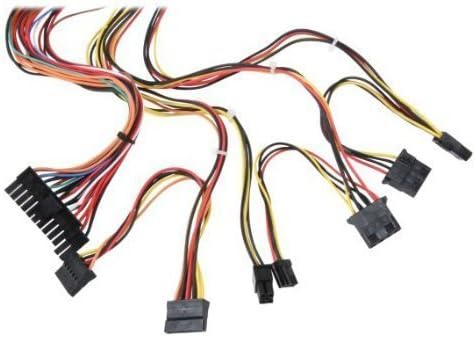
Obrázek 3: Přesview of power supply connectors.

Figure 4: Power supply dimensions and included AC power cord.
5. Návod k obsluze
After successful installation, you can power on your computer.
- Ensure the power switch on the rear of the power supply (Figure 2) is in the "ON" (I) position.
- Stiskněte tlačítko napájení na skříni počítače.
- The power supply will provide stable power to your system components.
- To power off, shut down your operating system normally. For complete power disconnection, switch the power supply to the "OFF" (O) position and unplug the AC cord.
6. Údržba
Pravidelná údržba pomáhá zajistit dlouhou životnost a optimální výkon vašeho zdroje napájení.
- Čištění: Periodically clean dust from the power supply's fan and vents using compressed air. Ensure the power supply is unplugged before cleaning.
- Proud vzduchu: Ensure that the computer case has adequate airflow and that the power supply's fan is not obstructed.
- Integrita kabelu: Periodically check all power cables for secure connections and signs of wear or damage.
7. Řešení problémů
Pokud narazíte na problémy se zdrojem napájení, postupujte podle následujících běžných kroků pro řešení problémů:
- Bez napájení:
- Zkontrolujte, zda je napájecí kabel bezpečně zapojený do zdroje napájení i do zásuvky.
- Ensure the power switch on the rear of the power supply is in the "ON" (I) position.
- Ověřte funkčnost zásuvky zapojením jiného zařízení.
- Check all internal power connections (20/24-pin ATX, 4-pin +12V, peripheral connectors) are firmly seated.
- Nestabilita systému/náhodné vypnutí:
- This could indicate an overloaded or failing power supply. Ensure your system's power requirements do not exceed the PS480D's 480W capacity.
- Zkontrolujte správné větrání a ujistěte se, že se ventilátor zdroje otáčí. Přehřátí může způsobit nestabilitu.
- Neobvyklý hluk:
- A loud fan noise might indicate dust buildup or a failing fan bearing. Clean the fan as described in the Maintenance section.
If problems persist after attempting these steps, contact Logisys customer support or a qualified technician.
8. Specifikace
| Funkce | Specifikace |
|---|---|
| Značka | Logisys |
| Číslo modelu | PS480D |
| Výstupní Wattage | 480 wattů |
| Form Factor | ATX |
| Rozměry (DxŠxV) | 6" D x 5.5" Š x 3.25" V (15.24 x 13.97 x 8.25 cm) |
| Hmotnost položky | 2.06 libry (0.93 kg) |
| Konektor základní desky | 1x 20+4 Pin ATX |
| Napájecí konektor CPU | 1x 4 Pin +12V |
| Standard Drive Connectors | 4x 4 Pin (Molex) |
| FDD/ZIP Connectors | 1x 4 Pin 3.5" |
| Serial ATA konektory | 1x SATA |
| Způsob chlazení | Vzduch |
| Ochrany | Přes Voltage Ochrana, Ochrana proti zkratu |
| Certifikace | FCC part 15J class B, CISPR 22, UL 1950, CSA 22.2 LEVEL 3 |
9. Záruka a podpora
For warranty information, technical support, or service inquiries, please refer to the official Logisys webnebo kontaktujte jejich zákaznický servis. Uschovejte si účtenku jako doklad o koupi.