
1. Úvod
Děkuji za nákupasing the Pentax Optio W10 Digital Camera. This manual provides essential information for the safe and effective use of your camera. The Optio W10 is a compact 6.0-megapixel digital camera featuring a 3x optical zoom lens, designed for capturing high-quality still images and video. Its robust design makes it suitable for various environments.
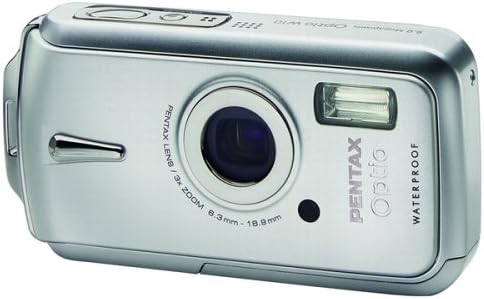
Obrázek 1.1: Přední strana view of the Pentax Optio W10 Digital Camera, showcasinobjektiv, blesk a branding.
2. Bezpečnostní informace
Před použitím fotoaparátu si prosím přečtěte a pochopte veškerá bezpečnostní opatření. Nedodržení těchto pokynů může vést ke zranění nebo poškození produktu.
- Nepokoušejte se fotoaparát rozebírat ani upravovat.
- Keep the camera away from extreme temperatures, direct sunlight, and high humidity.
- Ensure all compartment covers (battery, memory card) are securely closed and locked before exposing the camera to water or dust.
- Use only the specified battery type (Lithium-ion DL-I8) and charger.
- Uchovávejte mimo dosah dětí.
3. Obsah balení
Ověřte, zda jsou v balení fotoaparátu přítomny všechny položky:
- Pentax Optio W10 Digital Camera
- Lithium-ion Battery DL-I8
- Nabíječka baterií
- AC napájecí kabel
- USB kabel (pro připojení k počítači)
- Popruh
- CD-ROM se softwarem
- Návod k použití (tento dokument)
4. Nastavení
4.1. Instalace baterie
- Locate the battery/memory card compartment cover on the bottom of the camera.
- Slide the lock switch to the 'OPEN' position and open the cover.
- Insert the Lithium-ion battery DL-I8 into the compartment, ensuring the correct orientation as indicated inside the compartment.
- Close the cover and slide the lock switch to the 'LOCK' position until it clicks securely.

Obrázek 4.1: Spodní část view of the camera, illustrating the battery and SD card compartment with the lock switch.
4.2. Instalace paměťové karty
The Pentax Optio W10 uses SD memory cards.
- Open the battery/memory card compartment cover as described in Section 4.1.
- Insert the SD memory card into the designated slot with the label facing the correct direction, pushing gently until it clicks into place.
- Close the cover and slide the lock switch to the 'LOCK' position.
4.3. Počáteční zapnutí a nastavení data/času
- Stiskněte tlačítko ON/OFF tlačítko umístěné na horní straně fotoaparátu.
- Upon first power-on, the camera will prompt you to set the date and time. Use the directional buttons on the back of the camera to navigate and the OK tlačítko pro potvrzení.
- Dokončete počáteční nastavení podle pokynů na obrazovce.

Obrázek 4.2: Nahoře view of the camera, highlighting the ON/OFF button and 6.0 Megapixels branding.
5. Ovládání fotoaparátu
5.1. Základy fotografování
To take a still picture:
- Zapněte fotoaparát stisknutím tlačítka ON/OFF tlačítko.
- Komponujte snímek pomocí 2.5palcového LCD monitoru.
- Stiskněte tlačítko spouště do poloviny pro zaostření. Po zaostření se rámeček ostření rozsvítí zeleně.
- Stiskněte tlačítko spouště až na doraz pro pořízení snímku.

Obrázek 5.1: Zadní view of the camera, displaying the LCD screen and various control buttons for navigation and settings.
5.2. Režimy fotografování
The Optio W10 offers various shooting modes accessible via the MODE button. Refer to the on-screen menu for specific options such as Program Auto, Scene Modes, and Movie Mode.
5.3. Nahrávání videa
Chcete-li nahrát video:
- Switch to Movie Mode using the MODE tlačítko.
- Press the shutter button to start recording. The camera can capture QuickTime motion JPEG videos at 640 x 480 resolution at 30 frames per second.
- Dalším stisknutím tlačítka spouště nahrávání zastavíte.
5.4. Přehrávání
Na view pořízené obrázky a videa:
- Stiskněte tlačítko Přehrávání button (usually indicated by a triangle icon).
- Use the directional buttons to scroll through your photos and videos.
- Stiskněte tlačítko OK tlačítko na view video nebo přiblížení fotografie.
5.5. Připojení k počítači
Přenos obrázků a videí do počítače:
- Ujistěte se, že je fotoaparát vypnutý.
- Připojte fotoaparát k počítači pomocí dodaného kabelu USB.
- Turn on the camera. It should be recognized as a removable disk or a PTP device.
- Follow your computer's operating system instructions to access and transfer files.
6. Údržba
6.1. Čištění
- Tělo fotoaparátu: Otřete měkkým, suchým hadříkem. Na odolnou špínu použijte lehceamp hadříkem a poté důkladně osušte.
- Čočka: Use a lens brush or a soft, clean lens cloth. Avoid touching the lens surface with your fingers.
- Lcd monitor: Jemně otřete měkkým, suchým hadříkem. Netlačte na obrazovku silně.
- Vodotěsné těsnění: Regularly inspect the rubber seals around the battery/memory card compartment for dirt, sand, or damage. Clean gently with a soft cloth. Do not use sharp objects.
6.2. Skladování
When not in use for extended periods, store the camera in a cool, dry, and well-ventilated place. Remove the battery to prevent leakage. Avoid storing in areas with high humidity or extreme temperature fluctuations.
7. Řešení problémů
If you encounter issues with your Pentax Optio W10, refer to the following common solutions:
| Problém | Možná příčina / řešení |
|---|---|
| Fotoaparát se nezapne | Battery is depleted or incorrectly inserted. Recharge the battery or reinsert it correctly. |
| Nelze pořizovat snímky | Memory card is full, locked, or not inserted. Delete unnecessary files, unlock the card, or insert it correctly. |
| Obrázky jsou rozmazané | Lens is dirty, camera shake, or incorrect focus. Clean the lens, hold the camera steady, or ensure proper focus. |
| Water inside compartment | Compartment cover not securely closed or seal is damaged. Ensure cover is locked. If seal is damaged, contact service. |
For further assistance, please refer to the official Pentax support webnebo kontaktujte zákaznický servis.
8. Specifikace
Key technical specifications for the Pentax Optio W10 Digital Camera:
- Efektivní statické rozlišení: 6.0 megapixelů
- Technologie fotosenzoru: CCD (1/2.5 palce)
- Optický zoom: 3x
- Digitální zoom: 4x
- Maximální ohnisková vzdálenost: 114 mm
- Minimální ohnisková vzdálenost: 38 mm
- Velikost LCD obrazovky: 2.5 palce
- Stabilizace obrazu: Digitální, Optické
- Rozlišení videa: 640 x 480, 30/15 fps (QuickTime Motion JPEG)
- Podporováno File Formát: JPEG (Still Images), MJPEG (Video)
- Paměťová média: SD/MMC card, Internal Memory
- Typ baterie: Lithium-ion (DL-I8)
- Speciální funkce: Waterproof (Note: Ensure all seals are properly closed before water exposure)
- Minimální rychlost závěrky: 4 sekund
- Maximální rychlost závěrky: 1/2000 sekundy
- Rozsah ISO: Auto, 64, 100, 200, 400, 800
- Hmotnost položky: 5.6 unce
- Číslo modelu: 19033
9. Záruka a podpora
For information regarding warranty coverage, service, or technical support for your Pentax Optio W10 camera, please refer to the warranty card included with your product or visit the official Pentax webUschovejte si doklad o koupi pro případ reklamace.
Online podpora: Ricoh Imaging Global Support (Pentax is a brand of Ricoh Imaging)