
Escali P115
Návod k obsluze digitální potravinářské váhy Escali Primo (model P115)
Your guide to precise weight measurement and portion control.
1. Úvod
Thank you for choosing the Escali Primo Digital Food Scale. This manual provides essential information for the proper setup, operation, and maintenance of your new scale. Designed for accuracy and ease of use, the Escali Primo is ideal for various kitchen tasks, including food preparation, baking, and portion control.
The Escali Primo Digital Food Scale features a simple two-button operation, a sealed control panel for easy cleaning, and an automatic shut-off function to conserve battery life. It measures weights up to 11 lb (5,000 g) with precision.

Image: Escali Primo Digital Food Scale, Metallic.
2. Komponenty produktu
The Escali Primo Digital Food Scale consists of the following main components:
- Vážící plošina: Povrch, na který jsou umístěny předměty určené k měření.
- Digitální displej: Shows weight readings and unit indicators.
- On/Tare/Off Button: Used to power the scale on/off and activate the tare function.
- Unit (g/oz) Button: Used to switch between measurement units (grams, ounces, pounds:ounces).
- Přihrádka na baterie: Located on the underside, holds two AA batteries.
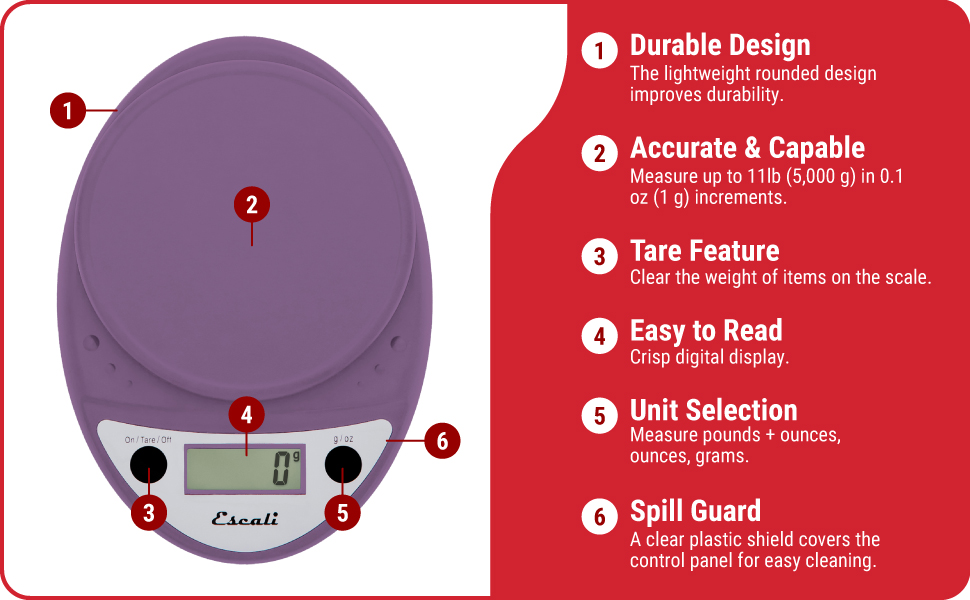
Image: Key features of the Escali Primo Digital Food Scale.
3. Nastavení
3.1 Instalace baterie
- Najděte přihrádku na baterie na spodní straně váhy.
- Otevřete kryt bateriového prostoru.
- Vložte dvě baterie typu AA a dbejte na správnou polaritu (+/-) vyznačenou uvnitř přihrádky.
- Bezpečně zavřete kryt bateriového prostoru.
3.2 Počáteční umístění
Place the scale on a flat, stable, and level surface. Avoid placing it on soft or uneven surfaces, which can affect accuracy.
4. Návod k obsluze
4.1 Zapnutí/vypnutí
- Zapnutí: Stiskněte tlačítko On/Tare/Off button. The display will show "0" when ready.
- Vypnutí: Stiskněte a podržte On/Tare/Off button for approximately 3 seconds. The scale will also automatically shut off after four minutes of inactivity to conserve battery life.
4.2 Výběr jednotky
To change the unit of measurement (grams, ounces, pounds:ounces), press the g/oz button while the scale is on. The display will cycle through the available units.

Image: Display and unit selection button.
4.3 Funkce tárování
The tare function allows you to subtract the weight of a container or to measure multiple ingredients consecutively.
- Umístěte prázdnou nádobu na vážící plošinu. Na displeji se zobrazí její hmotnost.
- Stiskněte tlačítko On/Tare/Off tlačítko. Displej se resetuje na „0“.
- Přidejte svou přísadu do nádoby. Na displeji se zobrazí pouze hmotnost ingredience.
- V případě potřeby opakujte proces tárování pro další ingredience.

Image: Using the scale for portion control with meal prep.
4.4 Vážení položek
Once the scale is on and set to your desired unit, simply place the item(s) to be weighed directly onto the weighing platform or into a tared container. The weight will be displayed instantly.

Image: Weighing ingredients for baking.
5. Údržba
5.1 Čištění
The sealed control panel and rounded design make the Escali Primo scale easy to clean. Wipe the scale with a damp tkanina. Váhu neponořujte do vody ani nepoužívejte abrazivní čisticí prostředky.
5.2 Skladování
Store the scale in a dry place at room temperature. Avoid placing heavy objects on the scale when not in use, as this may affect its calibration over time.
6. Řešení problémů
| Problém | Možná příčina | Řešení |
|---|---|---|
| Váha se nezapne | Vybité nebo nesprávně vložené baterie. | Vyměňte baterie za nové baterie typu AA a dbejte na správnou polaritu. |
| Nepřesné údaje | Scale not on a flat, stable surface; scale overloaded; debris under platform. | Place scale on a firm, level surface. Ensure weight does not exceed 11 lb (5000 g). Clean any debris from under the platform. |
| Displej zobrazuje „Err“ | Váha je přetížená. | Remove items from the scale. Ensure total weight is within the 11 lb (5000 g) capacity. |
| Automatic shut-off too soon | Normal operation (4 minutes of inactivity). | This is a battery-saving feature. Press the On/Tare/Off button to restart. |
7. Specifikace
- Model: P115
- Kapacita: 11 g
- Přírůstky: 0.05 oz (1 g)
- Jednotky měření: oz, lb:oz, g
- Moc: 2 AA baterie (součástí balení)
- Rozměry produktu: 8.5 x 6 x 1.5 palce (přibližně)
- Typ displeje: Digitální LED
- Speciální vlastnosti: Auto Shut Off, Tare Function, Sealed Control Panel
8. Informace o záruce
The Escali Primo Digital Food Scale comes with a Doživotní záruka. For detailed warranty terms and conditions, please refer to the official Escali webwebu nebo kontaktujte zákaznickou podporu.
9. Zákaznická podpora
For further assistance, product information, or support, please visit the official Escali webnebo kontaktujte jejich oddělení zákaznických služeb. Kontaktní údaje obvykle naleznete na obalu produktu nebo na webmísto.
Více informací a podporu naleznete na Escali Store on Amazon.
Ask a question about this manual
Ask about setup, troubleshooting, compatibility, parts, safety, or missing instructions. Manuals+ will review the question and use this page’s manual context to help answer it.