
Logitech 967558-0403
Uživatelská příručka k laserové bezdrátové myši Logitech MX 5000
Model: 967558-0403 | Značka: Logitech
Zavedení
The Logitech Cordless Desktop MX 5000 Laser is an advanced wireless keyboard and mouse combination designed to enhance your computing experience. This system features an LCD keyboard display, advanced Bluetooth wireless connectivity, a rechargeable laser mouse, and intuitive touch-sensitive media controls. It is engineered to provide seamless interaction with your PC, offering convenience and efficiency.

Image: Logitech Cordless Desktop MX 5000 Laser product packaging, showcasing the keyboard and mouse.
Obsah balení
Ověřte, zda jsou v balení obsaženy všechny níže uvedené položky:
- MX 5000 keyboard for Bluetooth
- MX 1000 Laser mouse for Bluetooth
- USB Bluetooth mini-receiver
- Rapid-charging base station with AC adapter
- 4 AA alkaline batteries (for keyboard)
- CD with software, comfort guidelines, and Help Center
- Rychlý průvodce
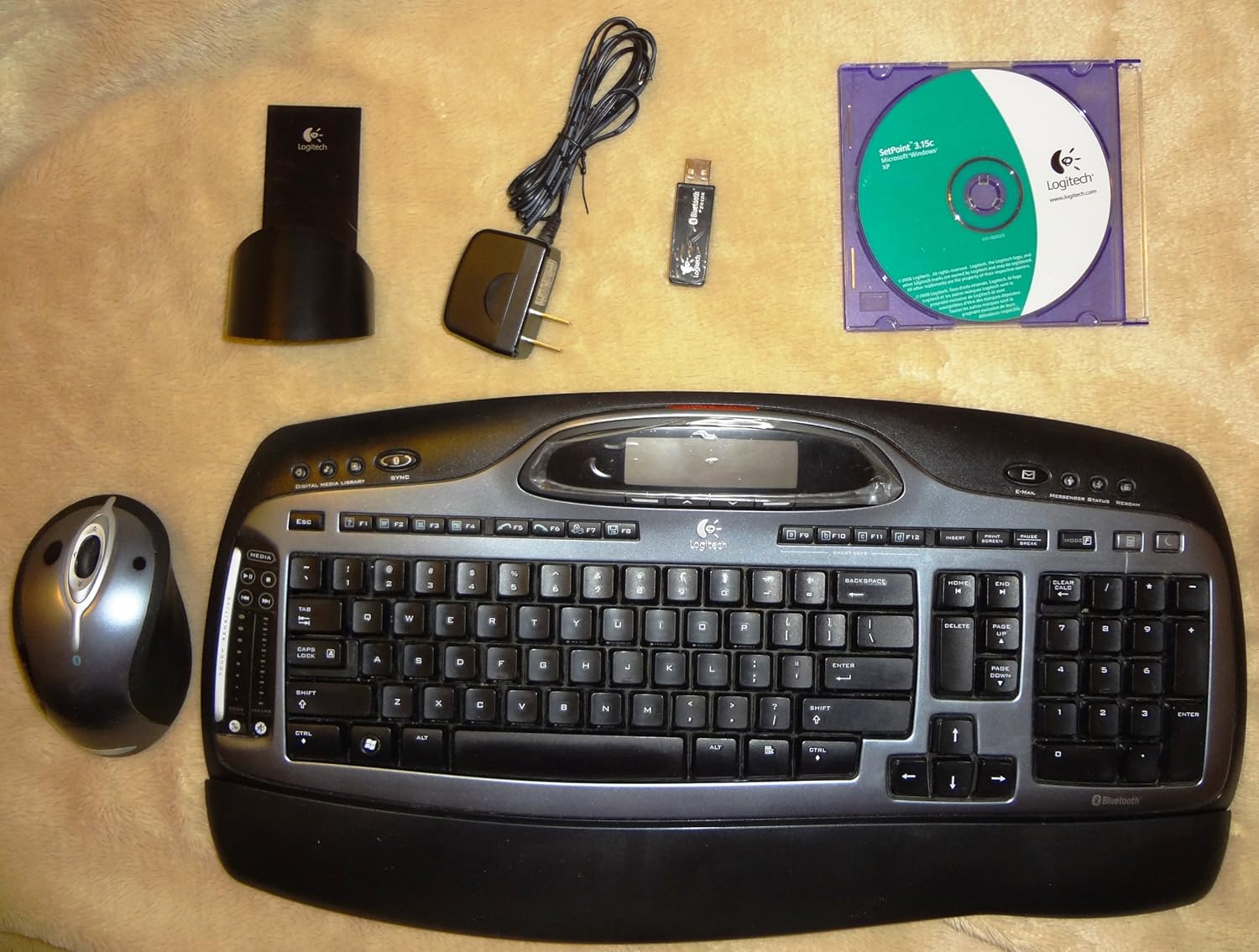
Image: All components of the Logitech Cordless Desktop MX 5000 Laser, including the keyboard, mouse, USB Bluetooth mini-receiver, rapid-charging base station, AC adapter, and software CD.
Nastavení
Follow these steps to set up your Logitech Cordless Desktop MX 5000 Laser:
- Nainstalujte baterie: Insert the 4 AA alkaline batteries into the keyboard. Ensure correct polarity.
- Připojení nabíjecí základny: Plug the AC adapter into the rapid-charging base station, then plug the adapter into a power outlet.
- Charge Mouse: Place the MX 1000 Laser mouse onto the rapid-charging base station. Allow the mouse to charge fully before first use.
- Connect USB Bluetooth Mini-Receiver: Plug the USB Bluetooth mini-receiver into an available USB port on your computer.
- Instalace softwaru: Insert the provided software CD into your computer's CD-ROM drive. Follow the on-screen instructions to install the Logitech SetPoint software and drivers. This software is essential for full functionality and customization.
- SecureConnect Technology: Your keyboard and mouse are pre-paired with the wireless mini-receiver using Logitech's SecureConnect technology. This establishes a secure link automatically, allowing for immediate use after software installation.
Operace
This section details the various features and functionalities of your Cordless Desktop MX 5000 Laser.
Funkce klávesnice
- LCD Keyboard Display: The integrated Dot Matrix LCD (102 x 42 pixels) provides instant feedback. It can display notifications for new instant messages or emails, application information, date and time, and Caps Lock status.
- Touch-Sensitive Media Controls: Utilize the touch-sensitive zone with 2 strips and 7 backlit controls for media management. Glide your finger to adjust volume or image size.
- Programmable Smart Keys: Customize specific keys to launch your favorite applications, websites, or folders for quick access.
- Windows Media Center Edition 2005 Compatibility: Seamlessly control your Windows Media Center PC from up to 60 feet away.
- Bluetooth Phone Synchronization: Perform one-touch synchronization of your PC calendar and address book with compatible mobile phones or PDAs.

Obrázek: Detail view of the Logitech MX 5000 keyboard, showing the LCD display, touch-sensitive media controls, and key layout.
Funkce myši
- MX Laser Engine: The MX 1000 Laser mouse features an 800-dpi resolution and 5.8-Megapixel image processing for precise tracking on various surfaces.
- Rechargeable Li-ion Batteries: The mouse is powered by Li-ion batteries and recharges via the rapid-charging base station, ensuring it is always ready for use.
- Tilt Wheel Plus Zoom: The scroll wheel offers side-to-side scrolling functionality and in/out zoom capabilities for enhanced navigation.
Bluetooth 2.0 Wireless Technology
- Enhanced Data Rate (EDR): Bluetooth 2.0 with EDR provides three times the speed of previous Bluetooth versions.
- Rozšířený rozsah: Enjoy an extended wireless range of up to 60 feet, minimizing interference from other devices.
- Bluetooth Hub Functionality: The USB Bluetooth mini-receiver acts as a hub, allowing you to connect other Bluetooth devices such as headsets for Voice over IP, mobile phones for picture transfer, or headphones for music streaming.
Údržba
Proper maintenance ensures the longevity and optimal performance of your Cordless Desktop MX 5000 Laser.
- Čištění: K čištění klávesnice a myši používejte měkký, suchý hadřík. V případě odolných nečistot lehceamphadřík vodou. Nepoužívejte agresivní chemikálie ani abrazivní čisticí prostředky.
- Správa baterie:
- The MX 1000 Laser mouse features a rapid-charging base station. Always return the mouse to its base when not in use to ensure it remains charged.
- Illuminated battery indicators on both the keyboard and mouse will alert you when it's time to recharge or replace batteries.
- For the keyboard, replace the 4 AA alkaline batteries when the low battery indicator illuminates.
- Skladování: Pokud zařízení delší dobu nepoužíváte, skladujte jej na chladném a suchém místě mimo dosah přímého slunečního záření a extrémních teplot.
Odstraňování problémů
If you encounter issues with your Logitech Cordless Desktop MX 5000 Laser, refer to the following common solutions:
- Žádné připojení/Zpoždění:
- Ensure the USB Bluetooth mini-receiver is securely plugged into a working USB port on your computer.
- Verify that the keyboard and mouse batteries are charged or replaced.
- Move the keyboard and mouse closer to the USB Bluetooth mini-receiver to rule out range issues. The maximum range is 60 feet, but obstacles can reduce this.
- Restartujte počítač.
- Re-establish the connection if prompted by the SetPoint software.
- Problémy se softwarem:
- Ensure the Logitech SetPoint software is correctly installed. Reinstall it from the provided CD or download the latest version from the Logitech support website if problems persist.
- Check for software updates for SetPoint.
- Myš nesleduje:
- Ujistěte se, že je myš plně nabitá.
- Clean the laser sensor on the bottom of the mouse.
- Zkuste použít myš na jiném povrchu.
- Keyboard LCD Not Displaying:
- Check keyboard battery levels.
- Ensure the SetPoint software is running correctly, as it manages the LCD display.
- Systémové požadavky: Ujistěte se, že váš počítač splňuje minimální systémové požadavky:
- Počítač s procesorem Pentium nebo kompatibilním
- Windows XP (edice Home, Pro, Tablet nebo Media Center)
- CD-ROM
- USB port
Specifikace
Specifikace produktu
- Zobrazení klávesnice: Dot Matrix LCD at 102 x 42 pixels (supports Western characters only)
- Ovládání klávesnicí: Touch Sensitive Zone with 2 strips and 7 backlit controls
- Mouse Engine: MX Laser Engine with 800-dpi resolution and 5.8-Megapixel image processing
- Výkon myši: Li-ion batteries with Fast Charging Station
- Bezdrátová technologie: Bluetooth 2.0 EDR Technology
- Bluetooth Stack Support: Widcomm BTW 5.0 and Microsoft XPSP2 Bluetooth stacks
- Bluetooth Profiles: Zvuková brána, AV, základní zobrazování, telefonické připojení k síti File Přenos, Výměna pevného kabelu, Sluchátka, Zařízení HID (Human Interface Device), Lokální síť, Výměna objektů, Sériový port, Synchronizace
- Rozměry produktu: 18 x 8 x 3 palce
- Hmotnost položky: 4 libry
- Baterie: 4 AA batteries required (for keyboard)
- Technologie připojení: Bluetooth, USB
- Speciální funkce: Opěrka zápěstí
- Kompatibilní zařízení: Osobní počítač, tablet
Záruka a podpora
The Logitech Cordless Desktop MX 5000 Laser comes with a Tříletá omezená záruka. For detailed warranty terms and conditions, please refer to the documentation included with your product or visit the official Logitech support webmísto.
For technical support, troubleshooting assistance, or to download the latest software and drivers, please visit the Logitech support webnebo kontaktujte jejich zákaznický servis.