
Zavedení
This manual provides essential information for the safe and efficient operation of your NEC VT37 1500-Lumen Portable Projector. Please read these instructions thoroughly before using the projector and retain them for future reference.
Obsah balení
Ověřte, zda jsou v balení obsaženy všechny níže uvedené položky:
- NEC VT37 Projector
- Krytka objektivu
- Měkké pouzdro
- Napájecí kabel
- RGB Cable (VGA)
- Dálkové ovládání
- Baterie AAA (x2)
- Stručný návod k obsluze
- CD-ROM (User Manual)
- Záruční list
Bezpečnostní informace
WARNING: To prevent electric shock, do not open the top cover. No user-serviceable parts are inside. Refer all servicing to qualified service personnel.
VAROVÁNÍ: Abyste snížili riziko požáru nebo úrazu elektrickým proudem, nevystavujte tento spotřebič dešti nebo vlhkosti.
CAUTION HOT: The lamp and surrounding areas become extremely hot during operation. Allow the projector to cool down for at least 60 minutes after turning off before attempting any maintenance, especially lamp nahrazení.
CAUTION: Replace with same type number lamp (LAMP TYPE: VT70LP).
Always ensure proper ventilation around the projector. Do not block ventilation openings.

Nastavení
1. Umístění
Place the projector on a stable, level surface. Ensure there is adequate space around the projector for ventilation. The versatile projection distance ranges from approximately 2 feet to 24 feet.
2. Připojení napájení
- Connect the power cable to the 'AC IN' port on the rear of the projector.
- Zapojte druhý konec napájecího kabelu do uzemněné elektrické zásuvky.
3. Připojení vstupních zdrojů
The NEC VT37 offers multiple input options. Connect your source device (computer, DVD player, etc.) to the appropriate port on the projector's rear panel.

- COMPUTER IN (VGA): Connect a computer using the supplied RGB (VGA) cable.
- S-VIDEO IN: Connect devices with S-Video output.
- VIDEO VSTUP: Connect devices with composite video output.
- AUDIO VSTUP: Connect audio cables from your source device to the corresponding audio input jacks.
Obsluha projektoru
1. Zapnutí/vypnutí
- Stiskněte tlačítko MOC button on the projector's control panel or remote control to turn on the projector. The power indicator will illuminate.
- Pro vypnutí stiskněte MOC button again. The projector will enter a cool-down cycle before fully shutting down.
2. Základní ovládací prvky
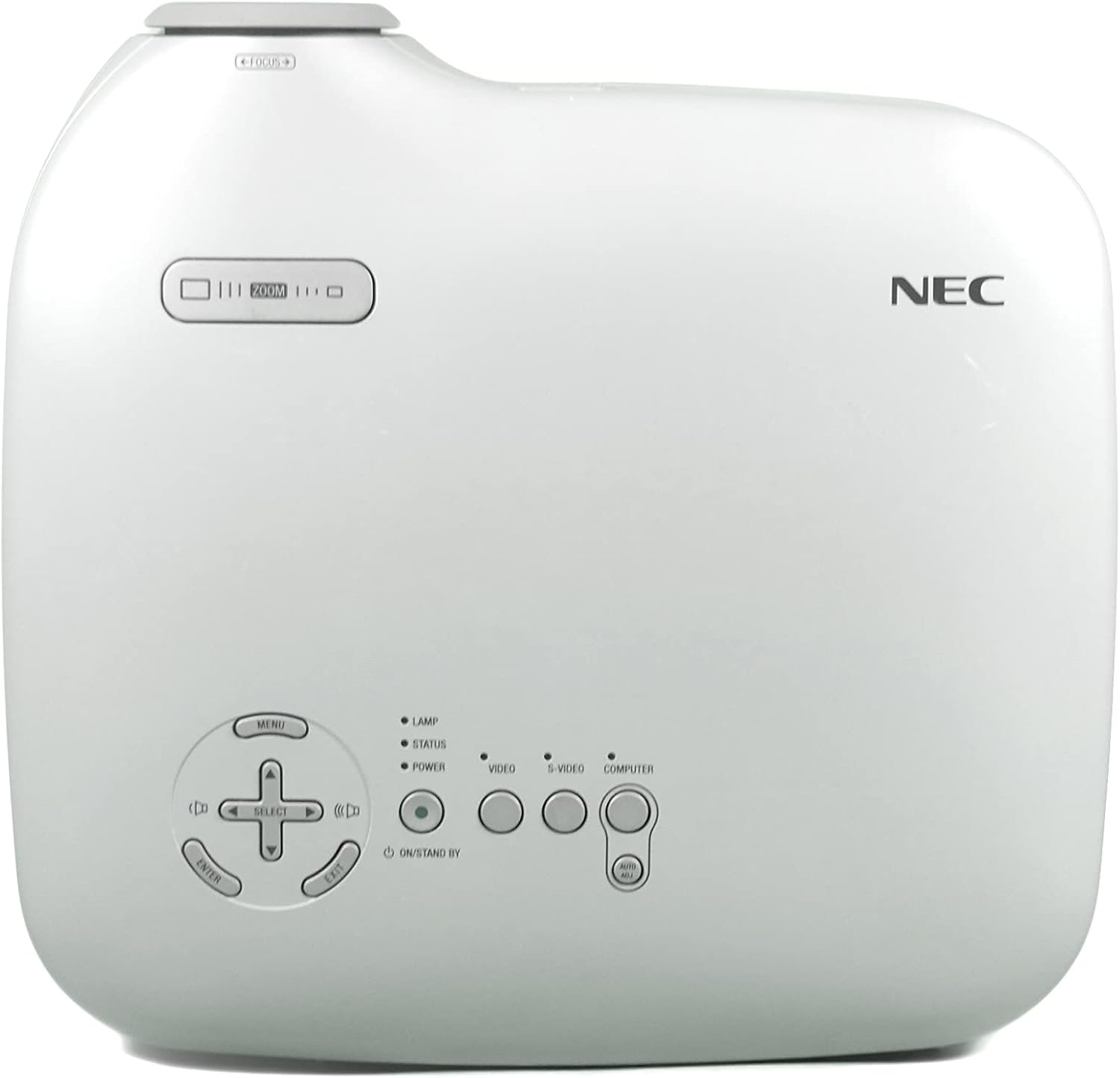
- JÍDELNÍ LÍSTEK: Přístup k nabídce na obrazovce (OSD).
- SELECT / Arrow Buttons: Procházejte možnostmi nabídky.
- ZADEJTE: Potvrzuje výběr.
- ZOOM: Upraví velikost obrazu.
- SOUSTŘEDIT SE: Zostřuje obraz.
- VIDEO / S-VIDEO / COMPUTER: Vybírá vstupní zdroj.
3. Úprava obrazu
- Soustředit: Otáčejte ostřícím kroužkem na objektivu, dokud nebude obraz ostrý.
- Lupa: Use the zoom lever near the lens to adjust the image size.
- Korekce lichoběžníkového zkreslení: The projector features Square Shot Keystone Correction to instantly project a square image, even when the projector is set up at a steep offset angle to the screen. Access this function via the OSD menu.

Údržba
1. Lamp Nahrazení
Jáamp has an estimated life of 4,000 hours in eco-mode or 3,000 hours in normal mode. When the lamp life is nearing its end, a warning message may appear, or the lamp indicator may illuminate.
- Vypněte projektor a odpojte napájecí kabel.
- Allow the projector to cool down for at least 60 minutes. The lamp compartment becomes extremely hot.
- Refer to the detailed instructions in the full user manual (on CD-ROM) for specific steps on how to open the lamp cover and replace the lamp.
- Always use a genuine NEC replacement lamp (Type: VT70LP).
2. Čištění vzduchového filtru
Regular cleaning of the air filter is crucial for maintaining optimal performance and preventing overheating. The bottom label provides a reminder to clean the air filter.
- Vypněte projektor a odpojte napájecí kabel.
- Locate the air filter cover, typically on the side or bottom of the projector.
- Remove the filter and gently clean it with a vacuum cleaner or soft brush. Do not wash the filter with water or any liquid.
- Vložte zpět čistý filtr a bezpečně zavřete kryt.
3. Čištění čočky
Používejte měkký hadřík bez žmolků, speciálně určený pro optické čočky. Nepoužívejte abrazivní čisticí prostředky ani rozpouštědla.
Odstraňování problémů
Pokud se s projektorem setkáte s problémy, podívejte se na následující běžná řešení:
- Bez napájení: Ensure the power cable is securely connected to both the projector and a working electrical outlet. Check the power indicator light.
- Bez obrázku:
- Verify the input source is correctly selected (e.g., COMPUTER, VIDEO).
- Check the connection cable between the source device and the projector.
- Ujistěte se, že je zdrojové zařízení zapnuté a vydává signál.
- Obrázek je rozmazaný: Upravte zaostřovací kroužek na objektivu.
- Image is Distorted (not square): Use the keystone correction feature in the OSD menu.
- Upozornění na přehřátí: Ensure the air filter is clean and ventilation openings are not blocked. Allow the projector to cool down.
For more detailed troubleshooting, consult the full user manual provided on the CD-ROM.
Specifikace
| Funkce | Specifikace |
|---|---|
| Číslo modelu | VT37 |
| Jas | 1500 ANSI Lumens |
| Kontrastní poměr | 400:1 |
| Rozlišení displeje | 1920 x 1080 (Native, likely supports lower resolutions like SVGA) |
| Lamp Život | 3,000 hours (Normal Mode), 4,000 hours (Eco-Mode) |
| Projekční vzdálenost | Approx. 2 to 24 feet |
| Projection Angles | 14-14.6 stupňů |
| Reprodukce barev | 16.7 million simultaneous colors |
| Zvuk | Built-in Monaural Speaker |
| Úroveň hluku | Již od 28 dB |
| Technologie připojení | HDMI, VGA (Note: HDMI is listed in specifications, but not explicitly on the rear panel image. Please verify actual unit.) |
| Hmotnost položky | 11 liber (hmotnost balení) |
| Rozměry balení | 15 x 14.6 x 11.3 palce |
Záruka a podpora
Informace o záruce
The manufacturer provides a two-year warranty covering parts and labor for the projector. A separate three-month warranty is provided for the lamp.
Zákaznická podpora
For technical assistance, warranty claims, or inquiries about accessories, please refer to the contact information provided on your warranty card or the official NEC webmísto.