
Zavedení
This manual provides essential information for the safe and efficient use of your ONKYO INTEC205 C-705FX CD Player. Please read it thoroughly before operating the unit and keep it for future reference.
The ONKYO INTEC205 C-705FX CD Player is designed for superior sound quality, incorporating advanced audio technologies. It features patented VLSC (Vector Linear Shaping Circuitry) to completely eliminate digital noise during D/A conversion, ensuring pure audio reproduction. The unit also utilizes a 192kHz/24bit Advanced Multi-bit DAC (Cirrus Logic CS4398) to faithfully convert digital signals to analog, preserving subtle musical nuances with an excellent signal-to-noise ratio. Furthermore, the "Direct Digital Pass" system uses high-purity cables for digital audio output, preventing noise interference and contributing to clear sound reproduction.
Bezpečnostní opatření
- Nevystavujte jednotku dešti nebo vlhkosti.
- Neotevírejte casing; veškerý servis svěřte kvalifikovanému personálu.
- Zajistěte správné větrání, aby nedošlo k přehřátí.
- Neumisťujte jednotku do blízkosti zdrojů tepla nebo na přímé sluneční světlo.
- Používejte pouze specifikovaný napájecí zdroj.
Obsah balení
Ověřte, zda jsou v balení přítomny všechny položky:
- ONKYO INTEC205 C-705FX CD Player Unit
- Napájecí kabel
- Dálkové ovládání (pokud je součástí dodávky)
- RCA Audio Cable (if included)
- Návod k použití (tento dokument)
Nastavení
1. Umístění
Place the CD player on a stable, level surface away from direct sunlight, heat sources, and excessive dust or vibration. Ensure adequate space around the unit for ventilation.
2. Připojení
Připojte CD přehrávač k amplifier or receiver using appropriate audio cables.
- Analogové audio připojení: Use an RCA audio cable to connect the ANALOG OUT jacks on the CD player to the CD IN or AUX IN jacks on your amplifier. Match the red plug to the right channel (R) and the white plug to the left channel (L).
- Digitální audio připojení (volitelné): For digital audio output, use either a digital coaxial cable or an optical digital cable.
- Koaxiální: Connect the DIGITAL OUT (COAXIAL) jack on the CD player to the COAXIAL DIGITAL IN jack on your ampživější.
- Optický: Connect the DIGITAL OUT (OPTICAL) jack on the CD player to the OPTICAL DIGITAL IN jack on your ampživější.
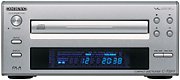 Obrázek: Přední strana view of the ONKYO INTEC205 C-705FX CD Player, showing the disc tray, display, and control buttons. This image illustrates the general appearance of the unit.
3. Připojení napájení
After all audio connections are made, plug the power cord into the AC INlet on the rear of the CD player, then plug the other end into a suitable wall outlet.
Návod k obsluze
1. Vkládání CD
- Stiskněte tlačítko MOC tlačítko pro zapnutí jednotky.
- Stiskněte tlačítko OTEVŘÍT/ZAVŘÍT tlačítko pro otevření zásuvky na disk.
- Place a CD with the label side facing up into the disc tray.
- Stiskněte tlačítko OTEVŘÍT/ZAVŘÍT znovu stiskněte tlačítko pro zavření přihrádky na disk. Přístroj načte disk.
2. Základní přehrávání
- PŘEHRÁT (►): Stisknutím spustíte přehrávání.
- PAUZA (‖): Press to temporarily stop playback. Press again to resume.
- STOP (■): Stisknutím zastavíte přehrávání.
- PŘESKOČIT (►►| / |◄◄): Press to skip to the next track or return to the beginning of the current track. Press twice to go to the previous track.
- RYCHLÝ VPŘED/ZPĚT: Hold down the SKIP buttons during playback to fast forward or rewind through the track.
3. Ovládací prvky na předním panelu
The front panel includes buttons for Power, Open/Close, Play, Pause, Stop, and Skip. The display shows track number, elapsed time, and other playback information.
4. Remote Control (if applicable)
If your unit came with a remote control, refer to its specific instructions for advanced functions such as programming, repeat play, and random play.
Údržba
1. Čištění jednotky
Wipe the exterior of the unit with a soft, dry cloth. Do not use abrasive cleaners, waxes, or solvents as they may damage the finish. Never spray cleaning liquids directly onto the unit.
2. Manipulace s disky
- Disky držte za hrany, abyste na hrací ploše nezůstaly otisky prstů.
- Udržujte disky čisté. Otírejte je měkkým hadříkem, který nepouští vlákna, od středu k okrajům.
- Disky skladujte v obalech, aby byly chráněny před prachem a poškrábáním.
- Nevystavujte disky přímému slunečnímu záření ani vysokým teplotám.
Odstraňování problémů
If you experience problems with your CD player, consult the following table before seeking professional service.
| Problém | Možná příčina | Řešení |
|---|---|---|
| Žádná síla | Napájecí kabel není bezpečně připojen. | Zkontrolujte připojení napájecího kabelu k jednotce a do zásuvky. |
| Žádný zvuk | Zvukové kabely nejsou správně připojeny; AmpVstup pro záchranný ventil není vybrán. | Zkontrolujte připojení audio kabelu. Vyberte správný vstup na vašem ampživější. |
| Disk se nepřehrává / Přeskakuje | Disc is dirty or scratched; Disc inserted incorrectly; Unit needs warm-up time. | Clean the disc. Insert the disc with the label side up. Allow the unit to warm up for a few minutes before playing. |
| Disc tray opens/closes too quickly | Sensitive tray mechanism. | This can be a characteristic of the unit. Ensure the disc is placed quickly and correctly. |
| LCD display not lighting up | Internal connection issue or display malfunction. | If the unit otherwise functions, this may indicate a display panel issue. Contact customer support. |
Specifikace
| Funkce | Detail |
|---|---|
| Značka | Onkyo |
| Číslo modelu | C-705FX |
| Barva | Stříbro |
| Hmotnost položky | Přibližně 2821 gramů |
| Kompatibilní zařízení | reproduktory, Ampzáchranáři |
| Jack pro sluchátka | 3.5mm Jack |
| Klíčové technologie | VLSC (Vector Linear Shaping Circuitry), 192kHz/24bit Advanced Multi-bit DAC (Cirrus Logic CS4398), Direct Digital Pass |
| Playback Type | Pouze přehrávání |
Záruka a podpora
For warranty information and customer support, please refer to the official Onkyo website or contact your local Onkyo dealer. Keep your purchase receipt as proof of purchase for warranty claims.