
1. Úvod
Děkuji za nákupasing the GPX BCD2004 Boombox. This portable audio system features a top-loading CD player and an AM/FM tuner, designed for versatile audio playback. This manual provides essential information for setting up, operating, and maintaining your device to ensure optimal performance and longevity.
2. Bezpečnostní informace
- Přečtěte si pokyny: Carefully read all operating instructions before using the unit.
- Uschovejte pokyny: Uschovejte tento návod pro budoucí použití.
- Voda a vlhkost: Nevystavujte tento spotřebič kapající ani stříkající vodě. Nepokládejte na spotřebič předměty naplněné tekutinami, například vázy.
- Větrání: Zajistěte dostatečné větrání. Neblokujte žádné větrací otvory.
- Teplo: Neumisťujte do blízkosti zdrojů tepla, jako jsou radiátory, topná tělesa, kamna nebo jiná zařízení (včetně amplifikátory), které produkují teplo.
- Zdroje energie: Use only the power source indicated on the appliance.
- Baterie: Follow battery safety guidelines. Do not mix old and new batteries, or different types of batteries. Remove batteries if the unit is not used for extended periods.
- Servis: Veškeré opravy svěřte kvalifikovanému servisnímu personálu.
3. Obsah balení
Zkontrolujte prosím, zda jsou v balení obsaženy následující položky:
- GPX BCD2004 Boombox Unit
- AC napájecí kabel
- Uživatelská příručka
4. Ovládací prvky a funkceview
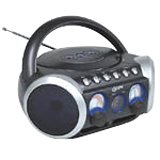
Obrázek 1: Přední view of the GPX BCD2004 Boombox. This image shows the overall design of the boombox, including the speaker grilles and the general layout of the front panel.
Familiarize yourself with the main controls and features of your boombox:
- Přihrádka na CD: Top-loading bay for inserting CDs.
- Přepínač funkcí: Selects between CD, AM, FM, and OFF modes.
- Ovládání hlasitosti: Rotary dial to adjust the audio output level.
- Ladicí volič: Rotary dial for selecting AM or FM radio frequencies.
- Tlačítko Přehrát/Pozastavit: Starts or temporarily stops CD playback.
- Tlačítko Stop: Zastaví přehrávání CD.
- Tlačítka Přeskočit/Hledat (◀◀ / ▶▶): Skips to the previous/next track or searches within a track.
- Tlačítko programu: Used to program a sequence of tracks for CD playback.
- Tlačítko opakování: Repeats the current track or the entire CD.
- AM/FM Antenna: Telescopic antenna for FM reception, internal antenna for AM.
- Vstup střídavého proudu: Jack for connecting the AC power cord.
- Přihrádka na baterie: Located on the bottom or rear for 'C' batteries.
- Fold-down Carrying Handle: Pro snadnou přenositelnost.
5. Nastavení
5.1 Zapnutí jednotky
Your GPX BCD2004 Boombox can be powered by either AC power or batteries.
Provoz na střídavý proud
- Ensure the Function Switch is in the OFF position.
- Insert the small end of the AC power cord into the AC power input jack on the back of the unit.
- Zapojte druhý konec napájecího kabelu do standardní zásuvky (120 V ~ 60 Hz).
Provoz na baterie
For portable use, the boombox requires 8 'C' size batteries (not included).
- Ensure the Function Switch is in the OFF position.
- Open the battery compartment cover located on the bottom or rear of the unit.
- Insert 8 'C' size batteries, observing the correct polarity (+ and -) as indicated inside the compartment.
- Bezpečně zavřete kryt bateriového prostoru.
- Poznámka: When operating on battery power, disconnect the AC power cord from the unit.
6. Ovládání CD přehrávače
The GPX BCD2004 is compatible with standard audio CDs, CD-R, and CD-RW discs.
6.1 Vkládání CD
- Lift the CD compartment door located on the top of the unit.
- Vložte CD na středový hřídel potištěnou stranou nahoru.
- Gently close the CD compartment door until it clicks shut.
6.2 Základní přehrávání CD
- Nastavte přepínač funkcí do polohy CD.
- The CD player will begin to read the disc. The track number will typically display.
- Press the PLAY/PAUSE (▶/██) button to start playback.
- Upravte ovládání hlasitosti na požadovanou úroveň poslechu.
- To pause playback, press the PLAY/PAUSE (▶/██) button. Press it again to resume.
- Chcete-li zastavit přehrávání, stiskněte tlačítko STOP (■).
6.3 Skipping and Searching Tracks
- Přeskočit skladbu: During playback, press the SKIP/SEARCH FORWARD (▶▶) button to go to the next track. Press the SKIP/SEARCH BACKWARD (◀◀) button to go to the beginning of the current track, or press it twice to go to the previous track.
- Search Within Track: During playback, press and hold the SKIP/SEARCH FORWARD (▶▶) or SKIP/SEARCH BACKWARD (◀◀) button to fast forward or rewind through the current track. Release the button to resume normal playback.
6.4 Program Play
Můžete naprogramovat až 16 skladeb, které se budou přehrávat v určitém pořadí.
- In STOP mode, press the PROGRAM button. The program indicator will flash.
- Use the SKIP/SEARCH buttons (◀◀ / ▶▶) to select your desired first track.
- Press the PROGRAM button again to confirm the selection.
- Repeat steps 2 and 3 to add up to 16 tracks to your program list.
- After programming all desired tracks, press the PLAY/PAUSE (▶/██) button to start programmed playback.
- Chcete-li program vymazat, stiskněte dvakrát tlačítko STOP (■).
6.5 Repeat Play
During CD playback, press the REPEAT button:
- Stiskněte jednou pro Opakujte 1 (repeats the current track).
- Press twice for Opakovat vše (repeats the entire CD or programmed tracks).
- Press a third time to cancel repeat function.
7. Operating the AM/FM Radio
7.1 Tuning to Radio Stations
- Set the Function Switch to either the AM or FM position.
- Adjust the Tuning Dial to select your desired radio station.
- Upravte ovládání hlasitosti na požadovanou úroveň poslechu.
7.2 Improving Radio Reception
- Příjem FM: Extend the telescopic antenna fully and adjust its position for the best reception.
- Dopolední recepce: The unit has a built-in AM antenna. Rotate the entire boombox for optimal AM reception.
8. Údržba
8.1 Čištění jednotky
- Otřete vnější část jednotky měkkým, damp tkanina. Nepoužívejte abrazivní čisticí prostředky nebo rozpouštědla.
- Pro čočky CD použijte specializovaný čisticí disk na čočky CD nebo měkký hadřík bez žmolků, speciálně určený pro optické čočky.
8.2 Péče o baterii
- Pokud nebudete přístroj delší dobu používat, vyjměte baterie, abyste zabránili jejich vytečení.
- Použité baterie zlikvidujte zodpovědně v souladu s místními předpisy.
9. Řešení problémů
If you experience issues with your boombox, please refer to the following common problems and solutions:
| Problém | Možná příčina | Řešení |
|---|---|---|
| Žádná síla | AC cord not connected; Batteries dead or incorrectly inserted; Function switch OFF. | Check AC cord connection; Replace batteries or check polarity; Set Function switch to CD, AM, or FM. |
| CD se nepřehrává | CD inserted incorrectly; CD dirty or scratched; CD compartment door open; Function switch not on CD. | Insert CD with label side up; Clean or replace CD; Close CD door securely; Set Function switch to CD. |
| Špatný příjem rádia | Anténa není vysunutá/nastavená; Slabý signál. | Extend and adjust FM antenna; Rotate unit for AM reception; Try a different location. |
| Žádný zvuk nebo nízká hlasitost | Volume too low; Unit in pause mode. | Increase volume; Press Play/Pause button to resume playback. |
10. Specifikace
- Model: BCD2004
- Značka: GPX
- CD kompatibilita: CD, CD-R, CD-RW
- Rádiový tuner: AM/FM
- Zdroj napájení: AC 120V ~ 60Hz nebo 8 x baterie typu „C“ (nejsou součástí balení)
- Řečníci: 2 Full-range speakers
- Rozměry (přibližně): 33.02 x 27.94 x 17.02 cm (d x š x v)
- Hmotnost (přibližně): 2.18 kg
- Vlastnosti: 16-track programming, Repeat play, Song skip/search, Fold-down carrying handle
11. Záruka a podpora
This GPX BCD2004 Boombox comes with a 90denní záruka od data původního nákupu. Tato záruka se vztahuje na vady materiálu a zpracování při běžném používání.
For warranty service or technical support, please refer to the contact information provided with your purchase documentation or visit the official GPX website. Please have your model number (BCD2004) and proof of purchase ready when contacting support.