
Zavedení
Welcome to your Polk Audio RM6750 5.1 Channel Home Theater Speaker System. This manual provides essential information for setting up, operating, and maintaining your speaker system to ensure optimal performance and longevity. The RM6750 system is designed to deliver a complete surround sound experience for your home theater. It includes two front speakers, two surround speakers, one center channel speaker, and one subwoofer.
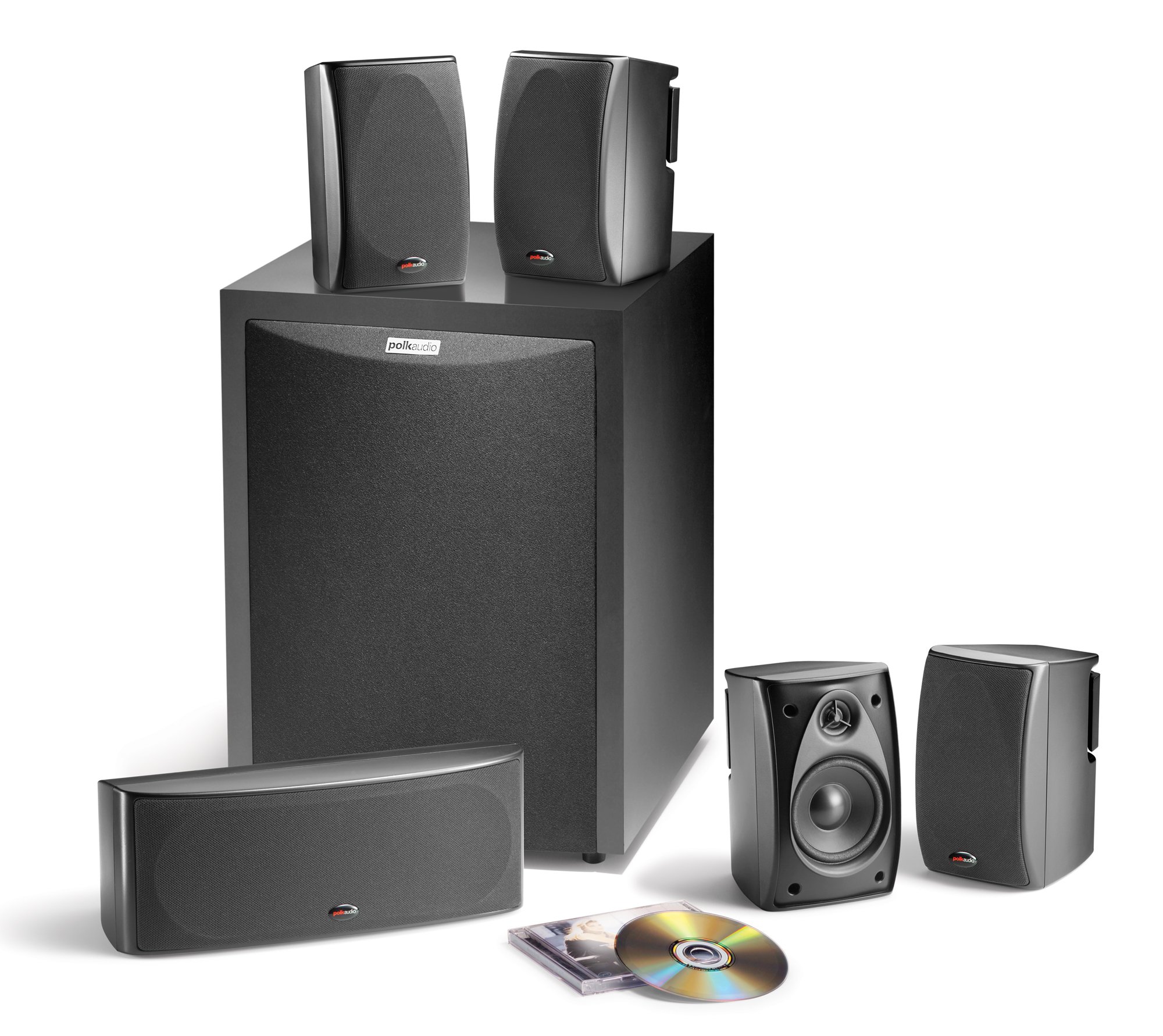
Image: The Polk Audio RM6750 5.1 Channel Home Theater Speaker System, showing the subwoofer, center channel, and satellite speakers.
Obsah balení
Ověřte, zda jsou v balení přítomny všechny komponenty:
- 2 Front Satellite Speakers
- 2 Surround Satellite Speakers
- 1 Center Channel Speaker
- 1 Napájený subwoofer
Nastavení
Umístění reproduktorů
Správné umístění reproduktorů je klíčové pro optimální zvukový výkon. Dodržujte následující pokyny:
- Přední reproduktory: Place the front left and right speakers equidistant from your primary listening position and from each other. They should form an equilateral triangle with the listening position.
- Středový kanálový reproduktor: Position the center speaker directly above or below your television, centered horizontally. This speaker handles dialogue.
- Prostorové reproduktory: Place the surround left and right speakers to the sides or slightly behind the listening position, ideally at ear level or slightly above.
- subwoofer: The subwoofer can be placed almost anywhere in the room, but experimentation is recommended to find the best bass response. Corner placement often enhances bass output.
Připojení reproduktorů
Ensure your receiver or ampPřed provedením jakýchkoli připojení se ujistěte, že je zařízení Lifefier vypnuto.
- Satellite and Center Channel Speakers: Connect the speaker wires from your receiver's corresponding speaker outputs (Front Left, Front Right, Center, Surround Left, Surround Right) to the binding posts on each satellite and center channel speaker. Ensure positive (+) terminals on the receiver connect to positive (+) terminals on the speakers, and negative (-) to negative (-).
- subwoofer: Connect the subwoofer to your receiver's LFE (Low-Frequency Effects) or Subwoofer Pre-Out jack using an RCA cable. Plug the subwoofer's power cord into an AC outlet.
Návod k obsluze
Počáteční zapnutí a konfigurace
- After all connections are made, turn on your receiver and the subwoofer.
- Access your receiver's speaker setup menu. Configure the speaker sizes (typically "Small" for satellites and center, "Yes" for subwoofer).
- Set crossover frequencies. A common starting point for the RM6750 satellites is 100-120 Hz.
- Adjust individual speaker levels using your receiver's test tones or an auto-calibration feature if available, to ensure balanced sound.
- Adjust the subwoofer volume control on the subwoofer itself to blend seamlessly with the satellite speakers, avoiding overpowering bass.
Tipy pro poslech
- Experiment with subwoofer placement and phase settings for optimal bass integration.
- Avoid placing speakers directly against walls or in corners, as this can sometimes lead to boomy or unnatural sound, except for the subwoofer which can benefit from corner placement.
- Ensure speaker wires are not tangled or pinched to prevent signal loss or damage.
Údržba
- Čištění: Dust the speaker cabinets regularly with a soft, dry cloth. Avoid using harsh chemicals or abrasive cleaners.
- Grily: The speaker grilles can be carefully removed for cleaning if necessary. Use a soft brush or vacuum with a brush attachment to remove dust.
- Prostředí: Keep speakers away from direct sunlight, excessive heat, and moisture.
Odstraňování problémů
| Problém | Možná příčina | Řešení |
|---|---|---|
| Žádný zvuk z reproduktorů | Loose speaker connections; Receiver not powered on; Incorrect input selected on receiver. | Check all speaker wire connections; Ensure receiver is powered on and correct input is selected. |
| Žádné basy ze subwooferu | Subwoofer not powered on; RCA cable loose or faulty; Subwoofer volume too low; Receiver LFE output disabled. | Check subwoofer power and power cable; Verify RCA cable connection; Increase subwoofer volume; Check receiver settings for LFE output. |
| Zkreslený zvuk | Volume too high; Loose connections; Damaged speaker wire. | Reduce volume; Check all connections; Inspect speaker wires for damage. |
Specifikace
- Typ systému: 5.1 Channel Home Theater Speaker System
- Konfigurace reproduktorů: 2 Front, 2 Surround, 1 Center, 1 Subwoofer
- Satellite/Center Drivers: 3.25 inch polymer composite cone (midrange), 0.5 inch silk and polymer composite dome (tweeter)
- Ovladač subwooferu: 8 inch long throw dynamic balance poly composite driver
- Maximální výstupní výkon reproduktoru: 100 Watts (System Max)
- Konektivita: RCA or Speaker Wire
- Impedance: 8 ohmů
- Barva: Černý
- Číslo modelu: RM6750
Informace o záruce
The Polk Audio RM6750 speaker system comes with a 5letá záruka na díly a práci. This warranty covers defects in materials and workmanship under normal use. Please retain your proof of purchase for warranty claims. For full warranty terms and conditions, please refer to the official Polk Audio webwebu nebo kontaktujte zákaznickou podporu.
Zákaznická podpora
For technical assistance, troubleshooting, or warranty inquiries, please visit the official Polk Audio website or contact their customer support department. Contact information can typically be found on the brand's official webmísto.
Online zdroje: www.polkaudio.com