
Logitech Z-5500
Logitech Z-5500 THX-Certified 5.1 Digital Surround Sound Speaker System User Manual
Model: Z-5500 (P/N: 970115-0403)
Zavedení
Welcome to the user manual for your Logitech Z-5500 THX-Certified 5.1 Digital Surround Sound Speaker System. This manual provides detailed instructions on setting up, operating, and maintaining your speaker system to ensure optimal performance and longevity. The Z-5500 system is engineered to deliver a powerful and immersive audio experience, whether you are listening to music, watching movies, or playing games.
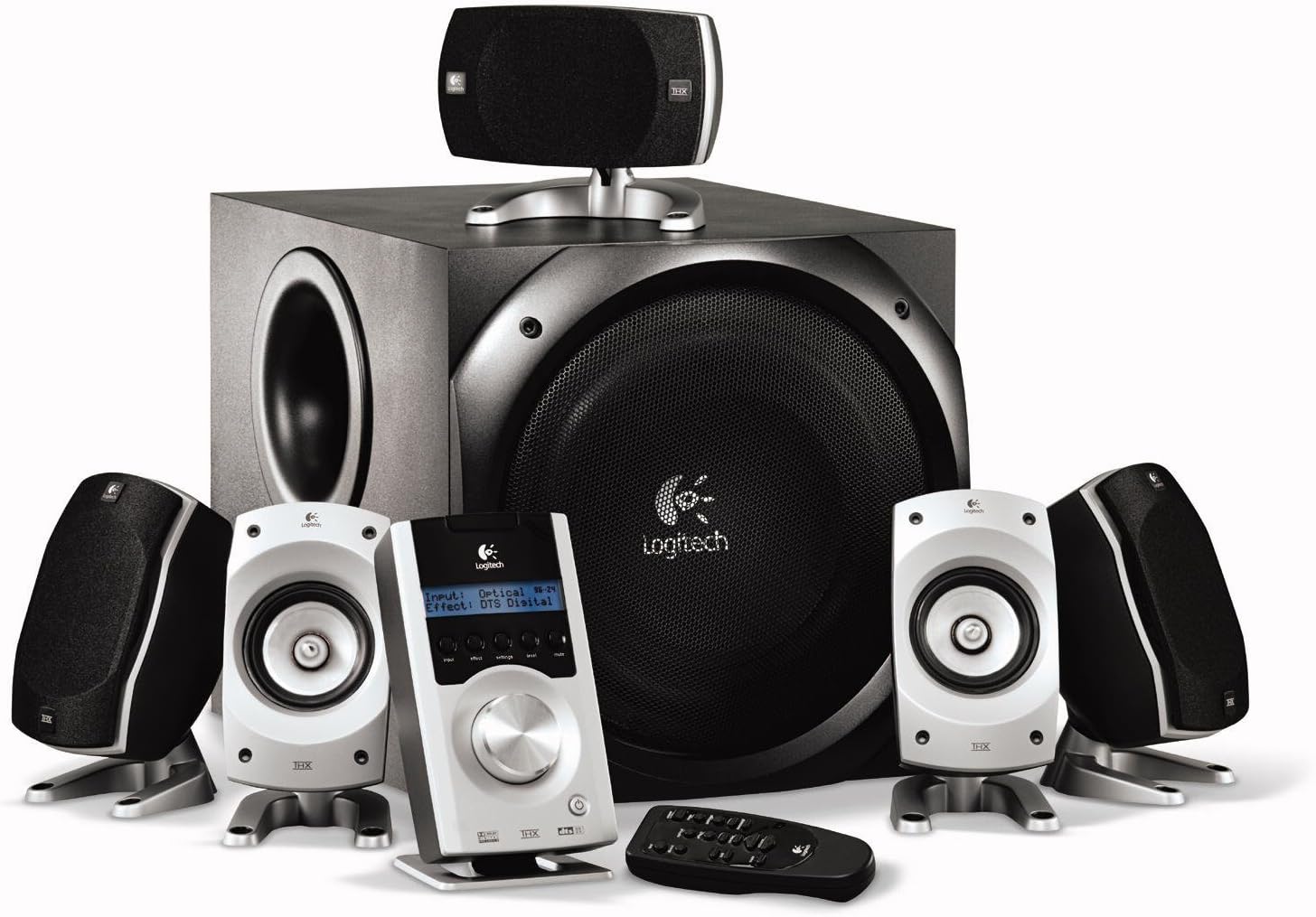
The complete Logitech Z-5500 system, showcasing the subwoofer, five satellite speakers, Digital SoundTouch control center, and wireless remote.
Bezpečnostní informace
Please read and follow all safety instructions carefully before using your Logitech Z-5500 speaker system. Failure to do so may result in injury or damage to the equipment.
- Zdroj napájení: Connect the system only to a power outlet of the type described in this manual or marked on the unit.
- Větrání: Do not block any ventilation openings. Ensure adequate space around the subwoofer and satellite speakers for proper airflow.
- Voda a vlhkost: Do not expose the system to water, moisture, or excessive humidity. Do not place objects filled with liquids on or near the system.
- Teplo: Udržujte systém mimo dosah zdrojů tepla, jako jsou radiátory, topná tělesa, kamna nebo jiná zařízení (včetně amplifikátory), které produkují teplo.
- Čištění: Unplug the system from the wall outlet before cleaning. Use a dry cloth for cleaning. Do not use liquid cleaners or aerosol cleaners.
- Umístění subwooferu: The subwoofer contains a powerful magnet. Keep it at least 3 feet (1 meter) away from electronic components, computers, and anything sensitive to electromagnetic energy to prevent interference or damage.
- Těžká složka: The subwoofer is heavy. Exercise caution when lifting or moving it.
Obsah balení
Your Logitech Z-5500 system package should include the following items:
- Jeden (1) subwoofer
- Čtyři (4) satelitní reproduktory
- One (1) Center Channel Speaker
- One (1) Digital SoundTouch Control Center
- One (1) Wireless Remote Control (with batteries)
- One (1) 6-Channel Direct Cable (for analog connection)
- Uživatelská příručka (tento dokument)
Nastavení
1. Umístění reproduktoru
Proper speaker placement is crucial for optimal surround sound. Consider the following guidelines:
- Front Left & Right: Place these speakers equidistant from your listening position, typically on either side of your monitor or TV.
- Středový kanál: Position this speaker directly in front of your listening position, usually above or below your monitor/TV, ensuring dialogue is clear and centered.
- Rear Left & Right (Surround): Place these speakers behind or to the sides of your listening position, facing towards you. They should be roughly at ear level when seated.
- subwoofer: The subwoofer can be placed anywhere in the room, but corner placement often enhances bass response. Ensure it is not directly against a wall and has adequate ventilation. Keep it away from sensitive electronics.

A single satellite speaker, designed for versatile placement.
2. Connecting the Speakers to the Subwoofer
Each satellite and center channel speaker connects to the back of the subwoofer. The speaker cables are color-coded or labeled to match the corresponding inputs on the subwoofer.
- Connect the Front Left, Front Right, Center, Rear Left, and Rear Right speakers to their respective spring clip terminals on the back of the subwoofer. Ensure the positive (+) and negative (-) terminals on the speaker match those on the subwoofer.
3. Connecting the Digital SoundTouch Control Center
The control center connects to the subwoofer via a dedicated cable.
- Plug the control center cable into the designated port on the back of the subwoofer.
4. Connecting to Audio Sources
The Z-5500 offers multiple input options for various devices.
Analog Connection (6-Channel Direct)
Use the included 6-channel direct cable for connecting to a PC sound card with 5.1 analog outputs.
- Connect the green, black, and orange plugs from the 6-channel direct cable to the corresponding color-coded analog input jacks on the back of the Digital SoundTouch control center.
- Connect the other end of the cable to your PC's sound card outputs (typically green for front, black for rear, orange for center/subwoofer).
Digitální optické připojení
For high-quality digital audio from DVD players, game consoles, or some PCs.
- Connect a digital optical cable (not included) from your audio source's optical output to the OPTICAL input on the Digital SoundTouch control center.
Digital Coaxial Connection
Another option for high-quality digital audio.
- Connect a digital coaxial cable (not included) from your audio source's coaxial output to the COAXIAL input on the Digital SoundTouch control center.
Stereo Mini-Jack Connection
For connecting MP3 players, CD players, or other stereo devices.
- Connect a 3.5mm stereo audio cable (not included) from your device's headphone or line-out jack to the AUX input on the Digital SoundTouch control center.
5. Připojení napájení
- Zapojte napájecí kabel subwooferu do zásuvky ve zdi.
- Turn on the power switch located on the back of the subwoofer.
Návod k obsluze
Digital SoundTouch Control Center
The control center is your primary interface for managing the Z-5500 system.

The Digital SoundTouch control center, providing comprehensive control over your audio experience.
- Vypínač: Zapíná nebo vypíná systém.
- Vstupní tlačítko: Cycles through available audio inputs (Analog, Optical, Coaxial, AUX).
- Tlačítko efektu: Selects different sound effects or decoding modes (e.g., Stereo, Stereo x2, Dolby Digital, DTS, Pro Logic II Movie/Music).
- Tlačítko nastavení: Accesses various settings such as speaker levels, subwoofer level, and balance.
- Tlačítko úrovně: Allows adjustment of individual speaker levels (front, rear, center, subwoofer).
- Tlačítko ztlumení: Ztlumí nebo zruší ztlumení zvukového výstupu.
- Knoflík hlasitosti: Upravuje celkovou hlasitost systému.
Bezdrátové dálkové ovládání
The remote control provides convenient access to most functions from your listening position.
- The remote duplicates most functions found on the control center, including power, input selection, volume, mute, and effect modes.
- Ensure line-of-sight between the remote and the control center for proper operation.
Údržba
To keep your Logitech Z-5500 speaker system in optimal condition, follow these maintenance guidelines:
- Čištění: Regularly wipe down the speakers and control center with a soft, dry, lint-free cloth. Do not use abrasive cleaners, waxes, or solvents.
- Prach: Use a soft brush or a vacuum cleaner with a brush attachment to gently remove dust from speaker grilles and ventilation openings.
- Vyhněte se tekutinám: Do not spray liquids directly onto the speakers or control center. If cleaning with a damp cloth is necessary, lightly dampen the cloth with water and ensure the system is unplugged.
- Prostředí: Store and operate the system in a clean, dry environment, away from extreme temperatures and direct sunlight.
Odstraňování problémů
If you encounter issues with your Z-5500 system, refer to the following common problems and solutions:
| Problém | Možná příčina | Řešení |
|---|---|---|
| Z žádného reproduktoru se nezobrazuje žádný zvuk | System not powered on; Mute activated; Incorrect input selected; Loose cables | Ensure subwoofer power switch is ON; Press Mute button on control center/remote; Select correct input source; Check all cable connections (power, control center, audio inputs). |
| No sound from specific speaker(s) | Loose speaker cable; Speaker level set too low; Incorrect audio source configuration | Check speaker wire connections to subwoofer; Adjust individual speaker levels using the control center's 'Level' button; Ensure your audio source (PC, DVD player) is configured for 5.1 output. |
| Zkreslený nebo nejasný zvuk | Volume too high; Poor audio source quality; Incorrect effect mode | Reduce volume; Test with a different audio source; Cycle through 'Effect' modes to find the appropriate one for your content. |
| Dálkové ovládání nefunguje | Dead batteries; Obstruction; Remote out of range | Replace batteries (2 AAA required); Remove any obstructions between remote and control center; Ensure you are within effective range. |
| Subwoofer nereprodukuje basy | Subwoofer level too low; Incorrect audio source configuration; Subwoofer cable loose | Increase subwoofer level via control center; Verify audio source is sending LFE (Low-Frequency Effects) signal; Check control center cable connection to subwoofer. |
If the problem persists after trying these solutions, please contact Logitech customer support.
Specifikace
| Funkce | Specifikace |
|---|---|
| Typ reproduktoru | 5.1 Systém prostorového zvuku |
| Celkový RMS výkon | 505 W RMS |
| Satellite RMS Power | 317 Watts RMS (2 x 62W Front, 2 x 62W Rear, 69W Center) |
| RMS výkon subwooferu | 188 W RMS |
| Celkový špičkový výkon | 1010 wattů |
| Frekvenční odezva | 33 Hz – 20 kHz |
| Odstup signálu od šumu | >93.5 dB |
| Vstupní impedance | 8,000 ohmů |
| Průměr subwooferu | 10 palce |
| Konektivita | Analog (6-channel direct), Digital Optical, Digital Coaxial, 3.5mm Stereo AUX |
| Certifikace | THX, Dolby Digital, DTS |
| Rozměry produktu (subwoofer) | 20.47 cm H x 26.85 cm Š x 16.18 cm V (přibližně) |
| Hmotnost položky | 54.5 libry |
| Číslo modelu | 970115-0403 |
Záruka a podpora
Your Logitech Z-5500 Digital Surround Sound Speaker System comes with a 2letá omezená záruka krytí dílů a práce od data nákupu.
For warranty claims, technical assistance, or further support, please visit the official Logitech support webnebo se obraťte na jejich zákaznický servis. Uschovejte si doklad o koupi pro ověření záruky.
Podpora Logitechu: www.logitech.com/support