
Zavedení
This manual provides detailed instructions for the safe and effective use of your Pentax Optio S4i 4MP Digital Camera. Please read this manual thoroughly before using the camera and keep it in a safe place for future reference. The Pentax Optio S4i is a compact digital camera featuring a 4-megapixel sensor, 3x optical zoom, and a 1.8-inch LCD monitor, designed for capturing high-quality still images and video.
Nastavení
1. Instalace a nabíjení baterie
The Pentax Optio S4i uses a rechargeable Lithium-Ion battery. Ensure the battery is fully charged before first use.
- Otevřete kryt přihrádky na baterie, který se nachází na spodní straně fotoaparátu.
- Insert the Lithium-Ion battery with the correct orientation, matching the polarity indicators.
- Bezpečně zavřete kryt bateriového prostoru.
- Connect the camera to the provided charger or use the external charger to recharge the battery. The charging indicator will show the charging status.

Obrázek 1: Dno view of the camera, illustrating the battery and SD card compartment. This is where the Lithium-Ion battery is inserted and secured.
2. Instalace paměťové karty
The camera has 10 MB of built-in memory. For extended storage, an optional Secure Digital (SD) memory card is recommended.
- Otevřete kryt prostoru pro baterii/paměťovou kartu na spodní straně fotoaparátu.
- Insert the SD card into the designated slot until it clicks into place. Ensure the card is inserted in the correct direction.
- Bezpečně zavřete kryt přihrádky.
3. Počáteční zapnutí
To power on the camera, press the ON/OFF button located on the top panel.

Obrázek 2: Nahoru view of the camera, highlighting the ON/OFF button. Press this button to power the camera on or off.
Návod k obsluze
1. Taking Still Pictures
The camera features a 4-megapixel sensor and a 3x optical zoom lens for capturing detailed images.
- Turn on the camera. The lens will extend.
- Select your desired shooting mode using the MODE button on the rear panel. The camera offers 21 shooting modes, including automatic exposure control.
- Komponujte snímek pomocí 1.8palcového LCD monitoru.
- Use the zoom lever to adjust the 3x optical zoom. The 4x digital zoom can further extend the magnification up to 12x combined.
- Stiskněte tlačítko spouště do poloviny pro zaostření a poté jej stiskněte úplně pro pořízení snímku.

Obrázek 3: Přední view of the Pentax Optio S4i with its 3x optical zoom lens extended, ready for capturing images.
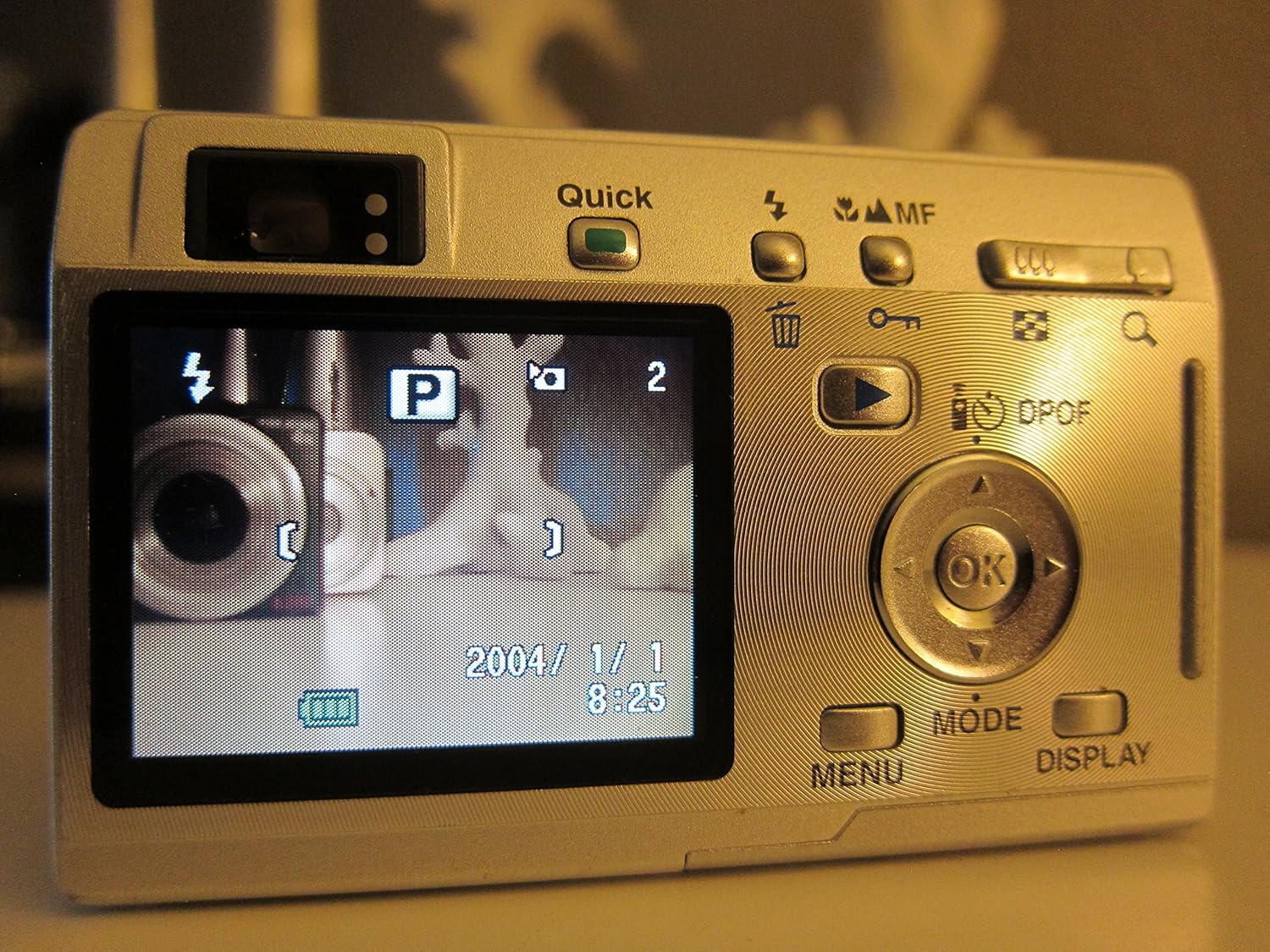
Obrázek 4: Zadní view of the camera displaying the LCD screen in shooting mode, with various controls visible for mode selection and navigation.
2. Nahrávání videí
The camera supports movie mode with sound, capturing video at 320 x 240 resolution at 15 frames per second.
- Switch to movie mode using the MODE button.
- Stisknutím tlačítka spouště spusťte záznam.
- Dalším stisknutím tlačítka spouště nahrávání zastavíte.
3. Režim přehrávání
View pořízené fotografie a videa na 1.8palcovém LCD displeji.
- Press the Playback button (often indicated by a triangle icon) to enter playback mode.
- Pro procházení obrázků a videí použijte směrový ovladač.
- Stiskněte tlačítko OK na view podrobnosti nebo přehrávání videí.

Obrázek 5: Zadní view of the camera with the LCD screen displaying an image in playback mode, showing navigation controls.
4. Připojení k počítači
Transfer your images and videos to a computer using the USB connection.
- Ujistěte se, že je fotoaparát vypnutý.
- Connect the camera to your computer using a compatible USB cable.
- Power on the camera. It should be recognized as a removable storage device.
- Převod files as you would from any other external drive.
Údržba
1. Čištění fotoaparátu
- K čištění těla fotoaparátu použijte měkký, suchý hadřík.
- Pro čištění čočky a LCD obrazovky použijte speciální hadřík a roztok na čištění čoček. Nepoužívejte abrazivní materiály.
- Do not use organic solvents such as alcohol or paint thinner.
2. Péče o baterie
- Nebudete-li fotoaparát delší dobu používat, vyjměte baterii.
- Baterie skladujte na chladném a suchém místě.
- Nevystavujte baterie extrémním teplotám.
3. Skladování
- Fotoaparát skladujte v suchém a bezprašném prostředí.
- Use a protective case to prevent scratches and damage.
Odstraňování problémů
- Fotoaparát se nezapne: Ujistěte se, že je baterie plně nabitá a správně vložená.
- Obrázky jsou rozmazané: Check that the lens is clean. Ensure the camera has focused correctly before taking the shot. Use appropriate shooting modes for different lighting conditions.
- Chyba paměťové karty: Reinsert the memory card. If the issue persists, try a different compatible SD card. Ensure the card is not locked.
- Slow shot-to-shot performance: This camera may exhibit slower performance between shots, especially in certain modes or with larger image sizes. This is normal operation.
- Nelze se připojit k počítači: Verify the USB cable connection. Ensure the camera is powered on after connecting. Try a different USB port or cable.
Specifikace
| Funkce | Specifikace |
|---|---|
| Název modelu | Optio S4i |
| Rozlišení foto snímače | 4 MP |
| Optický zoom | 3x |
| Digitální zoom | 4x (12x combined) |
| Velikost obrazovky | 1.8 palce |
| Typ snímače | CCD (1/2.5 palce) |
| Stabilizace obrazu | Digitální, Optické |
| Podporováno File Formát | JPEG, RAW |
| Rozlišení videa | 320 x 240, 15 fps, audio |
| Minimální rychlost závěrky | 4 sekund |
| Maximální rychlost závěrky | 1/2000 sekundy |
| Rozšířený rozsah ISO | 50–400 |
| Paměťová média | SD/MMC card, 10 MB Internal |
| Typ baterie | Lithium-iontová (dobíjecí) |
| Konektivita | USB |
| Hmotnost položky | 0.26 libry |
Záruka a podpora
For information regarding warranty coverage, technical support, or service, please refer to the official Pentax website or contact your local Pentax dealer. Specific warranty terms may vary by region and purchase date.
You can visit the official Pentax store for more information: Pentax Store