
Zavedení
Welcome to your Sharper Image Travel Soother 20 Radio/Alarm Clock. This manual provides detailed instructions for the proper setup, operation, and maintenance of your device. Please read this manual thoroughly before use and retain it for future reference.
Bezpečnostní informace
- Nevystavujte jednotku extrémním teplotám, přímému slunečnímu záření nebo vysoké vlhkosti.
- Zabraňte pádu jednotky nebo jejímu vystavení silným nárazům.
- Nerozebírejte jednotku. Veškerý servis svěřte kvalifikovanému personálu.
- Use only the specified power adapter (DC 6V) or batteries (4x AA 1.5V).
- Uchovávejte jednotku mimo dosah vody nebo jiných kapalin.
Obsah balení
- Sharper Image Travel Soother 20 Unit
- Uživatelská příručka
Konec produktuview
Familiarize yourself with the various parts of your Travel Soother 20 unit.
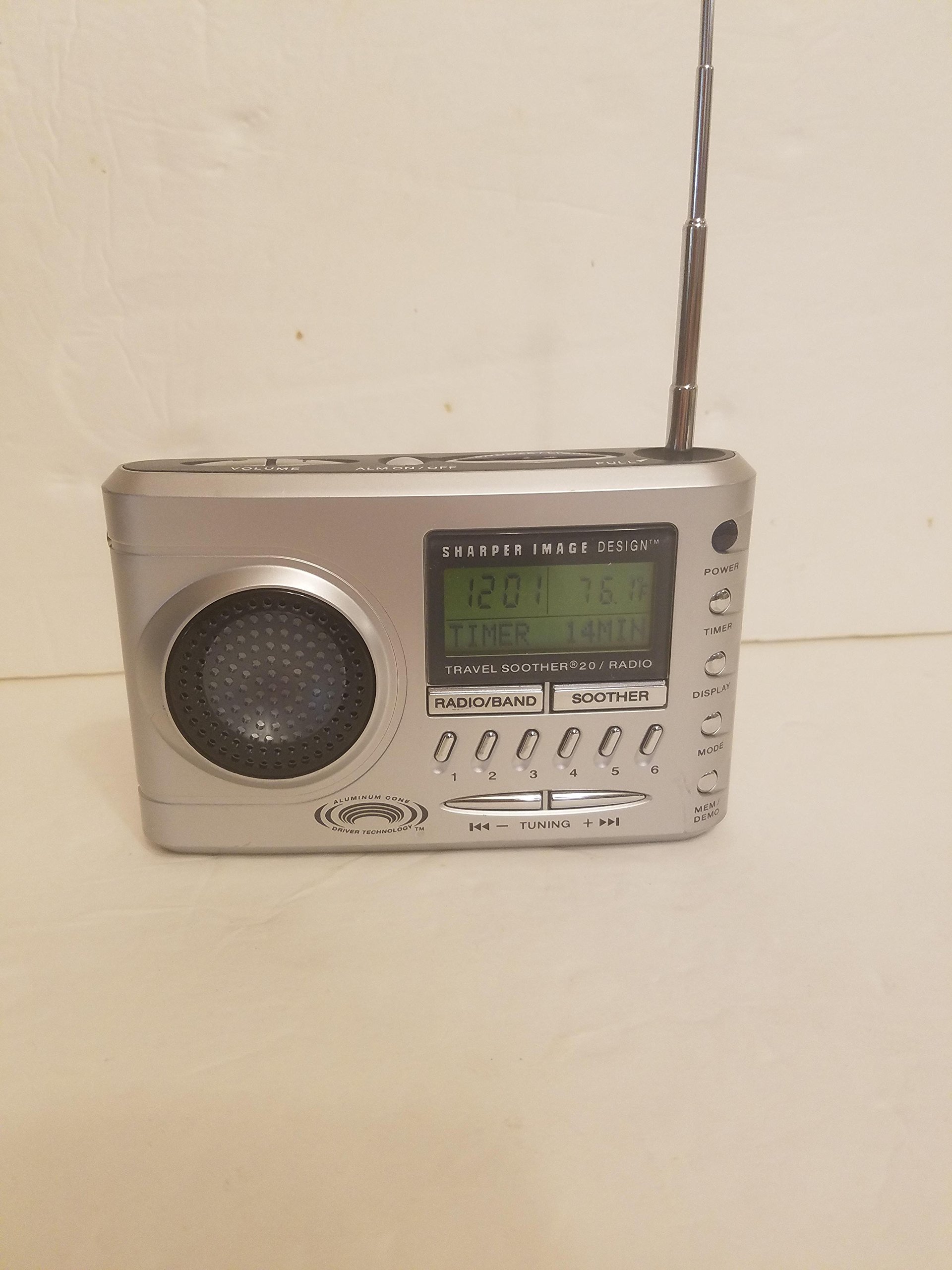
Obrázek: Přední strana view of the Sharper Image Travel Soother 20 Radio/Alarm Clock. This shows the display, speakers, and control buttons.
The back panel of the unit features the battery compartment, power input, and regulatory information. Specifically, it indicates the model number SI621, requires a DC 6V adapter, and uses four AA 1.5V batteries.
Nastavení
Napájení zařízení
Your Travel Soother 20 can be powered by either batteries or an AC adapter.
- Instalace baterie: Open the battery compartment on the back of the unit. Insert four (4) AA 1.5V batteries, ensuring correct polarity (+/-). Close the compartment securely.
- Připojení AC adaptéru: Connect a DC 6V power adapter (not always included) to the DC IN jack on the back of the unit. Plug the adapter into a standard wall outlet.
Note: When both batteries and AC adapter are connected, the unit will primarily draw power from the AC adapter.
Nastavení času
- Stiskněte a podržte NASTAVENÍ ČASU tlačítko.
- Při držení NASTAVENÍ ČASU, použijte HODINA a MINUTA tlačítky pro nastavení aktuálního času.
- Uvolněte NASTAVENÍ ČASU tlačítko pro potvrzení.
Návod k obsluze
Provoz rádia
- Stiskněte tlačítko RÁDIO tlačítko pro zapnutí rádia.
- Stiskněte AM/FM to select the desired band.
- Použijte TUNE +/- tlačítka pro ruční naladění stanice nebo stisknutím a podržením automaticky vyhledáte další dostupnou stanici.
- To save a preset: Tune to the desired station, then press and hold a PRESET button (e.g., 1-5) until the display flashes.
- To recall a preset: Briefly press the corresponding PRESET tlačítko.
Funkce budíku
- Nastavení budíku: Stiskněte a podržte NASTAVENÍ ALARMU button. While holding, use the HODINA a MINUTA buttons to set the alarm time. Release to confirm.
- Aktivace/deaktivace alarmu: Stiskněte tlačítko ALARM ZAPNUTO / VYPNUTO tlačítko pro přepnutí budíku. Po aktivaci se na displeji zobrazí ikona budíku.
- Funkce odložení: Když zazní alarm, stiskněte PODŘIMOVAT tlačítko pro dočasné ztlumení zvuku na několik minut.
- Zastavení alarmu: Stiskněte jakékoli tlačítko kromě PODŘIMOVAT to stop the alarm for the day. It will reactivate the next day if still enabled.
Sound Soother Functions
- Stiskněte tlačítko SOOTHER button to activate the sound soother.
- Stiskněte tlačítko SOOTHER button repeatedly to cycle through available sound options (e.g., Rain, Thunderstorm, Summer Night, City).
- Použijte OBJEM +/- tlačítky pro nastavení úrovně zvuku.
- Stiskněte tlačítko SOOTHER button until the display shows 'OFF' to deactivate.
Údržba
- Čištění: Otřete přístroj měkkým, suchým hadříkem. Nepoužívejte abrazivní čisticí prostředky ani rozpouštědla.
- Výměna baterie: Replace all four AA batteries simultaneously when the display dims or the unit malfunctions on battery power. Do not mix old and new batteries.
- Skladování: Pokud budete přístroj skladovat delší dobu, vyjměte baterie, abyste zabránili vytečení.
Odstraňování problémů
| Problém | Řešení |
|---|---|
| Jednotka se nezapne. | Check battery installation and polarity. Ensure AC adapter is securely connected and the outlet is functional. |
| Špatný příjem rádia. | Extend the antenna fully. Reposition the unit for better signal. Try tuning manually. |
| Alarm se nespustí. | Ensure the alarm is activated (alarm icon visible). Verify alarm time is set correctly. Check volume level. |
| Sound soother not working. | Ensure the sound soother is turned on and a sound is selected. Check volume level. |
Specifikace
- Model: SI621
- Příkon: DC 6V (adapter, not always included)
- Baterie: 4x AA 1.5V (UM-3)
- Rozměry balení: 6.4 x 6.3 x 3.7 palce
- Hmotnost položky: 15.7 unce
- ASIN: B00013891I
- Datum první dostupnosti: 26. února 2010
Prohlášení o shodě FCC
TOTO ZAŘÍZENÍ SPLŇUJE ČÁST 15 PRAVIDEL FCC. PROVOZ PODLÉHÁ NÁSLEDUJÍCÍM DVŮM PODMÍNKÁM: (1) TOTO ZAŘÍZENÍ NEMUSÍ ZPŮSOBIT ŠKODLIVÉ RUŠENÍ A (2) TOTO ZAŘÍZENÍ MUSÍ PŘIJÍMAT JAKÉKOLI PŘIJÍMANÉ RUŠENÍ, VČETNĚ RUŠENÍ, KTERÉ MŮŽE ZPŮSOBIT NEŽÁDOUCÍ FUNKCI.
Záruka a podpora
For warranty information or technical support, please refer to the original product packaging or contact Sharper Image customer service. Keep your purchase receipt as proof of purchase.