
Zavedení
The Nyko 80610 Airflo PC Game Controller is designed to enhance your PC and Mac gaming experience. This controller features an ergonomic design for comfortable use and an integrated airflow system to help keep your hands cool during extended gaming sessions. This manual provides detailed instructions for setting up, operating, maintaining, and troubleshooting your Airflo controller.
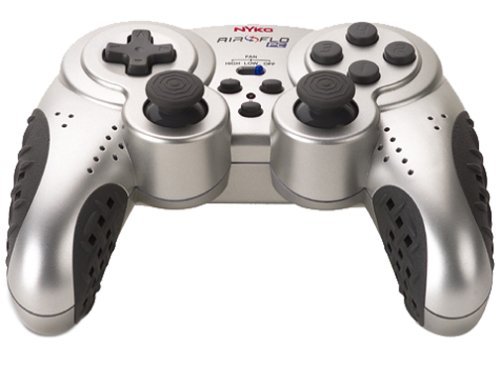
Image of the Nyko 80610 Airflo PC Game Controller, showcasinjeho ergonomický design a rozložení tlačítek.
Nastavení
Obsah balení
- Nyko 80610 Airflo PC Game Controller (Set of two 12-button gamepads)
- Driver Installation CD (if applicable)
- Uživatelská příručka (tento dokument)
Systémové požadavky
- Operating System: Windows 2000/XP/Vista/7/8, Mac-Intel OS X
- K dispozici port USB
Instalace
- Ujistěte se, že je počítač zapnutý a běží.
- Vyhledejte v počítači volný port USB.
- Plug the USB connector of the Nyko Airflo controller into the USB port.
- For most Windows operating systems, the controller will be automatically detected and drivers installed. If prompted, follow the on-screen instructions.
- If automatic installation does not occur, insert the provided Driver Installation CD into your computer's optical drive and follow the installation wizard.
- Once installed, the controller is ready for use. It is recommended to have the gamepad plugged in and ready before launching a game to ensure proper recognition.
Návod k obsluze
Základní ovládací prvky
The Nyko Airflo controller features a standard gamepad layout, including:
- Two Analog Sticks: For precise movement and camera control.
- D-Pad (Directional Pad): For directional input.
- Action Buttons: Typically labeled for in-game actions.
- Shoulder Buttons/Triggers: Located on the top of the controller.
- Start and Select/Back Buttons: For menu navigation and game functions.
Funkce proudění vzduchu
The integrated airflow system helps to cool your hands during intense gaming. The controller includes a switch or button to activate and adjust the fan speed. While effective, the fan may produce some noise, especially on higher settings.
- Locate the fan control switch/button on the controller.
- Toggle the switch or press the button to turn the fan on/off or cycle through different speed settings.
Konfigurace hry
Most PC games allow for controller configuration within their settings menu. You may need to:
- Navigate to the 'Controls' or 'Options' section of your game.
- Select 'Gamepad' or 'Controller' as the input device.
- Map the in-game actions to the corresponding buttons and sticks on your Nyko Airflo controller.
- The controller may come with mapping software that allows for custom button assignments, which can be useful for games that do not natively support the controller's default layout or for remapping keyboard commands.
Údržba
- Čištění: K otření ovladače použijte měkký, suchý hadřík. V případě odolné nečistoty lehceamphadřík vodou. Nepoužívejte agresivní chemikálie ani abrazivní čisticí prostředky.
- Skladování: Store the controller in a clean, dry place away from direct sunlight and extreme temperatures. Avoid wrapping the cable too tightly to prevent damage.
- Péče o kabely: Do not pull the controller by its cable. Always grasp the USB connector when plugging or unplugging it from your computer.
Odstraňování problémů
- Ovladač nebyl rozpoznán:
- Ujistěte se, že je kabel USB bezpečně připojen k ovladači i k počítači.
- Zkuste zapojit ovladač do jiného USB portu.
- Restart your computer with the controller connected.
- Verify that the necessary drivers are installed (refer to the Installation section).
- Analog Stick or D-Pad Issues:
- If analog sticks are not calibrated correctly in-game, try unplugging the gamepad, closing the game, plugging the gamepad back in, and then restarting the game.
- Some users have reported that the D-pad may not register diagonal inputs reliably or may simultaneously press adjacent directions. This can be a characteristic of the controller's design.
- Buttons Sticking or Requiring Heavy Pressing:
- Ujistěte se, že je ovladač čistý a v okolí tlačítek nejsou žádné nečistoty.
- If the issue persists, it may indicate wear or a manufacturing characteristic.
- Hlučnost ventilátoru:
- The airflow fan may produce audible noise, especially on higher settings. This is normal operation.
Specifikace
| Značka | Nyko |
| Model | 80610 Airflo |
| Kompatibilní zařízení | Mac, Windows |
| Typ ovladače | Gamepad |
| Technologie připojení | USB (elektrický kabel) |
| Barva | Černá/Stříbrná |
| Další funkce | Ergonomic, Integrated Airflow System |
| Množství tlačítek | 12 (per gamepad) |
| Hardwarová platforma | PC |
| Délka kabelu | Extra dlouhé |
| GTIN/UPC | 743840806103 |
| ASIN | B0000TNJWM |
Záruka a podpora
For information regarding warranty coverage, technical support, or replacement parts, please contact Nyko customer service directly. Details can typically be found on the manufacturer's official webmísto nebo obal produktu.
Uschovejte si prosím doklad o koupi pro případné reklamace.