
Zavedení
Děkuji za nákupasing the Nyko AirFlo EX Controller for PlayStation 2. This controller is designed to enhance your gaming experience with its unique airflow feature, providing comfort during extended gameplay sessions. Please read this manual thoroughly before use to ensure proper setup and operation.
Obsah balení
- Nyko AirFlo EX Controller for PlayStation 2
- Uživatelská příručka (tento dokument)
Funkce ovladače
The Nyko AirFlo EX Controller integrates several features for an optimized gaming experience:
- AirFlo Cooling System: An integrated fan provides airflow to help keep hands dry and comfortable during intense gaming.
- Ergonomický design: Shaped for comfortable grip and extended play.
- Standard PlayStation 2 Controls: Includes directional pad, action buttons (Triangle, Circle, Cross, Square), L1/R1/L2/R2 shoulder buttons, START, SELECT, and analog sticks (L3/R3 functionality).
- Vibrační zpětná vazba: Supports in-game vibration effects for enhanced immersion.
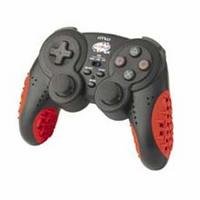
Image: Nyko AirFlo EX Controller for PlayStation 2. This image displays the front view of the controller, highlighting its button layout and ergonomic shape.
Nastavení
- Připojení k PlayStationu 2: Locate an available controller port on your PlayStation 2 console.
- Vložit konektor: Firmly insert the controller's connector cable into the chosen port. Ensure it is fully seated.
- Zapnutí konzole: Zapněte konzoli PlayStation 2. Ovladač by měl být automaticky rozpoznán.
- Test funkčnosti: Navigate the PlayStation 2 menu or start a game to confirm all buttons and analog sticks are responsive.
Návod k obsluze
The Nyko AirFlo EX Controller operates similarly to standard PlayStation 2 controllers, with the added AirFlo feature.
- Základní ovládání: Use the directional pad or left analog stick for movement, and the action buttons (Triangle, Circle, Cross, Square) for in-game actions.
- Analog Stick Functionality: Pressing the analog sticks down activates L3 and R3 functions, if supported by the game.
- AirFlo Fan Activation: The AirFlo fan is typically activated by a switch or button on the controller itself. Refer to the controller's physical layout for the exact location of the fan control. Toggle this control to turn the fan on or off.
- Vibrační zpětná vazba: Vibration effects will automatically engage during gameplay when supported by the software.
Údržba
- Čištění: Use a soft, dry cloth to clean the controller's surface. For stubborn dirt, a slightly damp cloth can be used, ensuring no moisture enters openings. Do not use harsh chemicals or abrasive cleaners.
- Skladování: Ovladač skladujte na chladném a suchém místě mimo dosah přímého slunečního záření a extrémních teplot. Abyste předešli poškození, neomotejte kabel těsně kolem ovladače.
- Vyhněte se kapkám: Chraňte ovladač před pády a nárazy, které by mohly poškodit vnitřní součásti.
Odstraňování problémů
| Problém | Možné řešení |
|---|---|
| Ovladač nereaguje. |
|
| AirFlo fan not working. |
|
| Buttons or analog sticks are unresponsive or stiff. |
|
Specifikace
- Model: AirFlo EX
- Kompatibilita: PlayStation 2
- Hmotnost položky: 9.6 unce (přibližně 272 gramů)
- Rozměry balení: 6 x 4.8 x 2.7 palce (přibližně 15.2 x 12.2 x 6.9 cm)
- Konektivita: Kabelové
- Speciální vlastnosti: Integrated AirFlo cooling fan
Záruka a podpora
For warranty information, technical support, or service inquiries regarding your Nyko AirFlo EX Controller, please contact Nyko customer support directly. Details can typically be found on the official Nyko webmísto nebo obal produktu.
Nyko Official Webmísto: www.nyko.com (Poznámka: Toto je zástupný symbol URL. Please refer to your product packaging or official Nyko documentation for the most current support information.)