
1. Úvod
This manual provides instructions for the setup, operation, and maintenance of your Bose MediaMate Computer Speakers. These speakers are designed to enhance the audio experience for your computer, whether for music, movies, or gaming. The compact design and upward-angled sound projection optimize audio delivery for desktop use, occupying minimal desk space.
2. Bezpečnostní informace
Please read and follow all safety instructions before using this product to prevent electric shock, fire, or injury. Keep this manual for future reference.
- Nevystavujte reproduktory vodě ani vlhkosti.
- Neumisťujte reproduktory do blízkosti zdrojů tepla, jako jsou radiátory, topení, kamna nebo jiná zařízení (včetně amplifikátory), které produkují teplo.
- Používejte pouze nástavce/příslušenství specifikované výrobcem.
- Odpojte toto zařízení během bouřky s blesky nebo když se delší dobu nepoužívá.
- Veškeré opravy svěřte kvalifikovanému servisnímu personálu. Servis je nutný, pokud bylo zařízení jakýmkoli způsobem poškozeno, například je poškozen napájecí kabel nebo zástrčka, pokud do zařízení vnikla tekutina nebo do něj spadly předměty, zařízení bylo vystaveno dešti nebo vlhkosti, nefunguje normálně. , nebo byla vypuštěna.
3. Obsah balení
Ověřte, zda jsou v balení přítomny všechny položky:
- Bose MediaMate Computer Speakers (2 units)
- Napájecí adaptér
- Audio Cable (3.5mm stereo jack)
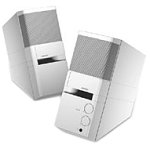
Image: The Bose MediaMate Computer Speakers in Gray. The image shows two compact speakers, one with visible volume and mix controls, and a headphone jack.
4. Nastavení
Follow these steps to set up your Bose MediaMate Computer Speakers:
- Umístění: Place the speakers on a flat, stable surface on either side of your computer monitor. Ensure they are angled slightly upward towards your listening position for optimal sound.
- Připojení audio kabelu: Connect the 3.5mm audio cable from the back of the primary speaker (the one with controls) to the audio output jack on your computer.
- Připojte napájení: Plug the power adapter into the power input on the primary speaker, then plug the adapter into a wall outlet.
- Zapnutí: Turn on the speakers using the volume knob. The power indicator light should illuminate.
5. Návod k obsluze
Once set up, operating your MediaMate speakers is straightforward:
- Ovládání hlasitosti: Use the large knob labeled "VOLUME" on the front of the primary speaker to adjust the overall sound level.
- Ovládání mixu: The "MIX" knob allows you to blend audio from two different sources if you have a second device connected to the auxiliary input.
- Sluchátkový jack: For private listening, plug your headphones into the headphone jack located on the front of the primary speaker. This will mute the speakers.
- Duální vstupy: The speakers feature dual inputs, allowing you to connect and mix two audio sources simultaneously. For example, you can connect your computer and a portable music player.
6. Údržba
To ensure the longevity and optimal performance of your speakers:
- Čištění: Use a soft, dry cloth to clean the exterior surfaces of the speakers. Do not use liquid cleaners or aerosols.
- Prach: Pravidelně otírejte prach z mřížek reproduktorů, abyste zabránili hromadění prachu, který by mohl ovlivnit kvalitu zvuku.
- Skladování: Pokud budete reproduktory skladovat delší dobu, odpojte je od napájení a uložte je na chladném a suchém místě.
7. Řešení problémů
If you encounter issues with your Bose MediaMate speakers, refer to the following common problems and solutions:
| Problém | Možná příčina | Řešení |
|---|---|---|
| Žádný zvuk |
|
|
| Zkreslený zvuk |
|
|
| Funguje pouze jeden reproduktor |
|
|
8. Specifikace
- Značka: Bose
- Model: MediaMate
- Konektivita: 3.5mm Audio Input, AC Power
- Zvukový výstup: Stereo
- Typ reproduktoru: Multimédia
- Materiál: Kov
- Velikost reproduktoru: 6 Centimeters (Audio Driver)
- Hmotnost položky: 3 libry
- Barva: Šedá
9. Záruka a podpora
Bose MediaMate Computer Speakers come with a limited warranty. For specific warranty details and duration, please refer to the warranty card included with your product or visit the official Bose webmísto.
For technical support, product registration, or service inquiries, please contact Bose customer service:
- Telefon: 800-444-2673
- Webmísto: www.bose.com
Please have your product model number (MediaMate) and purchase date available when contacting support.