
Důležité bezpečnostní informace
Please read all safety and operating instructions carefully before using this VCR. Retain this manual for future reference.
- Zdroj napájení: Connect the VCR only to the power supply indicated on the label.
- Větrání: Zajistěte dostatečné větrání. Neblokujte větrací otvory.
- Voda a vlhkost: Do not expose the VCR to rain or moisture. Do not place objects filled with liquids on the VCR.
- Čištění: Unplug the VCR from the wall outlet before cleaning. Use a dry cloth.
- Servis: Nepokoušejte se tento výrobek opravit sami. Veškerý servis svěřte kvalifikovanému servisnímu personálu.
Konec produktuview
The Sharp VC-A422 is a 4-head VCR designed for reliable playback and recording of VHS tapes. It features a user-friendly interface for easy operation.
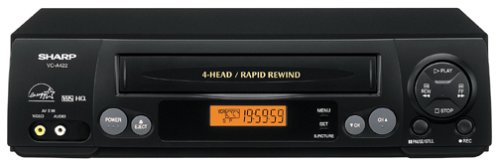
Obrázek: Přední strana view of the Sharp VC-A422 4-Head VCR, showing the tape slot, display, and control buttons.
Nastavení
1. Vybalení a umístění
- Opatrně vyjměte videorekordér z obalu.
- Place the VCR on a stable, level surface. Ensure there is adequate space around the unit for ventilation.
- Avoid placing the VCR near heat sources, direct sunlight, or areas with high humidity.
2. Připojení k televizi
To connect your VCR to a television, you will typically use RCA audio/video cables (red, white, yellow) or a coaxial cable.
- RCA Connection (Recommended for best quality):
- Připojte žlutý výstupní video konektor na videorekordéru ke žlutému vstupnímu video konektoru na televizoru.
- Propojte bílý audio výstupní konektor na videorekordéru s bílým audio vstupním konektorem na televizoru.
- Připojte červený audio výstupní konektor na videorekordéru k červenému audio vstupnímu konektoru na televizoru.
- Select the corresponding AV input on your television (e.g., Video 1, AV1, Input 1).
- Koaxiální připojení:
- Connect a coaxial cable from the "RF Out" or "Antenna Out" jack on the VCR to the "Antenna In" or "RF In" jack on your TV.
- Connect your antenna or cable TV signal to the "RF In" or "Antenna In" jack on the VCR.
- Tune your television to channel 3 or 4 (depending on the VCR's output setting) to receive the VCR signal.
3. Připojení napájení
- Zapojte napájecí kabel videorekordéru do standardní elektrické zásuvky.
- The VCR should enter standby mode, indicated by a clock display or power light.
Návod k obsluze
1. Základní přehrávání
- Ensure the VCR is powered on and your TV is set to the correct input.
- Insert a VHS tape into the tape slot. The VCR will automatically load the tape.
- Stiskněte tlačítko HRÁT tlačítko na videorekordéru nebo dálkovém ovladači.
- Přehrávání zastavíte stisknutím tlačítka ZASTÁVKA tlačítko.
- Chcete-li přehrávání pozastavit, stiskněte tlačítko PAUZA tlačítko. Stiskněte znovu pro obnovení.
- To fast forward or rewind, press the FF (Fast Forward) or REW (Rewind) button. Press HRÁT pro obnovení normálního přehrávání.
- Chcete-li vysunout pásku, stiskněte tlačítko EJECT tlačítko.
2. Nahrávací programy
The Sharp VC-A422 allows for recording television programs. Ensure a blank or recordable VHS tape is inserted and its safety tab is intact.
- Tune the VCR to the desired channel using the VCR's tuner.
- Stiskněte tlačítko ZÁZNAM button. The VCR will begin recording.
- Nahrávání zastavíte stisknutím tlačítka ZASTÁVKA tlačítko.
- For timed recordings, refer to the VCR's on-screen programming guide (if available) or consult the full manual for detailed timer recording instructions.
Údržba
Proper maintenance ensures the longevity and optimal performance of your VCR.
- Čištění exteriéru: Vnější povrch videorekordéru otřete měkkým, suchým hadříkem. Nepoužívejte tekuté čisticí prostředky ani abrazivní materiály.
- Čištění hlavy: If picture quality degrades (e.g., snowy picture, lines), the video heads may be dirty. Use a dry-type VCR head cleaning cassette sparingly. Excessive use can wear down the heads.
- Péče o pásku: Store VHS tapes in their cases, away from dust, direct sunlight, and strong magnetic fields. Avoid exposing tapes to extreme temperatures.
- Větrání: Keep the VCR's ventilation slots clear of obstructions to prevent overheating.
Odstraňování problémů
If you encounter issues with your Sharp VC-A422 VCR, refer to the following common problems and solutions:
| Problém | Možná příčina | Řešení |
|---|---|---|
| Žádná síla | Napájecí kabel je odpojený; zásuvka není aktivní. | Zkontrolujte připojení napájecího kabelu. Vyzkoušejte zásuvku s jiným zařízením. |
| Žádný obraz ani zvuk | Incorrect TV input selected; A/V cables loose or incorrectly connected. | Select correct TV input (e.g., AV1, Video 1). Ensure A/V cables are securely connected to matching color ports. |
| Snowy or distorted picture | Dirty video heads; poor tape quality; incorrect channel for coaxial connection. | Use a VCR head cleaning cassette. Try a different tape. If using coaxial, ensure TV is on channel 3 or 4. |
| Tape will not eject | Power failure; mechanical issue. | Ensure VCR is powered on. If problem persists, seek professional service. |
| Nelze nahrávat | Tape's safety tab removed; VCR not tuned to a channel. | Check if the safety tab on the VHS tape is intact (cover the notch with tape if removed). Ensure VCR tuner is set to the desired channel. |
Specifikace
- Značka: Ostrý
- Model: VC-A422
- hlavy: 4-Head (Video)
- Hmotnost položky: 6 libry
- Rozměry balení: 15.55 x 11.02 x 5.24 palce
- ASIN: B00005LABU
- Datum první dostupnosti: 4. září 1999
Poznámka: Specifikace se mohou změnit bez předchozího upozornění.
Informace o záruce
This Sharp product is covered by a limited warranty. For specific details regarding warranty coverage, duration, and terms, please refer to the warranty card included with your purchase or visit the official Sharp webUschovejte si doklad o koupi pro případ reklamace.
Zákaznická podpora
For further assistance, technical support, or service inquiries, please contact Sharp customer support. You can find contact information on the official Sharp webwebu nebo v dokumentaci dodané s vaším produktem.
Visit the official Sharp store for more information: Oficiální obchod Sharp
Právní vyloučení odpovědnosti
UPOZORNĚNÍ PRO SPOTŘEBITELE: This television receiver has only an analog broadcast tuner and will require a converter box after February 17, 2009 to receive over-the-air broadcasts with an antenna because of the U.S.'s transition to digital broadcasting. Analog-only TVs should continue to work as before with cable and satellite TV services, gaming consoles, VCRs, DVD players, and similar products. For more information, call the Federal Communications Commission at 1-888-225-5322 (TTY: 1-888-835-5322), or visit the commission s digital-television Web místo na: www.dtv.gov.