
Zavedení
Děkuji za nákupasing the Sharp XL-70-H Compact Stereo System. This manual provides essential information for the safe and efficient operation of your audio system. Please read it thoroughly before use and keep it for future reference.
Bezpečnostní informace
Pro zajištění bezpečného provozu a prevenci poškození dodržujte prosím následující bezpečnostní opatření:
- Nevystavujte jednotku dešti ani vlhkosti, abyste předešli požáru nebo úrazu elektrickým proudem.
- Neblokujte větrací otvory. Zajistěte kolem jednotky dostatečný prostor pro správné proudění vzduchu.
- Umístěte jednotku na stabilní, rovný povrch.
- Na jednotku nepokládejte předměty naplněné tekutinami, jako jsou vázy.
- Unplug the unit from the wall outlet during lightning storms or when unused for long periods.
- Veškeré opravy svěřte kvalifikovanému servisnímu personálu.
Obsah balení
Ověřte, zda jsou v balení přítomny všechny položky:
- Sharp XL-70-H Main Unit (Tower)
- Two 2-way MDF Speakers
- Napájecí kabel
- Remote Control (if included, not explicitly mentioned but common)
- Kabely reproduktorů
Konec produktuview
The Sharp XL-70-H is a compact stereo system designed for versatile audio playback. It features a CD player with a glass lid, a full logic cassette deck, and an auxiliary input for connecting external devices. The system includes two 2-way MDF speakers for clear sound reproduction.
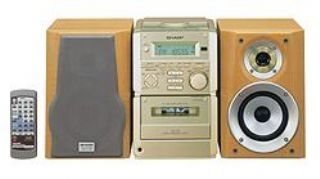
Obrázek 1: Přední view of the Sharp XL-70-H Compact Stereo System, showing the main unit and two speakers. The main unit features a central display, control buttons, and the CD tray.
Nastavení
1. Připojení reproduktoru
Connect the included 2-way MDF speakers to the main unit. Ensure that the positive (+) and negative (-) terminals on the speakers match the corresponding terminals on the main unit. Incorrect polarity can affect sound quality.
2. Připojení napájení
Plug the AC power cord into the power input on the rear of the main unit, then plug the other end into a standard wall outlet (AC 230V, 50Hz).
3. Počáteční zapnutí
Press the Power button on the main unit or remote control to turn on the system. The display will illuminate.
Návod k obsluze
Provoz CD přehrávače
- Stiskněte tlačítko CD tlačítko pro výběr funkce CD.
- Stiskněte tlačítko OTEVŘÍT/ZAVŘÍT button. The glass lid will open via motor assistance.
- Place a CD (CD-DA format) with the label side up on the disc tray.
- Stiskněte tlačítko OTEVŘÍT/ZAVŘÍT button again to close the lid.
- Stiskněte tlačítko PLAY/PAUSE tlačítko pro spuštění přehrávání.
- Použijte PŘESKOČIT tlačítka pro navigaci mezi skladbami.
Obsluha kazetového přehrávače
- Stiskněte tlačítko PÁSKA button to select the cassette function.
- Stiskněte tlačítko OTEVŘÍT/VYSUNOUT button to open the cassette deck.
- Vložte kazetu.
- Stiskněte tlačítko HRÁT tlačítko pro spuštění přehrávání.
- Použijte ZPĚT a RYCHLE VPŘED tlačítka pro navigaci.
- Stiskněte tlačítko STOP/EJECT tlačítko pro zastavení přehrávání a vysunutí kazety.
Ovládání vstupu AUX
Connect an external audio device (e.g., smartphone, MP3 player) to the AUX input jack on the main unit using a 3.5mm audio cable. Press the AUX button to select the auxiliary input. Audio from the connected device will play through the system speakers.
Ovládání hlasitosti a tónů
- Objem: Rotate the motorized SERVO VOLUME knob or use the volume buttons on the remote control to adjust the sound level.
- Basy/výšky: Použijte vyhrazený BASS a ZTROJNÁSOBIT controls to adjust the low and high frequency response of the audio.
Clock, Timer, and Sleep Functions
The system includes a clock display, a timer function for scheduled operations, and a sleep function to automatically turn off the system after a set period. Refer to the on-screen menu and Multi Jog Control for setting these features.
Údržba
Čištění jednotky
Wipe the exterior of the unit with a soft, dry cloth. Do not use abrasive cleaners, waxes, or solvents as they may damage the finish. For stubborn stains, lightly dampen the cloth with water and mild detergent, then wipe dry.
Péče o CD přehrávač
Handle CDs by their edges to avoid fingerprints. If a CD is dirty, wipe it gently from the center outwards with a soft, lint-free cloth. Do not use solvents or abrasive cleaners on CDs.
Péče o kazetový magnetofon
Periodically clean the tape heads and pinch rollers using a specialized cassette head cleaning kit to ensure optimal sound quality and prevent tape damage.
Odstraňování problémů
| Problém | Možná příčina | Řešení |
|---|---|---|
| Žádná síla | Napájecí kabel není připojen; zásuvka není aktivní. | Ensure power cord is securely plugged in; Check the wall outlet with another device. |
| Žádný zvuk | Volume too low; Speakers not connected; Incorrect input selected. | Increase volume; Check speaker connections; Select the correct input source (CD, TAPE, AUX). |
| CD se nepřehrává | CD vloženo nesprávně; CD je znečištěné nebo poškrábané; Formát disku není podporován. | Insert CD with label side up; Clean or replace CD; Ensure CD is CD-DA format. |
| Kazeta se nepřehrává | Tape inserted incorrectly; Tape heads dirty. | Ensure tape is inserted correctly; Clean tape heads. |
Pokud problém přetrvává i po vyzkoušení těchto řešení, kontaktujte zákaznickou podporu.
Specifikace
- Model: XL-70-H
- Značka: Ostrý
- Output Power (DIN 45324):
- Peak Music Power: 120W (Total)
- Music Power: 60W (30W + 30W)
- Sine Wave Power: 40W (20W + 20W)
- Rozměry (Š x V x H):
- Main Unit (Tower): 160mm x 241mm x 298mm
- Speakers: 160mm x 240mm x 189mm
- Hmotnost položky: 8 kg
- Konektivita: Pomocný
- Typ reproduktoru: 2-way MDF speaker system
- Zdroj napájení: AC-adapter (connected to a standard wall outlet)
- Kompatibilní zařízení: Cassette player, AUX device
- Podporovaný formát zvuku: CD-DA
- Počet reproduktorů: 2
- Režim výstupu zvuku: Stereo (2.0 kanálů)
- Barva: Stříbro
- Podpora Bluetooth: Ano
Záruka a podpora
This product comes with a standard manufacturer's warranty. For detailed warranty information, please refer to the warranty card included with your purchase or visit the official Sharp website. For technical support or service inquiries, please contact Sharp customer service.