
1. Úvod
The Pentax IQ Zoom 160 is a compact 35mm film camera designed for ease of use and versatility. It features a powerful 38-160mm zoom lens, an advanced autofocus system, and various shooting modes to capture a wide range of photographic situations. This manual provides detailed instructions for the proper operation and care of your camera.

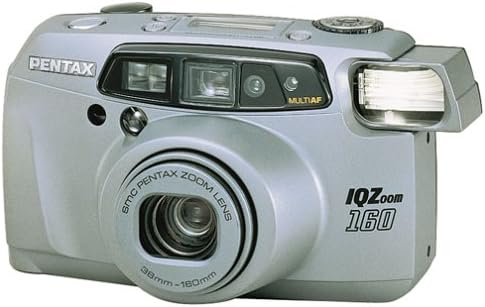
Obrázek 1: Přední strana view of the Pentax IQ Zoom 160 camera, showing the lens, flash, and viewnálezce.
Klíčové vlastnosti:
- 38-160mm power zoom lens for versatile framing.
- Five-point passive autofocus system for precise focusing.
- Six-segment multipattern metering system for optimal exposure.
- Automatic backlight compensation.
- Actual-image zoom viewfinder with diopter adjustment.
- Panorama mode for wide-angle shots.
- Multiexposure mode for creative effects.
- Self-timer function.
- Easy-to-read LCD instruction panel with automatic illumination.
2. Nastavení
2.1. Instalace baterie
The Pentax IQ Zoom 160 requires one 3V Lithium battery, type CR123A or SF123A. Ensure the battery is inserted with the correct polarity as indicated inside the battery compartment.
- Vyhledejte kryt prostoru pro baterie na spodní straně fotoaparátu.
- Slide or twist the cover latch to open the compartment.
- Insert one CR123A/SF123A battery, matching the (+) and (-) terminals with the indicators.
- Kryt přihrádky na baterie bezpečně zavřete, dokud nezacvakne na místo.
Obrázek 2: Spodní část view of the camera, showing the battery compartment and tripod mount.
2.2. Vkládání filmu
The camera uses standard 35mm film rolls. Always load film in subdued light to prevent accidental exposure.
- Open the camera back by sliding the film door release latch (usually on the side or top of the camera).
- Vložte novou 35mm filmovou kazetu do filmové komory na levé straně.
- Pull the film leader across to the film take-up spool on the right side, ensuring it catches on the spool's teeth.
- Close the camera back firmly until it latches. The camera will automatically advance the film to the first frame. The exposure counter on the LCD panel will display "1".

Obrázek 3: Zadní view of the camera, showing the viewfinder and film door release.
3. Ovládání fotoaparátu
3.1. Zapnutí/vypnutí a výběr režimu
The user-friendly mode dial allows you to turn the camera on and off, and select various shooting modes.

Obrázek 4: Nahoře view of the camera, highlighting the mode dial and LCD instruction panel.
- Zapnutí: Rotate the mode dial from "OFF" to any desired shooting mode (e.g., Auto). The lens will extend.
- Vypnout: Rotate the mode dial to "OFF". The lens will retract.
- Mode Dial Settings: The dial typically includes modes such as Auto, Red-eye Reduction, Flash Off, Self-timer, and Multiexposure. Refer to the icons on the dial for specific functions.
3.2. Fotografování
- Namiřte kameru: Podívejte se skrz viewhledáček a zaměřte objekt.
- Lupa: Use the zoom buttons (usually marked 'W' for Wide and 'T' for Telephoto) to adjust the focal length of the 38-160mm lens.
- Soustředit: Lightly press the shutter button halfway down. The camera's five-point passive autofocus system will focus on the subject. A focus indicator in the viewhledáček potvrdí zaostření.
- Střílet: Stiskněte tlačítko spouště až na doraz pro pořízení snímku.
3.3. Režimy blesku
The built-in flash provides illumination in low-light conditions. The camera features automatic backlight compensation, firing the flash when necessary to properly expose the subject.
- Automatický blesk: Fotoaparát automaticky určí, zda je potřeba blesk.
- Redukce červených očí: Fires a pre-flash before the main flash to reduce red-eye effect.
- Vypnutý blesk: Prevents the flash from firing, useful in situations where flash is prohibited or undesirable.
3.4. Special Shooting Functions
- Panoramatický režim: Switch to panorama mode via the mode dial or a dedicated button. The viewfinder will adjust to show the panorama framing area. This mode allows for wider aspect ratio images.
- Samospoušť: Activate the self-timer (typically 10 seconds) using the mode dial or a dedicated button. The camera will delay taking the picture, allowing the photographer to be included in the shot.
- Multiexposure Mode: This creative mode allows you to combine two or more exposures onto a single frame of film. Consult the LCD instruction panel for guidance on activating and using this feature.
3.5. Viewfinder and LCD Panel
The actual-image zoom viewvyhledávač poskytuje jasný view of your subject and includes a diopter adjustment for users with varying eyesight. The large LCD instruction panel displays essential camera settings and indicators, such as exposure counter, battery exhaustion warning, flash status, and selected mode. It automatically lights up for visibility in any lighting condition.
4. Údržba
4.1. Čištění fotoaparátu
- Čočka: Use a soft, lint-free cloth or a lens brush to gently remove dust. For smudges, use a specialized lens cleaning solution and cloth. Avoid touching the lens surface with your fingers.
- Tělo fotoaparátu: Tělo fotoaparátu otřete měkkým, suchým hadříkem. V případě odolných nečistot lehceampOpláchněte hadřík vodou. Nepoužívejte rozpouštědla ani abrazivní čisticí prostředky.
- Viewnálezce: Use a soft brush or air blower to remove dust from the viewokulár hledáčku.
4.2. Skladování
- Pokud se přístroj delší dobu nepoužívá, vyjměte baterii, abyste zabránili jejímu vytečení.
- Fotoaparát skladujte na chladném a suchém místě, mimo dosah přímého slunečního záření, vysoké vlhkosti a extrémních teplot.
- Use a camera bag or case to protect the camera from dust and physical damage.
5. Řešení problémů
| Problém | Řešení | |
|---|---|---|
| Fotoaparát se nezapne. | Vybitá nebo nesprávně vložená baterie. | Replace battery with a fresh CR123A/SF123A, ensuring correct polarity. |
| Film se neposouvá vpřed. | Film not properly loaded or end of roll. | Re-load film, ensuring the leader catches the take-up spool. Check if the film counter shows 'S' or 'E'. |
| Obrázky jsou rozmazané. | Camera shake, subject too close, or focus error. | Hold camera steady, ensure subject is within focusing range, or use a tripod. Ensure focus confirmation appears before shooting. |
| Blesk se nespouští. | Flash is set to "Flash Off" mode or battery is low. | Check flash mode setting. Replace battery if low. |
| Red-eye in photos. | Flash fired directly at subject's eyes. | Use Red-eye Reduction flash mode. Increase ambient lighting if possible. |
6. Specifikace
| Generál | |
|---|---|
| Značka | Pentax |
| Název modelu | IQ Zoom 160 |
| Číslo modelu | 10124 |
| Form Factor | Kompaktní |
| Hmotnost položky | 16 unce |
| Materiál pouzdra | Plast |
| Čočka | |
| Typ objektivu | Přiblížení |
| Minimální ohnisková vzdálenost | 38 milimetrů |
| Maximální ohnisková vzdálenost | 160 milimetrů |
| Minimální clona | 4.5 |
| Režimy clony | 4.5-12 |
| Exposure & Focus | |
| Kontrola expozice | Automatický |
| Metody měření | Spot, Multi-pattern |
| Minimální rychlost závěrky | 1/400 sekundy |
| Maximální rychlost závěrky | 2 sekund |
| Technologie automatického ostření | Contrast Detection, Multi area, sensor |
| Body automatického ostření | 5 |
| Režim ostření | Jednoduché AF (AF-S) |
| Nastavení vyvážení bílé | Auto |
| Rozšířené minimum ISO | 100 |
| Blikat | |
| Blesk fotoaparátu | Vestavěný |
| Režimy blesku | Automatic, Red Eye Reduction |
| Rychlost synchronizace blesku | 1/400 sekundy |
| Další funkce | |
| Viewnálezce | Optický |
| Typ zobrazení | LCD |
| Samospoušť | 10 sekund |
| Režimy fotografování | Automatic, Panorama, Multiexposure, Self-timer |
| Speciální funkce | Panoráma |
| Typ baterie | 3V Lithium CR123A/SF123A |
| Úroveň odolnosti proti vodě | Není odolný vůči vodě |
| Má stabilizaci obrazu | Žádný |
7. Záruka a podpora
For specific warranty information, please refer to the documentation included with your purchase or visit the official Pentax website. For technical support or service inquiries, please contact Pentax customer service directly.
You can often find additional support resources, FAQs, and contact information on the manufacturer's official webmísto.