
1. Úvod
This manual provides essential information for the proper setup, operation, and maintenance of your GPX C3302RS Sports Cassette Player. Please read these instructions thoroughly before using the device to ensure optimal performance and longevity.
2. Nastavení
2.1 Vybalení
Carefully remove the cassette player from its packaging. Ensure all components are present. Retain the packaging for future transport or storage.
2.2 Power Source: Battery Installation
The GPX C3302RS requires two (2) AA batteries for operation. Follow these steps to install the batteries:
- Vyhledejte kryt přihrádky na baterie, obvykle na zadní nebo boční straně jednotky.
- Posuňte nebo zvedněte kryt pro otevření přihrádky.
- Insert two fresh AA batteries, ensuring the positive (+) and negative (-) terminals align with the markings inside the compartment.
- Bezpečně zavřete kryt bateriového prostoru.
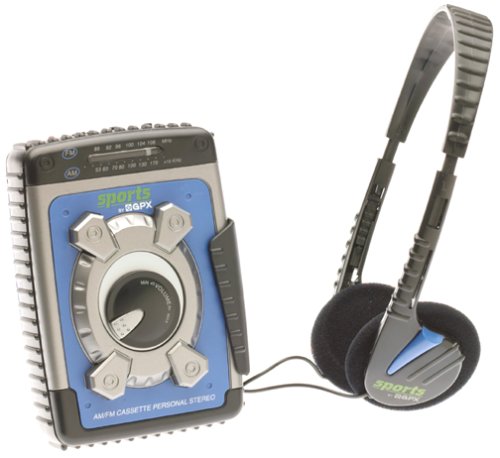
Image: The GPX C3302RS Sports Cassette Player with its cassette compartment open, revealing the internal mechanism. This view also indicates the general location for battery access, often adjacent to or within the main body of the player.
2.3 Připojení sluchátek
Locate the headphone jack, usually marked with a headphone symbol. Insert your 3.5mm stereo headphones firmly into this jack. Ensure the connection is secure for optimal audio output.
3. Návod k obsluze
3.1 Vkládání kazety
- Stiskněte tlačítko STOP/EJECT tlačítko pro otevření dvířek kazetového prostoru.
- Insert a cassette tape with the exposed tape side facing upwards and the desired side (A or B) facing the playback head.
- Gently close the cassette compartment door until it clicks shut. Do not force the door.
3.2 Cassette Playback Controls
- HRÁT (►): Press this button to start playing the cassette tape.
- STOP/EJECT (■/▲): Press once to stop playback. Press again to open the cassette compartment.
- FAST FORWARD (FFWD ►►): Press and hold to rapidly advance the tape. Release to stop.
- REWIND (REW ◄◄): Press and hold to rapidly rewind the tape. Release to stop.
- PAUSE (▐▐): Press to temporarily stop playback without disengaging the tape. Press again to resume.
3.3 Ovládání hlasitosti
Otočte OBJEM dial, typically located on the side or front of the unit, to adjust the audio output level through your headphones.
3.4 Provoz AM/FM rádia
Your GPX C3302RS includes an integrated AM/FM radio tuner.
- Posuňte FUNKCE přepnout na kterýkoli z nich AM or FM.
- Otočte LADĚNÍ dial to scan for radio stations.
- Upravte OBJEM dial to your desired listening level.
- Pro optimální příjem FM vytáhněte teleskopickou anténu. Pro příjem AM otáčejte jednotkou pro dosažení nejlepšího signálu.
3.5 Funkce zvýraznění basů
Zapojte se BASS BOOST switch (if present) to enhance low-frequency audio output for a richer sound experience.
4. Údržba
4.1 Čištění jednotky
- Vnější: Wipe the exterior of the player with a soft, slightly damp tkanina. Nepoužívejte abrazivní čisticí prostředky nebo rozpouštědla.
- Magnetické hlavy: Periodically clean the tape heads, pinch roller, and capstan using a cotton swab lightly moistened with isopropyl alcohol. This helps maintain sound quality and prevents tape damage.
4.2 Péče o baterie a jejich výměna
- Replace batteries when the sound becomes distorted or the unit stops functioning.
- Always replace both batteries at the same time with new ones.
- Pokud nebudete přístroj delší dobu používat, vyjměte baterie, abyste zabránili jejich vytečení a poškození.
- Použité baterie zlikvidujte zodpovědně v souladu s místními předpisy.
4.3 Skladování
When not in use, store the cassette player in a cool, dry place away from direct sunlight, extreme temperatures, and excessive dust.
5. Řešení problémů
| Problém | Možná příčina | Řešení |
|---|---|---|
| Žádná síla | Vybité nebo nesprávně vložené baterie. | Vyměňte baterie za nové a dbejte na správnou polaritu. |
| Žádný zvuk | Headphones not connected properly; Volume too low; Dirty tape heads. | Ensure headphones are fully plugged in. Increase volume. Clean tape heads. |
| Tape not playing/moving | Tape jammed; PLAY button not fully engaged; Batteries low. | Check tape for damage. Press PLAY firmly. Replace batteries. |
| Špatný příjem rádia | Antenna not extended (FM); Unit orientation (AM); Weak signal area. | Extend FM antenna. Rotate unit for AM. Try moving to a different location. |
6. Specifikace
- Číslo modelu: C3302RS
- Zdroj napájení: 2 x 'AA' size batteries (not included)
- Rozměry produktu: 4.2 x 2 x 5.1 palce (přibližně)
- Hmotnost položky: 1.6 unce (bez baterií)
- Výrobce: GPX
7. Záruka a podpora
For warranty information or technical support regarding your GPX C3302RS Sports Cassette Player, please refer to the warranty card included with your purchase or visit the official GPX webwebu. Uschovejte si účtenku jako doklad o koupi.